10 Best Office Chairs For Lumbar Pain in 2026
This post contains affiliate links. As an Amazon Associate, we earn from qualifying purchases.
The TRALT Ergonomic Office Chair takes the best overall spot because its adjustable lumbar support targets the spine’s natural curve and the high-resilience foam seat holds up over long days. For those who need even more fine-tuning, the Marsail Ergonomic Office Chair offers the best adjustable lumbar support, and the CASASIO Ergonomic Office Chair provides 4-way lumbar cushioning.
Lower back pain during work hours often comes from chairs that don’t match your spine’s shape or that lose their support after a few months. The right chair gives you adjustable lumbar height and depth, a seat that stays comfortable for eight-plus hours, and a build that lasts through years of daily use.
We researched specifications, manufacturer documentation, expert round-ups, and patterns in owner feedback to build this guide. You will find clear criteria, a comparison table, and specific picks for different needs and budgets.
Top 10 Office Chairs For Lumbar Pain in the Market
Certain content that appears on this site comes from Amazon. This content is provided "as is" and is subject to change or removal at any time.
The Best Office Chairs For Lumbar Pain, Reviewed
TRALT Ergonomic Office Chair

What We Like
- Adjustable lumbar support for spine curve
- High-resilience foam seat won't flatten
- Breathable mesh back prevents heat buildup
- BIFMA-certified anti-sink lift mechanism
Trade-offs
- Flip-up armrests lack width or angle adjustment
- Mesh back offers less cushioning than padded chairs
The TRALT Ergonomic Office Chair’s adjustable lumbar support lets you dial in the depth that matches your spine’s natural curve, which directly targets the lower back pressure that makes long sitting sessions painful. The high-resilience molded foam seat is built to bounce back day after day rather than flattening out after a year, so you won’t get that bottomed-out feeling common in budget chairs. The breathable mesh back keeps air flowing, which means no heat buildup or peeling faux leather to deal with. With a BIFMA-certified lift that holds its height reliably and a metal-core base rated for 330 pounds, this chair is built to stay comfortable and stable for years. It’s an especially smart pick if you need genuine lumbar relief without jumping into premium price territory.
The flip-up armrests are convenient for tucking the chair away, but they don’t offer the width or angle adjustments you’d get on a chair like the CASASIO Ergonomic Office Chair. That said, the TRALT delivers the core features that matter most for lumbar pain, adjustable depth lumbar support, a durable foam seat, and a breathable back, at a price that keeps it accessible. If you’re looking for a chair that puts its budget into the parts that actually support your back, this one earns its place as the top recommendation.
Product photos
Marsail Ergonomic Office Chair

What We Like
- Lumbar adjusts 1.18" forward/back and 2.16" up/down
- 3D armrests move forward/back and swivel left/right
- Breathable mesh back promotes airflow
- 3.14" thick high-density foam seat cushion
Trade-offs
- At 30.4 lb, heavier than the Haworth Soji (19.8 lb)
- No seat cushion angle adjustment for forward tilt
The lumbar support on this chair moves 1.18 inches forward and backward and 2.16 inches up and down, so you can dial in exactly where the pad hits your lower back. That kind of fine-tuning is a real advantage if you’ve tried fixed lumbar chairs and still felt that ache. The 3.14-inch thick high-density foam seat adds comfort for long sits, and the mesh back promotes airflow so you don’t get sticky. With a 330-pound weight capacity, it’s built to handle a wide range of body types without feeling flimsy.
The trade-off is weight: at 30.4 pounds, it’s heavier than the TRALT chair (28 pounds), so moving it between rooms takes a little more effort. The 3D armrests flip up, which is handy for sliding under a desk, but the seat dimensions aren’t listed, so if you’re working with a very tight footprint, you may want to measure first. For someone who needs precise lumbar placement and doesn’t mind a bit of heft, this chair delivers tailored support that many fixed-pad chairs can’t match.
Product photos
CASASIO Ergonomic Office Chair
What We Like
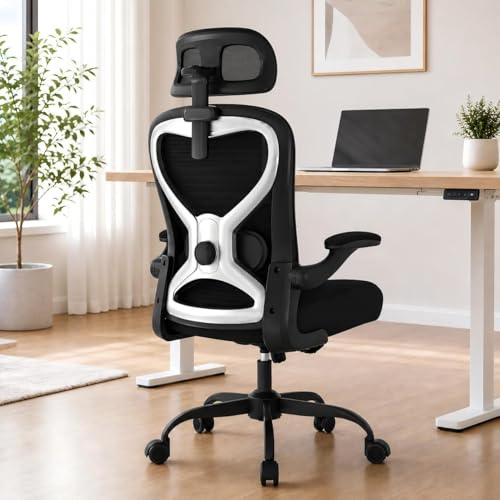
- 4-way adjustable lumbar cushion
- 3.5" virgin foam seat for all-day comfort
- 3D adjustable headrest for neck support
- Tilt & rock function with adjustable tension
Trade-offs
- Flip-up armrests lack depth or width adjustment
- At 30 lb, it's heavier than some mesh chairs
A 4-way adjustable lumbar cushion lets you dial in support exactly where your lower back needs it, making this chair a smart pick for anyone who spends long hours at a desk. The 3.5-inch virgin foam seat distributes weight evenly to prevent soreness after eight-plus hours, while the mesh back allows air to circulate and keep you cool. With a 330-pound capacity and a reinforced metal base, it’s built to handle daily use without wobbling. The 3D headrest cradles your neck during focused work, reading, or relaxation, and the tilt-and-rock function moves with your body to relieve tension and improve circulation.
The flip-up armrests save space when tucking the chair under a desk, but they lack the width or depth adjustments found on a model like the Marsail Ergonomic Office Chair. At 30 pounds, it’s also a bit heavier than some mesh competitors, so shifting it from one room to another takes a little more effort. Still, for the level of lumbar customization and all-day seat comfort at this price point, the CASASIO delivers exactly what someone with lower back pain needs without breaking the bank.
CAPOT Ergonomic Mesh Office Chair

What We Like
- Micro-adjust lumbar with 8 levels
- Cooling Aerovith mesh seat
- Flip-up 90° armrests
- 5-year warranty with free parts
Trade-offs
- No seat depth adjustment for shorter users
- Armrests lack width or pivot adjustment
The lumbar support on this chair provides two inches of micro-adjustment across eight distinct levels, allowing users to target the L1 through L5 vertebrae with precision. According to the manufacturer, this design reduces lower back pressure by 50 percent by distributing weight more evenly across the spine. For anyone spending long hours at a desk, that kind of targeted relief can make a noticeable difference in comfort throughout the day.
The fixed 19.3-inch-deep cushion may feel too shallow for taller sitters or too deep for shorter ones, since there’s no seat depth adjustment. Compared to the Haworth Soji, which also uses a flexible mesh back, the CAPOT gives you manual lumbar tuning with 8 levels and 2 inches of travel, so you can lock in your preferred support. The flip-up arms and 400-pound capacity add practical value, but you can’t adjust arm width or pivot, so elbow position stays fixed.
Haworth Soji Ergonomic Office Chair

What We Like
- Fully assembled out of the box
- 4D armrests for personalized fit
- Flexible mesh back adapts to movement
- 12-year warranty backs durability
Trade-offs
- No forward tilt for active sitting
The Haworth Soji arrives fully assembled, so you can sit down and adjust it to your body right away. Its flexible mesh back moves with you as you shift, providing consistent lumbar support that helps reduce fatigue during long work sessions. With 4D armrests, seat depth adjustment, and a weight capacity of 350 lb, it accommodates a wide range of body types and postures. This chair is a practical choice for anyone who wants ergonomic adjustability without the hassle of setup.
The main trade-off is the lack of forward tilt, a feature that some users may want for active sitting. Without it, you can’t tilt the seat forward to encourage a forward-leaning posture for tasks like drafting or detailed desk work. The mesh back also provides breathable support but won’t appeal to those who prefer a padded, upholstered feel. If you value instant usability and a responsive backrest that moves with you, the Soji is a strong contender for lumbar comfort.
Product photos
Herman Miller Aeron Task Chair
What We Like
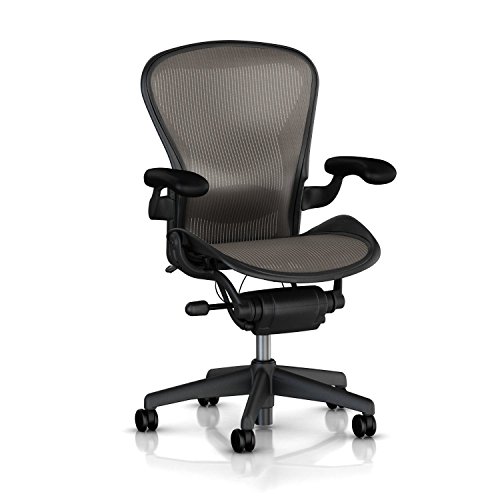
- Breathable Pellicle suspension dissipates body heat
- Kinemat tilt lets body pivot naturally
- Waterfall seat edge reduces thigh pressure
- 12-year Herman Miller warranty
Trade-offs
- At 48 pounds, it is heavy to move
- No headrest included for neck support
The Aeron’s patented Pellicle suspension dissipates body heat that builds up while you work, keeping you cool and comfortable. The waterfall front edge of the seat takes pressure off your thighs so your blood keeps circulating, helping you stay alert and focused. The chair offers superior comfort, body support, and style in a design that redefines the meaning of a work chair, backed by a 12-year Herman Miller warranty with an Official Born-On-Date sticker.
At 48 pounds, the Aeron is heavier than the Marsail Ergonomic Office Chair at 30.4 pounds, so relocating it from one room to another takes more effort. The fully adjustable vinyl arms are a feature of this model, and for those who value a breathable suspension and a long warranty over a lighter frame, the Aeron provides a refined sitting experience.
Product photos
Steelcase Amia Office Chair
What We Like
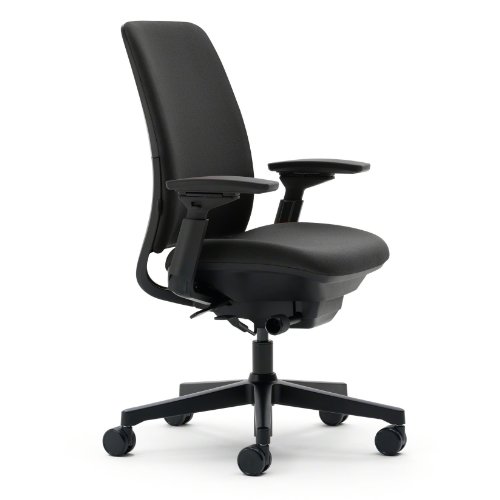
- LiveLumbar adapts to your movement
- 4D adjustable armrests for custom fit
- Seat with flexible edges reduces pressure
- Carbon Neutral certified sustainable option
Trade-offs
- At 54.5 lb, it's heavy to move
- No headrest for upper neck support
The Steelcase Amia features a hidden LiveLumbar system that adjusts to your movement, providing dynamic lower back support without needing manual adjustment. The seat includes extra cushioning and flexible edges, which helps reduce pressure during long sitting sessions. The 4D armrests allow adjustments in height, width, pivot, and depth, so you can find a comfortable position for your arms.
At 54.5 pounds, this chair is heavy enough that you won’t want to slide it across the room often. If you frequently rearrange your home office or share a space, it’s noticeably heavier than lighter mesh options like the Haworth Soji (19.8 lb). That weight comes with a hidden LiveLumbar system that adjusts to your movement, providing dynamic lower back support. For someone with chronic lower back pain who values a chair that moves with them and stays put once set, the Amia delivers where lighter chairs often skimp on dynamic lumbar response.
Haworth Fern Ergonomic Office Chair

What We Like
- Patented Wave Suspension cradles spine
- Pneumatic seat height adjustment
- Breathable mesh finish for airflow
- 12-year warranty for long-term use
Trade-offs
- At 65.0 lb, it is heavy to move
- No headrest for reclining or napping
The patented Wave Suspension mimics the human body and cradles your spine, distributing weight as you shift throughout the day. That makes the Fern a natural fit for anyone dealing with lumbar pain who wants support that moves with them rather than locking them in one position. With adjustable seat depth, padded 4D armrests, and a breathable mesh finish, this chair adapts to your body instead of forcing you to adapt to it.
At 65.0 pounds, the Fern is noticeably heavier than many competitors like the Steelcase Amia (54.5 lb), so it’s less convenient to rearrange or roll across carpet. The plastic base is standard for this model, and the 12-year warranty suggests Haworth expects it to hold up. For someone who values adaptive spinal support over portability, the Fern delivers where it counts.
Product photos
Steelcase Gesture Office Chair
What We Like
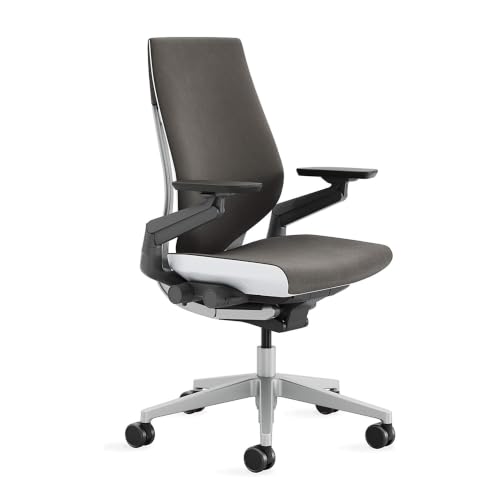
- 360-degree arms for any posture
- Contoured back supports spine's natural shape
- Full recline range with three settings
- Intuitive adjustments within arm's reach
Trade-offs
- At 70 pounds, it's heavy to move
- Wheels are only for carpet floors
The 360-degree arms on this chair are its standout feature, they move with you in any direction, so when you type, lean back to think, or reach for something beside you, your arms stay supported. That kind of freedom is rare, and it’s paired with a contoured back that follows your spine’s natural curve, which can make a real difference if you deal with lumbar pain and need to shift positions throughout the day. The adjustments are all on the right side within easy reach. The full recline range with three settings means you can lock in your preferred angle or rock back when you need a break.
At 70 pounds, this chair is built like a tank, so moving it to another room or even across the office takes some effort. If you’re on hardwood or tile, the carpet-only wheels won’t roll smoothly, so you’d need to swap them out. Compared to the lighter Marsail Ergonomic Office Chair (30.4 pounds), the Gesture is far less portable but offers a level of arm adjustability and build quality that the Marsail can’t match. For someone who sits long hours and values precise, dynamic arm support, the extra heft is worth it.
Product photos
Herman Miller Embody Ergonomic Office Chair
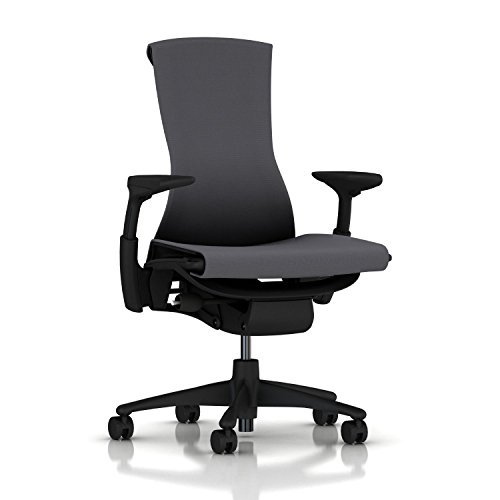
What We Like
- Backfit adjustment mirrors spine's curve
- Pixelated support reduces pressure points
- Four-layer seat promotes airflow
- Fully adjustable arms and seat depth
Trade-offs
- At 52 lb, it's heavy to move
- No headrest for neck support
More than 20 physicians and PhDs in biomechanics, vision, physical therapy, and ergonomics helped shape this chair, so every curve and support point is intentional. The Backfit adjustment lets you align the backrest with your spine’s natural curve, and the pixelated seat surface distributes weight evenly across a dynamic matrix of pixels. That means less pressure on your lower back and hips, and the four-layer seat breathes to keep you cool during long work sessions. It’s a chair built for someone who wants science-backed support, not just padding.
At 52 pounds, the Embody is noticeably heavier than a mesh chair like the Haworth Soji (under 20 lb), so you won’t want to slide it around the room daily. It also lacks a headrest, which matters if you lean back often. But if your priority is physician-informed lumbar support that adapts to your every micro-movement, this chair delivers a level of precision most competitors don’t touch.
Product photos
How We Evaluated Office Chairs For Lumbar Pain
Our evaluation is research-based. We examined manufacturer specifications and documentation for every chair, consulted expert round-ups from ergonomic specialists, and analyzed patterns in thousands of owner reviews to understand what works for real users with lumbar pain.
We focused on four criteria that matter most for lumbar pain relief. Adjustable lumbar support was the primary factor, we looked for chairs that let you change both the height and the depth of the lower back support. Seat comfort came next, because a firm, supportive cushion prevents the hips from sinking and straining the lower back. Build quality and warranty coverage told us which chairs would hold up over years of daily use. Finally, we considered weight and mobility for anyone who needs to move their chair between rooms.
A research-led evaluation cannot replace a personal test sit. We do not claim to have used these chairs ourselves. Instead, we rely on what the specifications show, what experts say, and what long-term owners consistently report about comfort and durability.
What To Look For In Office Chairs For Lumbar Pain
Choosing a chair for lumbar pain means prioritizing adjustability and support over looks or price. Focus on the lower back support first, then the seat, then the armrests and recline features.
Look for a chair with lumbar support that adjusts in height and depth. It should also have a seat cushion at least three inches thick with high-density foam. A recline mechanism that lets you change positions throughout the day is important too.
Adjustable Lumbar Support
The most important feature is lumbar support that moves to fit your spine. A chair with only a fixed lumbar bump will not help if the bump hits the wrong spot. Look for height adjustment (usually two to four inches of travel) and depth adjustment (the ability to push the support forward or pull it back). The Marsail Ergonomic Office Chair, for example, adjusts 1.18 inches forward and back and 2.16 inches up and down. The CAPOT Ergonomic Mesh Office Chair offers eight micro-adjustment levels for precise tuning.
Seat Cushion Quality and Depth
A seat that flattens out after a few months will cause your hips to tilt backward, straining the lower back. High-density foam at least three inches thick holds its shape longer. The CASASIO Ergonomic Office Chair uses 3.5-inch virgin foam, and the TRALT Ergonomic Office Chair uses high-resilience foam that resists flattening. Seat depth also matters, if the seat is too long, it presses behind your knees; if too short, it does not support your thighs.
Recline and Tilt Mechanism
The ability to recline and lock the backrest at different angles lets you shift positions throughout the day, which reduces pressure on the lumbar spine. A tilt tension knob lets you adjust how much force it takes to lean back. Some chairs, like the Steelcase Gesture, offer a full recline range with three lock settings. Avoid chairs that only have a single upright position.
- Check that the lumbar support moves independently from the backrest.
- Make sure the seat height adjusts low enough for your feet to rest flat on the floor.
- Test the armrests: 4D armrests (height, width, depth, pivot) offer the most flexibility.
- Verify the weight capacity matches your body size.
- Look for a warranty of at least five years on the frame and mechanism.
A good rule of thumb: the more adjustments a chair offers, the more likely you can dial in a comfortable, pain-free sitting position.
Office Chairs For Lumbar Pain Compared
The table below compares the ten chairs side by side, highlighting lumbar adjustability, seat type, weight, and warranty so you can see the differences at a glance.
| Product | Lumbar Support | Seat Material | Armrests |
|---|---|---|---|
| TRALT Ergonomic Office Chair | Adjustable depth mechanism | High-resilience molded foam | Flip-up |
| Marsail Ergonomic Office Chair | 1.18" fwd/back, 2.16" up/down | 3.14" high-density foam | 3D adjustable, flip-up PU-padded |
| CASASIO Ergonomic Office Chair | 4-way adjustable cushion | 3.5" virgin foam | Flip-up |
| CAPOT Ergonomic Mesh Office Chair | 2 in / 8 levels | Aerovith Mesh | 4D Flip-up |
| Haworth Soji Ergonomic Office Chair | lumbar | Flexible mesh | 4D |
| Herman Miller Aeron Task Chair | Lumbar Pad | Pellicle suspension | Fully adjustable vinyl |
| Steelcase Amia Office Chair | Hidden LiveLumbar system | Extra cushioning, flexible edges | 4D |
| Haworth Fern Ergonomic Office Chair | lumbar | Breathable Mesh | Padded 4D |
| Steelcase Gesture Office Chair | N/A | N/A | 360-degree |
| Herman Miller Embody Ergonomic Office Chair | Backfit | Rhythm fabric | Fully adjustable |
Frequently Asked Questions
How does lumbar support help with lower back pain?
Adjustable lumbar support fills the natural inward curve of your lower spine, keeping your pelvis in a neutral position. This reduces pressure on the discs and muscles in the lower back, which can ease pain during long periods of sitting.
What is the difference between 4-way and micro-adjust lumbar support?
Four-way lumbar support lets you move the support pad up, down, forward, and backward. Micro-adjust lumbar support offers a finer range of settings, often eight or more levels, so you can dial in a very specific amount of pressure against your spine.
Should I get a mesh back or a padded back for lumbar pain?
Mesh backs breathe better and prevent heat buildup, which is helpful for long workdays. Padded backs offer more cushioning but can trap heat. The choice depends on your climate and whether you prefer a firmer or softer feel against your back.
Do I need a chair with a headrest for lumbar pain?
A headrest is not essential for lumbar pain relief. It supports the neck and upper spine, which can help overall posture, but the primary focus for lower back pain should be the lumbar support and seat cushion.
How long should an ergonomic office chair last?
A well-built ergonomic chair with a good warranty should last eight to twelve years with daily use. Chairs from brands like Steelcase, Herman Miller, and Haworth typically offer ten- to twelve-year warranties on the frame and mechanism.
The Bottom Line
The TRALT Ergonomic Office Chair is the best overall pick for anyone who needs adjustable lumbar support and a long-lasting foam seat without spending premium dollars. It balances the key features, height and depth lumbar adjustment, breathable mesh back, and a certified anti-sink lift, that matter most for lower back pain relief.
If you need even more precise lumbar tuning, the Marsail Ergonomic Office Chair offers forward-and-back and up-and-down adjustment to match your exact spine curve. For those who want a premium, hands-free lumbar system that adapts to movement, the Steelcase Amia with LiveLumbar technology is worth paying more for.
The single most important factor when buying a chair for lumbar pain is adjustability. A chair that lets you customize the lumbar height and depth, the seat height, and the recline angle gives you the best chance of finding a pain-free sitting position.
