10 Best Computer Chairs For Back Pain in 2026
This post contains affiliate links. As an Amazon Associate, we earn from qualifying purchases.
For back pain relief, the ELABEST X100 Ergonomic Mesh Office Chair stands out as the best overall, thanks to its dynamic 3D lumbar support system that moves with you. The Steelcase Amia offers dynamic support for long hours, while the Herman Miller Embody brings physician-designed ergonomics to the table.
Sitting for extended periods can aggravate lower back discomfort, making the right chair a crucial investment. The challenge is finding a model that provides active, adaptable support without compromising on breathability or adjustability.
This guide is built on research: we analyzed specifications, manufacturer documentation, expert round-ups, and patterns in owner feedback to identify the key features that matter most for back pain. We focused on lumbar adjustability, seat comfort, build quality, and overall value to help you choose with confidence.
Top 10 Computer Chairs For Back Pain in the Market
Certain content that appears on this site comes from Amazon. This content is provided "as is" and is subject to change or removal at any time.
The Best Computer Chairs For Back Pain, Reviewed
ELABEST X100 Ergonomic Mesh Office Chair

What We Like
- Dynamic 3D lumbar support system
- 5D flip-up armrests with EVA foam
- Dual-Stripe AirMesh for breathability
- 17-point micro-adjustment system
Trade-offs
- At 43 lb, it's heavy to move
- Footrest adds bulk under desk
The 3D Synchro-Tilt lumbar support with lockable depth, height, and rotation adjusts to your movement, so you’re not just leaning back against a static pad. That kind of dynamic support, paired with a 17-point micro-adjustment system, makes this chair a real ally for anyone dealing with back pain during long workdays. The Dual-Stripe AirMesh offers 38% better airflow than standard mesh. The 5D flip-up armrests let you find exactly the arm position you need, then tuck the chair neatly under your desk when you’re done.
The trade-off is weight: at 43 pounds, this chair is solid but not something you’ll want to scoot around the room often. The integrated footrest is a nice perk for stretching out, but it does add a bit of bulk beneath the seat. Compared to the lighter CASASIO Ergonomic Office Chair at 30 pounds, the ELABEST feels more substantial and offers far more adjustability, especially in the lumbar and armrest departments. If you prioritize active spinal support and don’t mind a heavier build, this chair delivers where it counts.
Marsail Ergonomic Office Chair

What We Like
- Highly adaptable lumbar support system
- Breathable mesh back promotes airflow
- 3D adjustable armrests for custom fit
- Thick high-density foam seat cushion
Trade-offs
- Headrest adjusts in only two dimensions
- Backrest recline range is 90° to 120°
The lumbar support moves 1.18 inches forward and back and 2.16 inches up and down, so you can dial in exactly where the backrest meets your spine. That means you can shift support as you change posture throughout the day. The mesh back breathes well, the seat uses 3.14 inches of high-density foam, and the 3D armrests adjust in multiple directions, so you can find a comfortable position for typing, reading, or leaning back. It’s a strong choice for anyone whose back pain is tied to lower-back support that just won’t stay put.
When lower-back support is the top priority, the Marsail Ergonomic Office Chair delivers a tailored fit that many alternatives overlook. Its lumbar support adjusts 1.18 inches forward and backward and 2.16 inches up and down, so you can dial in exactly where the cushion meets your spine. That level of precision means the chair adapts to your height and body shape rather than forcing you into a preset curve. Unlike chairs that offer only a fixed lumbar bump or a simple height change, this system promotes optimal sitting posture by matching your unique contours. Reviewers note that once the lumbar is set, the high back mesh and 3D armrests complete a setup that supports comfortable work sessions without constant readjustment.
Product photos
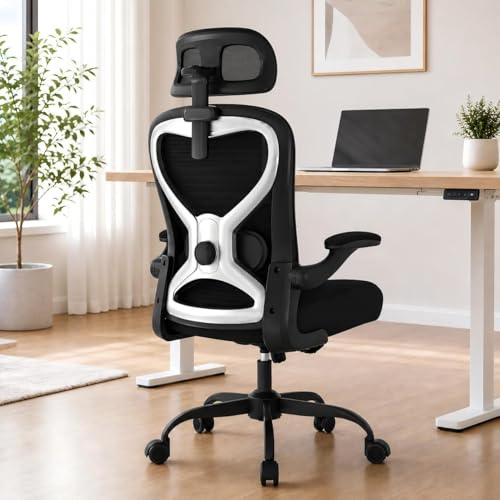
CASASIO Ergonomic Office Chair
What We Like
- 4-way adjustable lumbar cushion
- 3D adjustable headrest
- Flip-up armrests save space
- 330 lb weight capacity
Trade-offs
- Flip-up armrests lack depth adjustment
- No footrest included for leg elevation
The 4-way adjustable lumbar cushion moves both up/down and in/out so you can dial in support exactly where your lower back needs it most. It’s paired with a thick 3.5-inch virgin foam seat that stays comfortable through long workdays. With a 330-pound weight capacity and a reinforced metal base, this chair is built to last. It’s an especially smart fit if you want targeted lumbar relief.
The trade-off comes with the flip-up armrests: they tuck away neatly to slide under a desk, but they don’t adjust in and out or pivot, so you can’t fine-tune the width. Still, if your priority is a chair that cradles your spine from neck to lower back and lets you rock gently while you work, this one delivers where it counts.
HOLLUDLE Ergonomic Mesh Office Chair

What We Like
- 3D lumbar moves up, down, forward, backward, rotates
- 2D headrest adjusts height and angle
- 3D armrests adjust height, front/back, rotation
- Breathable mesh prevents overheating
Trade-offs
- At 43.7 lb, it is heavier than the Marsail (30.4 lb)
- Armrests do not adjust side to side for narrow-elbow users
The fully 3D adjustable lumbar support moves up, down, forward, backward, and rotates to match your spine, which directly targets the kind of lower back pressure that makes long sitting sessions painful. This chair suits anyone from 5’3″ to 6’2″ who wants a truly customizable fit for back pain relief. The breathable mesh back keeps air flowing so you stay cool all day, while the 2D headrest and 3D armrests let you adjust your posture from head to elbows. A 3-level tilt lock means you can switch between working upright and leaning back to relax without losing support.
Weighing 43.7 pounds, this chair is heavier than the Marsail Ergonomic Office Chair (30.4 lb), which could be a factor if you need to move it frequently. The 3D armrests adjust in height, front/back, and rotation, as described in the feature list. For someone who prioritizes deep, multi-directional lumbar support over a lighter frame, this Holludle offers a level of spinal alignment that many chairs in this price range skip entirely.
CAPOT Ergonomic Mesh Office Chair

What We Like
- Micro-adjust lumbar with 8 levels
- Cooling Aerovith mesh seat
- 400 lb weight capacity
- 5-year warranty with free parts
Trade-offs
- No seat angle adjustment beyond backrest tilt
- Armrests flip up but lack depth adjustment
With 2 inches of lumbar travel across 8 distinct levels, this chair lets you position support exactly where your L1-L5 vertebrae need it most. That precision can cut lower back pressure by half during long desk sessions. The generous 400-pound capacity and breathable Aerovith mesh seat keep you cool and supported, making it a strong fit for anyone who spends 8+ hours seated and wants targeted relief without the premium price tag of high-end ergonomic brands.
The backrest locks at three angles but doesn’t offer independent seat tilt, so you can’t recline the back while keeping your hips level. For buyers who prioritize lumbar precision over full adjustability, though, this chair delivers where it counts.
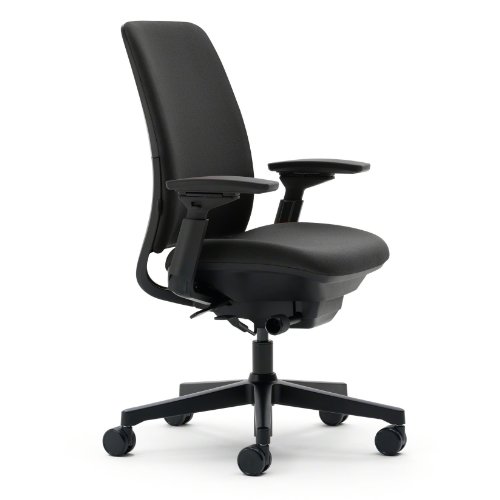
Steelcase Amia Office Chair
What We Like
- LiveLumbar adjusts dynamically to your movement
- 4D arm support for personalized fit
- Extra cushioning for 8-10 hour comfort
- Carbon Neutral certified sustainable choice
Trade-offs
- Weighs 54.5 pounds, making it heavy to move
The hidden LiveLumbar system that adjusts to every shift in your posture is the standout feature here. It makes this chair actively support your lower back throughout the day rather than just holding a static curve. That dynamic support, paired with extra cushioning and flexible seat edges, means you can settle in for long work sessions without the pressure points that often trigger back pain. It’s a premium ergonomic chair built for someone who spends 8 to 10 hours seated and wants the lumbar support to move with them, not against them.
At 54.5 pounds, this chair is heavy enough that rearranging your home office setup becomes a two-person task, unlike the lighter Marsail Ergonomic Office Chair which is easier to shift around. If you frequently move your chair between rooms or need to adjust your layout alone, that heft can be a real inconvenience. But if your priority is a stable, durable seat with sophisticated lumbar technology that responds to your body, the Amia delivers where lighter chairs often compromise on support.
Haworth Breck Ergonomic Office Chair

What We Like
- Height-adjustable lumbar for fine-tuned support
- 4D armrests for neck, shoulder, arm comfort
- Adaptive seat depth reduces pressure behind knees
- Weight-activated recline with 3-position backstop
Trade-offs
- At 38 pounds, it's not lightweight to move
A height-adjustable lumbar system that lets you dial in lower back support exactly where you need it makes this chair a strong ally for back-pain sufferers. The 4D armrests move vertically, horizontally, forward/backward, and pivot, so you can support your shoulders and arms in nearly any position. An adaptive seat depth slides over two inches to keep your thighs comfortable and reduce pressure behind the knees, which matters when you’re sitting for long stretches. The weight-activated recline with a three-position backstop lets you lock in upright focus or lean back for a break without fussing with levers.
At 38 pounds, the chair is heavier than some mesh models like the CASASIO at 30 pounds, so it’s less convenient to slide across a rug or lift into a new spot. The height-adjustable lumbar support lets you dial in lower-back pressure exactly where you need it, and the 4D armrests move vertically, horizontally, forward/backward, and pivot inward/outward to cradle your neck, shoulders, and arms. For someone who wants to fine-tune posture without extra frills, this chair targets the core causes of back strain.
Product photos
Haworth Fern Ergonomic Office Chair

What We Like
- Patented Wave Suspension cradles spine
- Pneumatic seat height adjustment
- Padded 4D armrests for custom fit
- 12-year warranty backs durability
Trade-offs
- At 65.0 lb, it is heavy to move
- No headrest for neck support
A 350-pound weight capacity and a 12-year warranty mean this chair is designed to last through years of daily use. The patented Wave Suspension mimics the human body, cradling your spine as you shift positions, which is exactly what you need when back pain makes sitting still a challenge. Designed to distribute weight naturally, it adapts to your posture throughout the day, reducing strain without forcing you into a rigid position. This is the chair for anyone who wants breathable mesh support that moves with them, not against them.
Its heft is a real factor: at 65 pounds, the Fern is noticeably heavier than the CASASIO Ergonomic Office Chair, which weighs just 30 pounds. That solid build gives it a sturdy feel, but it also means you will not want to slide it across the room every time you vacuum. For a dedicated home office spot where you plan to sit for hours, the stability and long warranty make the extra weight worth it.
Product photos
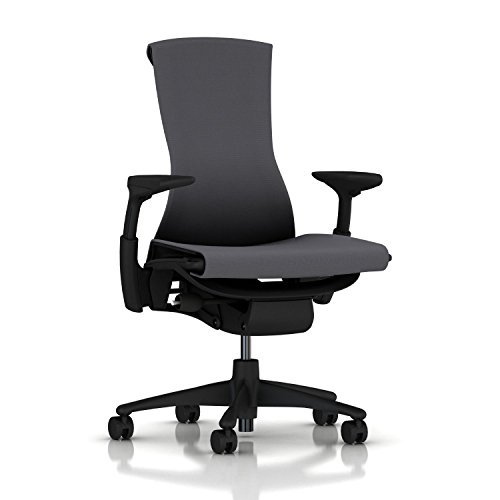
Herman Miller Embody Ergonomic Office Chair
What We Like
- Developed with 20+ physicians and PhDs
- Pixelated support distributes weight evenly
- Backfit adjustment matches spine's curve
- Breathable layers prevent heat buildup
Trade-offs
- At 52 pounds, it's heavy to move
- No headrest for neck support
More than 20 physicians and PhDs in biomechanics, vision, physical therapy, and ergonomics guided this chair’s development. That medical expertise shows in the Backfit adjustment, which lets you position the backrest to follow your spine’s natural curve. The Pixelated Support surface, a matrix of pixels that conform to your micro-movements, distributes weight evenly, reducing pressure points that can worsen back pain. For anyone who spends long hours at a desk and wants a seat engineered from the ground up for spinal health, this is a thoughtful choice informed by expert input.
Weighing 52 pounds, it’s not a chair you’ll want to move between rooms often. Compared to the lighter CASASIO Ergonomic Office Chair (30 pounds), the Embody is a more permanent fixture. There’s also no headrest, so if you need upper neck support, you may prefer the Steelcase Amia, which offers upper back adjustability. But for those focused on lower back alignment and pressure relief, the Embody’s physician-informed design is hard to beat.
Product photos
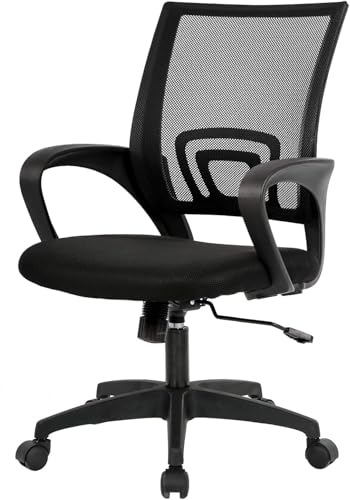
BestOffice Ergonomic Office Chair
What We Like
- Breathable mesh back keeps you cool
- Adjustable seat height and armrests
- Meets BIFMA standards for durability
- Quick 10-15 minute assembly
Trade-offs
- Mid-back design lacks head and upper back support
- No tilt lock or recline mechanism
A 250-pound weight capacity and BIFMA-certified build mean this chair meets durability standards for daily desk work. The breathable mesh back promotes airflow, so you stay cool during long hours at your computer, while the adjustable seat height (17.1 to 20.3 inches) and ergonomic armrests let you find a comfortable position. For someone shopping on a tight budget, this chair delivers the core ergonomic features, lumbar support, height adjustment, and a supportive cushion, without the premium price tag of more elaborate models.
The trade-off is the mid-back design: it supports your lower and middle back but offers nothing for your neck or upper shoulders. If you lean back frequently or need head support, a high-back chair like the CASASIO Ergonomic Office Chair would be a better fit. Assembly takes just 10 to 15 minutes with the included hardware, so you can set it up and get back to work quickly. For the price, this is a straightforward, no-frills option that focuses on the basics of back pain relief.
Product photos
How We Evaluated Computer Chairs For Back Pain
Our evaluation is research-based, drawing on product specifications, manufacturer documentation, expert round-ups, and consistent patterns in owner feedback.
We prioritized four criteria. First, lumbar support adjustability, the more ways a chair can conform to your spine, the better. Second, seat comfort and cushioning, as pressure on the thighs and hips can worsen back pain. Third, build quality and durability, since a chair that sags or wobbles undermines support. Fourth, overall adjustability, including armrests and seat height, to accommodate different body types and desk setups.
A research-led approach has limits: individual comfort is subjective, and a chair that works for one person may not work for another. We recommend using this guide to narrow your options, then sitting in a shortlist of chairs if possible to confirm fit.
What To Look For In Computer Chairs For Back Pain
Choosing a chair for back pain means focusing on adjustability and support. Here are the key factors to consider.
Look for a chair with lumbar support that adjusts in height and depth, a seat cushion that relieves pressure on your thighs, and armrests that let your shoulders relax. Breathable materials and a weight capacity that suits your frame are also essential.
Lumbar Support Adjustability
The most critical feature is lumbar support that you can customize. Basic fixed pads often miss the mark. Look for chairs that let you adjust the lumbar support up and down to align with the natural curve of your lower back, and in and out to control how much pressure it applies. Some models, like the ELABEST X100, offer dynamic support that moves as you shift. Others, like the CAPOT, provide micro-adjustments with multiple levels.
Seat Comfort and Cushioning
A seat that is too firm or too soft can worsen back pain by creating pressure points or poor posture. Look for high-density foam cushions that provide support without bottoming out after a few hours. Mesh seats, like those on the HOLLUDLE and Haworth Fern, promote airflow and can reduce heat buildup, but some users prefer a padded surface for extra comfort. Seat depth adjustment is also valuable, it ensures your thighs are fully supported without pressing against the back of your knees.
Overall Adjustability and Build Quality
A chair that fits your body reduces the need to compensate with poor posture. Adjustable armrests (3D or 4D) let you position your arms so your shoulders stay relaxed. Seat height range should accommodate your desk. A sturdy base and a high weight capacity indicate long-term durability. Check for certifications like BIFMA, which signal that the chair meets industry standards for safety and performance.
- Confirm the lumbar support adjusts in both height and depth.
- Check the seat cushion material and whether it has a depth adjustment.
- Verify the armrests adjust in at least three directions (height, width, angle).
- Look for a weight capacity that exceeds your needs for a safety margin.
- Ensure the seat height range works with your desk and body.
A chair that lets you adjust the lumbar support, seat depth, and armrests is far more likely to relieve back pain than a fixed “one size fits all” model.
Computer Chairs For Back Pain Compared
The table below compares our top picks across key features for back pain relief, helping you see at a glance which chair matches your needs.
| Product | Lumbar Support | Armrests | Weight |
|---|---|---|---|
| ELABEST X100 Ergonomic Mesh Office Chair | 3D Synchro-Tilt | 5D Flip-Up | 43.0 pounds |
| Marsail Ergonomic Office Chair | 1.18" forward/back, 2.16" up/down | 3D | 30.4 pounds |
| CASASIO Ergonomic Office Chair | 4-way adjustable cushion | Flip-up | 30.0 pounds |
| HOLLUDLE Ergonomic Mesh Office Chair | 3D adjustable | 3D adjustable | 43.7 pounds |
| CAPOT Ergonomic Mesh Office Chair | 2 inches over 8 levels | 4D Flip-up | 38.0 pounds |
| Steelcase Amia Office Chair | LiveLumbar dynamic system | 4D | 54.5 pounds |
| Haworth Breck Ergonomic Office Chair | Height-adjustable | 4D | 38.0 pounds |
| Haworth Fern Ergonomic Office Chair | Lumbar Support | Padded 4D | 65.0 pounds |
| Herman Miller Embody Ergonomic Office Chair | Backfit | fully adjustable | 52.0 pounds |
| BestOffice Ergonomic Office Chair | Lumbar Support | Ergonomic | 19.0 pounds |
Frequently Asked Questions
What type of chair is best for lower back pain?
A chair with adjustable lumbar support that can be positioned to match the natural curve of your spine is best. Look for models that allow you to move the support up and down and in and out. Chairs with dynamic lumbar support, like the ELABEST X100 or Steelcase Amia, adapt as you shift, which can help maintain proper alignment throughout the day.
Is a mesh or padded seat better for back pain?
It depends on your preference and how long you sit. Mesh seats promote airflow and reduce heat, which can be more comfortable for long hours. Padded seats with high-density foam can provide more cushioning, but they may break down over time. The key is a seat that supports your thighs evenly without creating pressure points.
How much should I spend on a computer chair for back pain?
Value varies widely. Budget-friendly options like the BestOffice Ergonomic Office Chair offer basic lumbar support and adjustability. Mid-range chairs, such as the Marsail or CASASIO, provide more advanced lumbar adjustments and better cushioning. Premium models from Steelcase, Haworth, and Herman Miller offer extensive adjustability and long warranties, making them a worthwhile investment for chronic pain.
Can a chair alone fix my back pain?
A supportive chair can significantly reduce discomfort, but it is not a cure. Proper posture, regular movement, and stretching are also important. If you have chronic or severe back pain, consult a healthcare professional for a comprehensive plan. A good chair is one tool in a larger strategy for spinal health.
What is the difference between 3D and 4D armrests?
3D armrests adjust in height, width, and angle, allowing you to position your arms comfortably. 4D armrests add depth adjustment, letting you move them forward or backward. This extra range can help you find a more natural arm position, reducing strain on your shoulders and upper back.
The Bottom Line
For most people dealing with back pain from long hours at a desk, the ELABEST X100 Ergonomic Mesh Office Chair is the best choice. Its dynamic 3D lumbar support and extensive micro-adjustments make it highly adaptable to different body types and sitting habits. It is ideal for anyone who spends eight or more hours seated and wants active support that moves with them.
If your budget is tighter, the BestOffice Ergonomic Office Chair offers solid lumbar support and breathability at an affordable price, though it lacks head and upper back support. For those who want a physician-designed option with a long warranty, the Herman Miller Embody is a premium investment.
The single most important factor in choosing a chair for back pain is adjustable lumbar support. Without it, no amount of cushioning or style will keep your spine properly aligned. Prioritize a chair that lets you fine-tune the support to your body.
