10 Best Office Chairs For Back Pain in 2026
This post contains affiliate links. As an Amazon Associate, we earn from qualifying purchases.
For back pain relief, the SIHOO M18 Ergonomic Office Chair leads with its four-point ergonomic support system and breathable mesh back, making it our Best Overall pick. The ELABEST X100 offers advanced lumbar support for chronic pain, while the Haworth Soji arrives fully assembled with a 12-year warranty.
Sitting for long hours often means battling lower back strain, a stiff neck, or pressure points that build over the workday. The right chair addresses these issues with targeted lumbar support, adjustable armrests, and a seat that fits your frame.
This guide is built on research: we looked at manufacturer specifications, expert round-ups, and patterns in owner feedback to find the chairs that genuinely help with back pain. We focused on lumbar adjustability, build quality, and ergonomic features that matter most for comfort.
Top 10 Office Chairs For Back Pain in the Market
Certain content that appears on this site comes from Amazon. This content is provided "as is" and is subject to change or removal at any time.
The Best Office Chairs For Back Pain, Reviewed
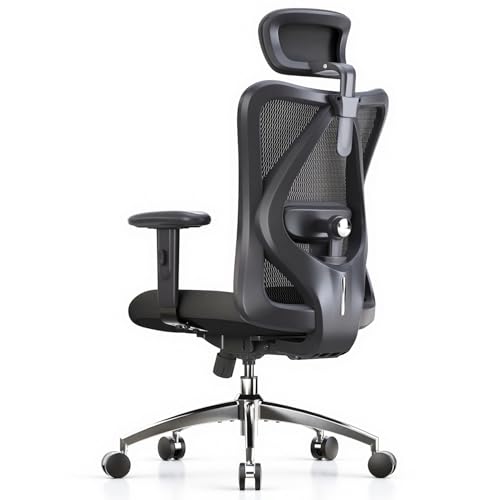
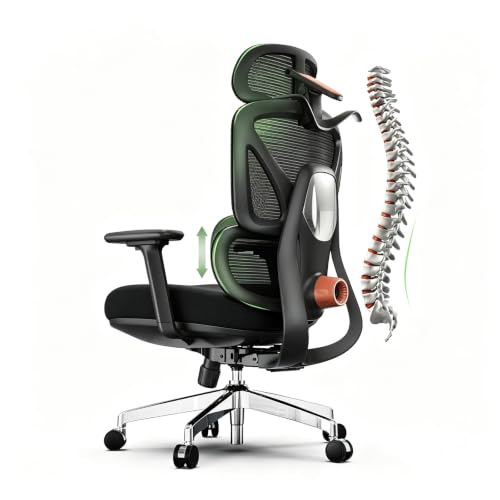
SIHOO M18 Ergonomic Office Chair
What We Like
- Four-point ergonomic support system
- Adjustable headrest, lumbar, and back support
- Breathable mesh backrest keeps you cool
- Reclines through three lockable angles
Trade-offs
- 2D armrests lack forward/backward adjustment
- Weight at 38 lbs makes it less portable
A 330-pound weight capacity and four-point ergonomic support (head, back, hips, hands) make this a chair that actually adapts to your body rather than forcing you to adapt to it. The adjustable lumbar support and back support target the lower spine directly, which is exactly what you need when back pain makes every hour at a desk feel longer. With a height range of 5’6″ to 6’2″, it covers most average-sized adults, and the breathable mesh backrest keeps air moving so you don’t end up sweaty and uncomfortable during long work sessions. For someone looking for a solid all-around ergonomic chair that doesn’t require a second mortgage, this one checks all the practical boxes.
The trade-off here is that the 2D armrests only adjust up/down and rotate in/out, so if you need to slide them forward or backward for precise elbow positioning, you won’t find that range here. Still, the three recline positions (108°, 118°, and 128°) and the under-seat tilt tension knob give you real flexibility to shift from focused typing to leaning back on a break. It’s a smart, no-nonsense pick that prioritizes the features that matter most for back relief.
ELABEST X100 Ergonomic Mesh Chair

What We Like
- Dynamic 3D lumbar support with auto-tracking
- 5D flip-up armrests with zero-pressure padding
- Breathable Dual-Stripe AirMesh back
- 17-point micro-adjustment system
Trade-offs
- Footrest adds bulk under the seat
- At 43 lb, heavier than the CASASIO chair (30 lb)
The dynamic spinal alignment system uses force-sensitive springs that track your spine’s natural curve as you move, so you get active support through long work sessions without having to stop and tweak a knob. That kind of adjustability, paired with a breathable mesh back that moves with you, makes this chair a strong match for anyone dealing with lower back pain who wants more than a static lumbar pad. The flip-up armrests tuck neatly under a standard desk when you need extra room, and the extendable footrest lets you shift from focused typing to a relaxed recline without leaving your seat.
At 43 pounds, the X100 is noticeably heavier than the CASASIO Ergonomic Office Chair (30 lb), so moving it between rooms or rolling it on thick carpet takes a bit more effort. The integrated footrest also adds depth under the seat, which can feel snug if you’re shorter or prefer to sit with your legs tucked back. For the price of a premium ergonomic chair, you’re getting orthopedic-engineered support that’s certified by the American Ergonomics Partnership for fatigue reduction over 12-plus hours, making it a worthwhile investment if advanced lumbar care is your priority.
Marsail Ergonomic Office Chair

What We Like
- Precise 4-way lumbar adjustment
- 3D adjustable armrests
Trade-offs
- No seat depth adjustment for taller users
- Headrest only adjusts in 2 directions
- Mesh back lacks cushioning for some preferences
What you give up is seat depth adjustment, taller users may find the seat pan a bit short for full thigh support. The headrest only moves in two directions, so it’s less customizable than the four-way lumbar. Compared to the SIHOO M18, which also holds 330 pounds but has 2D armrests, the Marsail gives you more arm movement and a thicker cushion for roughly similar back support. If you need a chair that zeroes in on lumbar fit and don’t mind a simpler headrest, this is a thoughtful, comfortable pick.
Product photos
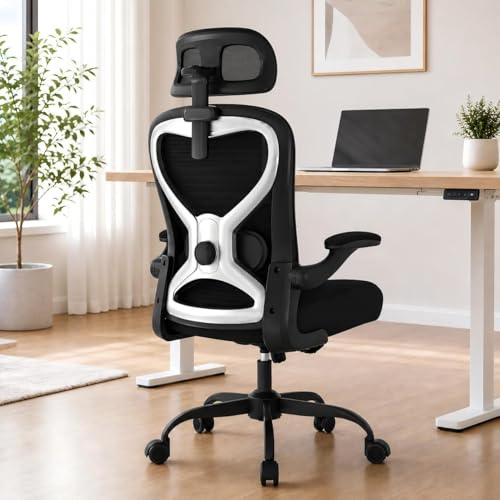
CASASIO Ergonomic Office Chair
What We Like
- Dual-direction adjustable lumbar cushion
- 3D adjustable headrest for neck support
- Breathable mesh back
- Flip-up armrests for small spaces
Trade-offs
- No depth adjustment on armrests
- Flip-up armrests lack depth adjustment
The CASASIO Ergonomic Office Chair stands out with its dual-direction adjustable lumbar cushion, letting you dial in support exactly where your lower back needs it most. That kind of precision is rare at this level, and it makes a real difference during long workdays. The 3.5-inch virgin foam seat distributes weight evenly to keep hips and thighs comfortable even after eight hours, while the breathable mesh back helps prevent that sticky feeling on warm afternoons. The 3D headrest cradles your neck whether you’re typing, reading, or leaning back to think, and the flip-up armrests let you tuck the chair completely under a desk when you’re done. For anyone dealing with back pain who needs targeted lumbar relief without breaking the bank, this chair delivers where it counts.
A key difference is that this chair skips extras like a footrest or reclining feature, which some other picks in this guide include. The ELABEST X100, for example, offers a built-in footrest for those who like to kick back during breaks. The CASASIO focuses instead on core ergonomic adjustability and all-day comfort, and its 330-pound weight capacity means it’s built to handle bigger frames as well. Still, for the person whose main priority is getting the lumbar support just right, this chair’s thoughtful design makes it a smart, practical choice.
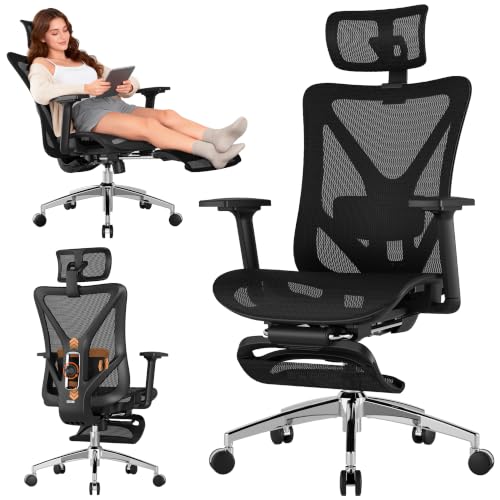
GABRYLLY Ergonomic Chair with Footrest
What We Like
- 135° recline with lockable positions
- 2-way adjustable lumbar support
- Retractable steel footrest included
- 3D adjustable armrests
Trade-offs
- No seat depth adjustment for taller users
- Footrest extends only 18.1 inches
A 135-degree recline with three lockable positions means you can lean way back for a real break without the chair tipping. That’s the standout here: the retractable steel footrest extends 18.1 inches, so you can actually stretch your legs out and nap between tasks. Combined with the 2-way adjustable lumbar support that moves vertically and horizontally, it’s built for people who want both work posture and rest in one seat. The 3D armrests and adjustable headrest add further customization, making it a strong fit for anyone who spends long hours at a desk and needs a chair that adapts to different positions throughout the day.
One downside is that the chair lacks seat depth adjustment, which can be a problem if you’re on the taller side, your thighs might not get full support when you recline. Next to the SIHOO M18, which offers a wider cushion and higher weight capacity, the GABRYLLY focuses more on recline versatility and built-in footrest than on accommodating very tall or heavy users. The mesh back keeps you cool, but if you prefer a padded backrest, this won’t deliver that plush feel. For someone who values the ability to fully recline and put their feet up without buying a separate ottoman, this chair delivers a unique combo that most competitors don’t offer.
Product photos
MOLENTS Ergonomic Mesh Chair

What We Like
- BIFMA X5.1 certified for durability
- Adjustable lumbar support in 4 directions
- Breathable mesh for long hours
- 3D armrests reduce shoulder strain
Trade-offs
- No headrest for neck support
- Seat depth fixed at 18.9"
- Assembly requires removing base from seat
The BIFMA X5.1 certification means this chair has passed rigorous industry testing for durability and safety, so you can trust it to hold up through years of daily use. Its adjustable lumbar support moves both up and down and forward and backward, letting you dial in the exact lower back pressure that keeps you comfortable during long workdays. The breathable mesh back prevents heat buildup, and the 3D armrests let you position your arms exactly where they need to be to avoid shoulder fatigue. For anyone seeking a well-built ergonomic chair without the premium price tag, this is a smart investment.
The main drawback is the lack of a headrest, which means you won’t get neck support during reclined breaks. Unlike the SIHOO M18, which includes a headrest, the MOLENTS focuses its adjustability on the lumbar and arms instead. The seat depth is also fixed at 18.9 inches, so taller users may find the cushion a bit short for full thigh support. If you prioritize a certified, breathable chair with precise lumbar tuning over neck support, this model delivers exceptional value for the money.
Product photos
Haworth Soji Ergonomic Chair

What We Like
- Fully assembled out of box
- 12-year warranty for long-term use
- 4D armrests for personalized fit
- GREENGUARD Gold certified low emissions
Trade-offs
- No forward tilt for active sitting
A 350-pound weight capacity and fully assembled delivery make the Haworth Soji an immediate, no-hassle upgrade for anyone seeking serious back support. Its flexible mesh back moves with you, while the 4D armrests and seat depth adjustment let you dial in a custom fit that reduces fatigue over long workdays. This chair suits home office users who want ergonomic adjustability without the complexity of building it themselves.
One thing to note is that the Soji skips forward tilt, a feature some users prefer for leaning into tasks. But if you prioritize breathable mesh support and a generous warranty over heft, the Soji delivers a comfortable, sustainable workstation that’s ready to use the moment it arrives.
Product photos
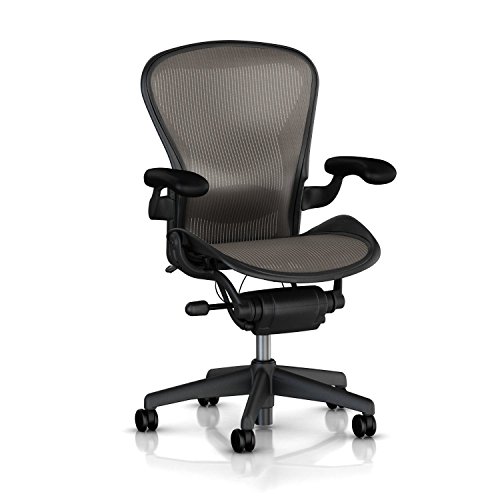
Herman Miller Classic Aeron Chair
What We Like
- Patented Kinemat tilt mechanism for natural movement
- Breathable Pellicle suspension dissipates body heat
- Waterfall seat edge reduces thigh pressure
- 12-year warranty with Born-On-Date sticker
Trade-offs
- At 48.0 pounds, it's heavy to move
The Kinemat tilt mechanism lets your neck, shoulders, hips, knees, and ankles pivot in a natural, coordinated motion, so you stay comfortable even during long stretches at your desk. This chair is built for someone who prioritizes ergonomic precision and wants a seat that moves with them, not against them. The breathable Pellicle suspension keeps you cool by dissipating body heat, and the waterfall front edge relieves pressure on your thighs, helping your circulation stay steady. With a 12-year warranty, it’s designed to last through years of daily use.
The 12-year warranty with an official Born-On-Date sticker shows Herman Miller stands behind this chair for over a decade, so you can count on it lasting through years of daily use. At 48 pounds, it’s built like a tank, which means it stays planted on the floor even when you lean back or shift around. The patented Kinemat tilt mechanism lets your neck, shoulders, hips, knees, and ankles move naturally as you recline, so your whole body stays in sync rather than fighting the chair. The breathable Pellicle suspension dissipates body heat that builds up while you work, keeping you cool and comfortable even during long sessions. The waterfall front edge of the seat takes pressure off your thighs to keep blood circulating and you alert.
Product photos
Ergoa Ergonomic Mesh Office Chair
What We Like
- 8-position lumbar support with fine travel
- 4D soft-padded flip-up armrests
- Removable 11-position 3D headrest
- Breathable mesh with silent casters
Trade-offs
- 48 lb weight makes repositioning harder
- No footrest included for reclining
A 400-pound weight capacity means this chair supports a wide range of body types, and the premium mesh fabric keeps you from overheating even during long stretches at the desk. The lumbar support has eight positions with 2.36 inches of travel, so you can dial in support exactly where your back needs it. The 4D armrests flip up, which makes it easy to tuck the chair under a desk when you’re done working. The removable headrest lets you switch between a high-back and mid-back setup depending on your preference.
The 90-to-135-degree recline with three lockable positions still lets you lean back comfortably, and the lumbar support automatically adjusts as you recline to keep your spine aligned.
Product photos
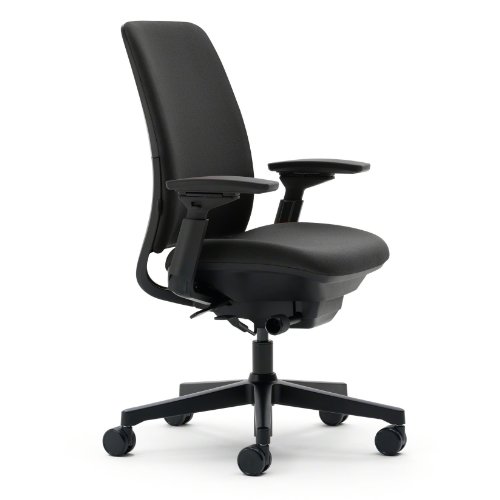
Steelcase Amia Office Chair
What We Like
- Hidden LiveLumbar adjusts to your movement
- 4D arm support for personalized fit
- Extra cushioning for 8-10 hour sitting
- Carbon Neutral certified sustainable option
Trade-offs
- At 54.5 lb, it's heavy to move
- No headrest for users who need neck support
The LiveLumbar system hidden inside the backrest moves with you, so your lower back gets continuous support whether you lean forward to type or recline to think. That dynamic response is what makes this chair feel alive under you, not like a static pad that shifts out of place. It’s built for people who spend 8 to 10 hours at a desk and need pressure-free sitting, with extra cushioning in the seat and flexible edges that don’t dig into your thighs. The 4D armrests adjust in height, width, pivot, and depth, letting you dial in exactly where your arms rest while you work.
One consideration is weight: at 54.5 pounds, this is a chair you set up and leave, not one you slide around the room easily. If you need a chair that stays put and cradles your back through long days without calling attention to itself, this one delivers.
How We Evaluated Office Chairs For Back Pain
This evaluation is based on manufacturer specifications, expert ergonomic round-ups, and consistent patterns in owner feedback. We analyzed what makes a chair effective for back pain relief according to design and user experience data.
The three criteria that mattered most were lumbar support adjustability, overall ergonomic range, and build quality. A chair that cannot adapt to your spine’s curve or your sitting posture will not help with pain. We prioritized models with multi-directional lumbar adjustments, adjustable armrests, and breathable materials that support all-day use.
An honest limit of this research-led approach is that individual fit varies. A chair that works for one person’s back pain may not work for another’s. We recommend using this guide to narrow your choices, then sitting in your top picks to confirm the fit.
What To Look For In Office Chairs For Back Pain
Choosing an office chair for back pain means focusing on adjustability, support, and build quality. The right chair adapts to your body, not the other way around.
Look for a chair with adjustable lumbar support that moves in height and depth, 3D or 4D armrests, a breathable backrest, and a seat depth that fits your thighs. A BIFMA certification indicates durability, and a long warranty shows manufacturer confidence.
Lumbar Support Adjustability
The most critical feature for back pain is lumbar support that you can adjust. Basic chairs offer a fixed lumbar pad, but the best options allow you to change both the height and the depth of the support. This lets you position the curve exactly where your lower back needs it. The ELABEST X100 and Steelcase Amia offer dynamic lumbar support that moves with you, while the Ergoa provides eight distinct positions for fine-tuning.
Armrest and Seat Adjustments
Armrests that adjust in three or four directions (height, width, depth, and pivot) help you maintain a neutral shoulder position, reducing upper back and neck strain. Seat depth adjustment is also important: a seat that is too deep can press behind your knees, while one too shallow offers inadequate thigh support. Look for chairs with at least 3D armrests and a sliding seat pan if you are taller or shorter than average.
Build Quality and Warranty
A chair that wobbles or loses its gas cylinder after a year will not help your back. BIFMA X5.1 certification, like the MOLENTS chair has, indicates the chair has passed durability tests. Long warranties, such as the 12-year coverage on the Haworth Soji and Herman Miller Aeron, signal that the manufacturer expects the chair to last.
- Check the weight capacity to ensure the chair supports your body.
- Look for a breathable mesh back to prevent heat buildup during long sits.
- Consider the chair’s weight if you need to move it between rooms.
- Verify that the seat height range fits your desk and your leg length.
A good rule of thumb: the more points of adjustment a chair offers, the more likely you are to find a comfortable position that relieves your specific back pain.
Office Chairs For Back Pain Compared
The table below compares the key features of our top picks, helping you see at a glance which chair offers the lumbar support, adjustability, and warranty that match your needs.
| Product | Weight Capacity | Armrests | Lumbar Support | Recline |
|---|---|---|---|---|
| SIHOO M18 Ergonomic Office Chair | 330 lbs | 2D adjustable | Adjustable Lumbar Support | 108°, 118°, 128° |
| ELABEST X100 Ergonomic Mesh Chair | 300 lbs | 5D Flip-Up | 3D Synchro-Tilt | 3-stage |
| Marsail Ergonomic Office Chair | 330 lbs | 3D adjustable, flip-up PU-padded | 1.18" forward/back, 2.16" up/down | 90° to 120° |
| CASASIO Ergonomic Office Chair | 330 lbs | Flip-up | Dual-direction adjustable | Tilt & Rock |
| GABRYLLY Ergonomic Chair with Footrest | 300 lbs | 3D adjustable | 2-way adjustable | 135° (3 positions) |
| MOLENTS Ergonomic Mesh Chair | N/A | 3D | Up/down, forward/backward | 90° – 120° |
| Haworth Soji Ergonomic Chair | 350 lb | 4D armrests | lumbar | back lock, tilt tension control |
| Herman Miller Classic Aeron Chair | 48.0 pounds | Fully adjustable vinyl | Lumbar Pad | Tilt Limiter w/Seat Angle Adj |
| Ergoa Ergonomic Mesh Office Chair | 400 lbs | 4D soft-padded, flip-up | 8 positions, 2.36" travel | 90°–135° |
| Steelcase Amia Office Chair | 54.5 pounds | 4D (height, width, pivot, depth) | LiveLumbar dynamic system | Full range, lockable upright |
Frequently Asked Questions
What type of office chair is best for lower back pain?
An ergonomic chair with adjustable lumbar support is best. Look for a model that lets you change the height and depth of the lumbar curve so it fits the natural inward curve of your spine. The SIHOO M18 and ELABEST X100 both offer strong lumbar adjustability.
How much should I spend on an office chair for back pain?
Value varies widely. Budget-friendly options like the MOLENTS offer BIFMA certification and adjustable lumbar support at an affordable price. Premium chairs like the Herman Miller Aeron cost more but include advanced tilt mechanisms and long warranties. The right price depends on how many hours you sit each day.
Are mesh back chairs better for back pain?
Mesh back chairs are often better because they allow air to circulate, keeping you cool during long sits. They also conform to your back’s shape without creating pressure points. Many of our picks, including the SIHOO M18 and Haworth Soji, use breathable mesh backs.
Do I need a chair with a headrest for back pain?
A headrest helps if you lean back frequently, as it supports your neck and upper spine. However, not everyone needs one. If you sit upright most of the day, a chair without a headrest, like the Steelcase Amia or MOLENTS, may work fine. Choose based on your typical posture.
What is the difference between 2D, 3D, and 4D armrests?
2D armrests adjust up and down only. 3D armrests add forward and backward movement, and 4D armrests also pivot side to side. For back pain, 3D or 4D armrests are better because they let you position your arms to reduce shoulder and neck strain.
The Bottom Line
For most people, the SIHOO M18 Ergonomic Office Chair is the best balance of support, adjustability, and value. Its four-point ergonomic system targets the lower back, upper back, neck, and arms, making it a strong choice for anyone dealing with back pain during long workdays.
If your back pain is more persistent, the ELABEST X100 offers dynamic 3D lumbar support that tracks your movements, while the budget-minded MOLENTS delivers BIFMA-certified durability without a headrest. Taller users should consider the CASASIO for its dual-direction lumbar cushion or the Ergoa for its eight-position lumbar adjustment.
The single most important factor in choosing a chair for back pain is lumbar adjustability. No other feature matters as much as being able to position the support exactly where your spine needs it.
