10 Best Gaming Desks in a Budget-Friendly Range for 2026
This post contains affiliate links. As an Amazon Associate, we earn from qualifying purchases.
The best gaming desk is the EUREKA ERGONOMIC Gaming Desk 60 Inch, offering a full-surface mouse pad, built-in cable management, and a steel frame that supports up to 500 pounds. For dual-monitor setups, the Respawn 1063 Gaming Desk 63 Inch is a top choice, while the Secretlab Magnus Pro Electric Standing Desk delivers a clean, single-cable power system for those who want to stand.
Building a gaming setup means balancing a stable surface, enough room for your gear, and a way to keep cables from becoming a mess. With so many desks on the market, it is easy to get distracted by flashy features and overlook the basics of build quality and usable space.
This guide is based on a review of specifications, manufacturer documentation, expert round-ups, and patterns in owner feedback. We focused on the features that matter most for a dedicated gaming desk: stability, surface space, cable management, and storage.
Top 10 Budget-Friendly Gaming Desks in the Market
Certain content that appears on this site comes from Amazon. This content is provided "as is" and is subject to change or removal at any time.
The Best Gaming Desks in a Budget-Friendly Range, Researched
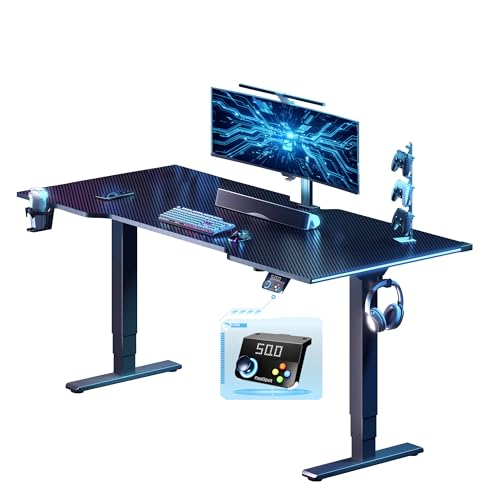
EUREKA ERGONOMIC Gaming Desk 60 Inch

What We Like
- Full-surface mouse pad for smooth glide
- Built-in cable management keeps cords tidy
- Includes cup holder and dual headset hooks
- Steel frame supports up to 500 pounds
Trade-offs
- At 55.6 lb, it's heavy to move alone
- No height adjustability for standing use
A 500-pound weight capacity means this desk can handle a full battle station, dual monitors, a heavy PC tower, speakers, and accessories, without wobbling during intense gaming sessions. The reinforced steel frame and adjustable feet keep it steady even on uneven floors, so you can focus on your game instead of a shaky surface. It’s a great fit for gamers who want a spacious, organized setup without the premium price tag of motorized standing desks. The 60-inch carbon fiber-textured top gives you room to spread out, while the full-surface mouse pad provides a smooth fabric surface for controlled tracking across one continuous area.
This desk is fixed at 30.1 inches tall, so if you prefer alternating between sitting and standing, you’ll want to look at the Secretlab Magnus Pro Electric Standing Desk instead. But for those who game primarily seated, the Eureka desk offers a rock-solid foundation and thoughtful extras like a controller rack, cup holder, and dual headset hooks that keep your gear within reach and off the desktop. Assembly is straightforward with clear instructions and included tools, and the one-year warranty provides peace of mind. It’s a practical, well-rounded choice that delivers where it counts.
Product photos
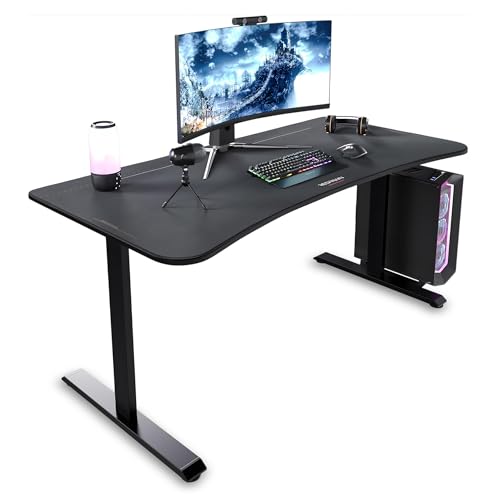
Respawn 1063 Gaming Desk 63 Inch
What We Like
- Full-surface 5mm mouse pad included
- Oversized wire trough for cable management
- Supports up to 175 lb
- 5-year warranty for long-term use
Trade-offs
- At 68 lb, it is heavy to move
- Fixed height, no standing option
A 63-inch wide desktop gives you room to spread out with dual monitors or an ultra-wide display, so you can keep your gaming and productivity tools within easy reach. The full-surface mouse pad that spans the entire desk stays firmly in place and helps protect the surface, while the oversized wire trough underneath keeps cables organized and out of sight. This setup works well for gamers or creators who need a spacious, stable workstation that doesn’t require constant adjustments.
The Respawn 1063 supports up to 175 pounds, so it can handle a heavy dual-monitor setup plus peripherals without wobbling. It comes with a full-surface mouse pad that stays put, and the built-in cable trough keeps wires out of sight. Backed by a 5-year warranty, this desk is built to last through years of gaming or work.
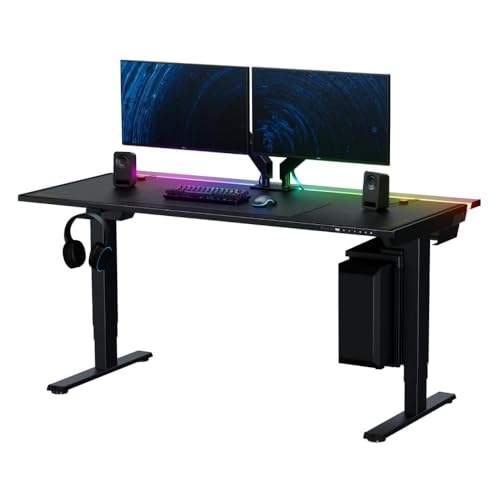
Secretlab Magnus Pro Electric Standing Desk
What We Like
- Single-cable power for desk and devices
- Built-in cable management tray
- Magnetic cable management system
- Integrated power supply column
Trade-offs
- At 120 lb, very heavy to move
- Fixed 25.6-inch height limits use for tall users
A single concealed cable running through the desk leg powers both the desk and your devices, so there is no tangle of cords behind your setup. The integrated power supply column and built-in cable management tray keep everything tidy, making this a great pick for gamers who value a clean, minimal look. Its 59.1-inch width offers plenty of space for a multi-monitor rig, and the magnetic ecosystem lets you attach accessories without drilling or adhesive.
At 120 pounds, this desk is a beast to move or reposition once assembled, so it suits a permanent spot rather than a frequently rearranged room. Compared to the Secretlab Magnus Metal Desk, which has a fixed height of 28.9 inches, the Magnus Pro’s 25.6-inch height is lower, which may work better for shorter users but could be less accommodating for taller ones. If you want a clean, single-cable setup and don’t plan to move the desk often, this is a premium choice.
Secretlab Magnus Metal Desk

What We Like
- Built-in full-length cable management tray
- Magnetic accessories keep cords organized
- Includes MAGPAD leatherette desk mat
- Rated for 220 lbs of equipment
Trade-offs
- At 92.6 lb, it's heavy to move alone
- No height adjustment, fixed at 29 inches
- Cable management bundle sold separately
With a metal frame that supports up to 220 lbs, this desk can handle multiple monitors and a desktop PC without breaking a sweat. The full-length cable management tray snaps on in an instant and gives you room to stash power strips and every cord out of sight within minutes. Its proprietary magnetic system lets you attach cable anchors and sheaths exactly where you need them, turning cord chaos into a tidy, customized layout.
A fixed 28.9-inch height works well if you’re average height but won’t suit everyone who prefers standing or a lower seated position. Compared to the Secretlab Magnus Pro Electric Standing Desk, this model skips the motorized lift, so you lose that flexibility entirely. At 92.6 pounds, it’s a piece you set up once and leave, perfect if you’re after a magnetic-ready workstation that stays put.
Product photos
AODK L Shaped Desk with LED & Power

What We Like
- Reversible L-shape with storage shelves
- Integrated LED strip with 10 colors
- Built-in power outlet and USB ports
- Includes CPU stand, hook, and bag
Trade-offs
- No built-in cable management tray included
- 40.4-pound frame less stable for heavy monitor arms
A 53-inch reversible L-shape with built-in LED lighting and a power strip means you can set up a vibrant gaming corner without hunting for extra outlets or stringing lights yourself. The storage shelves, CPU stand, headphone hook, and storage bag keep controllers, books, and gear organized right where you need them. This desk suits gamers who want a compact, feature-packed workstation that can tuck into a corner and still offer plenty of surface for dual monitors or a laptop and peripherals.
At 40.4 pounds, this desk is light enough to move easily but won’t anchor down against aggressive typing like the 68-pound Respawn 1063 will. The 53-inch span fits a corner snugly, yet it lacks a built-in cable management tray, so you’ll route cords through the included storage bag or add your own solution. For a budget L-shape with integrated lighting and power in a compact footprint, this AODK delivers real value.
Product photos
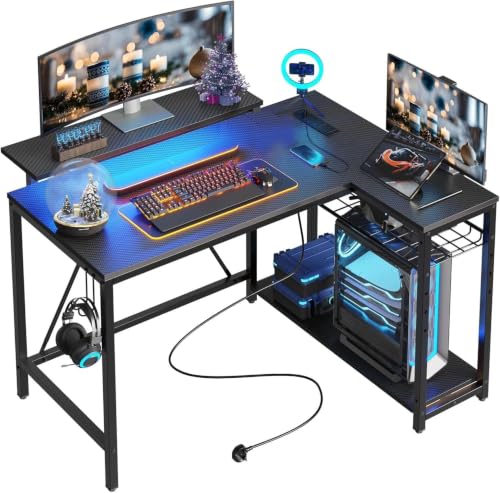
Bestier 42-Inch L-Shaped Computer Desk
What We Like
- Compact 42-inch footprint fits tight corners
- Reversible shelves for left or right layout
- Built-in power strip with USB and Type-C
- Headphone and backpack hook reduces clutter
Trade-offs
- Smaller surface limits dual-monitor setups
- 42-inch width restricts large peripherals
A 42-inch corner footprint means this desk slips into bedrooms, dorms, or apartment nooks where a full-size gaming station simply won’t fit. The built-in power strip with two AC outlets plus USB and Type-C ports keeps your phone, tablet, and peripherals charged without crawling under the desk. Reversible shelves let you mount storage on the left or right, so the layout adapts to your room’s outlets and wall position. For students or remote workers who need one compact hub for laptop, monitor, and gear, this setup turns a wasted corner into a tidy workstation without overwhelming the space.
Surface area is the trade-off: at roughly 32.3 by 41.9 inches, this desk won’t comfortably hold two large monitors side by side. If you run a triple-screen gaming rig, the 60-inch EUREKA ERGONOMIC desk gives you more horizontal room and a full mouse pad. But for someone who values a small footprint, integrated lighting, and a clutter-free charging hub, the Bestier delivers a complete corner station that supports work, study, and casual gaming in one compact package.
Product photos
Korfile 40 Inch Gaming Desk with Power Outlet
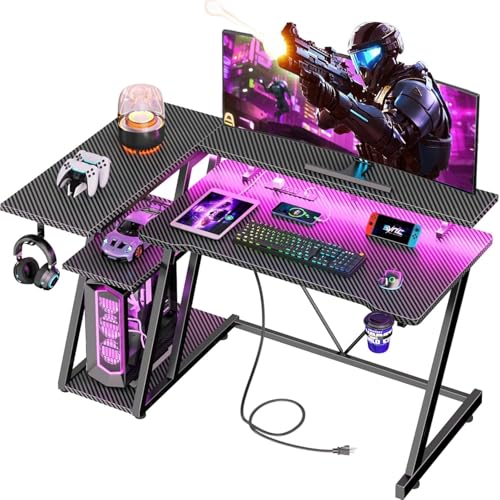
What We Like
- Carbon fiber texture is scratch-resistant
- Reversible L-shape fits left or right
- Built-in power outlets and USB ports
- Includes cup holder and headphone holder
Trade-offs
- 40-inch size limits dual monitor setup
- 220 lb capacity is lower than steel-frame desks
A 40-inch L-shaped footprint makes this desk a natural fit for tight corners where every inch counts. The carbon fiber textured MDF top resists scratches and wipes clean easily, so it stays looking sharp through long sessions. With three AC outlets and two USB ports built right into the surface, you can plug in your monitor, laptop, and phone without hunting for a power strip. The reversible design lets you flip the desk to suit your room layout, and the included monitor stand, cup holder, and headphone hook keep essentials organized without cluttering the work area.
At 40 inches across, this desk’s monitor stand is designed to hold two 24-inch monitors or a single large monitor, so it can handle a dual-screen setup within that size range. The 220-pound weight capacity supports a typical gaming rig with a monitor and accessories, but if you’re planning a very heavy multi-monitor or tower setup, you may want to check the load limits. But if you’re outfitting a small space and want a desk that combines power access, storage extras, and a sleek carbon fiber look without taking over the room, this Korfile delivers a tidy package that’s easy to assemble in about an hour.
Product photos
Korfile 47 Inch Gaming Desk with Drawers
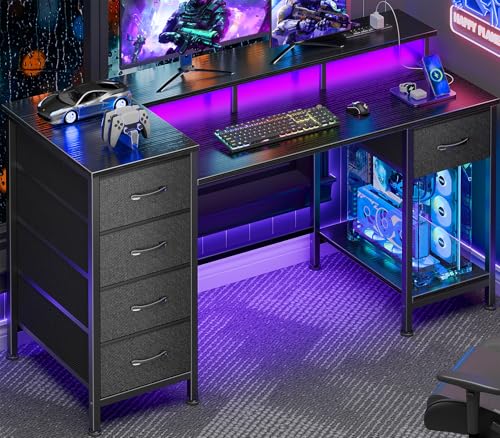
What We Like
- 5 storage drawers with reversible placement
- 22 LED lighting effects plus power outlets
- All-in-one monitor stand reduces neck strain
- Sturdy steel frame with crossbar support
Trade-offs
- Non-woven fabric drawers less durable than wood
Five storage drawers that can be mounted left, right, top, or bottom give you serious flexibility for any room layout. That reversible design, paired with built-in power outlets and 22 LED effects, makes this desk a smart pick if you want both organization and ambiance without a big footprint. The included monitor stand also lifts your screen to eye level, helping you stay comfortable during long sessions. It’s a tidy, self-contained station that keeps cables, controllers, and documents out of sight.
The drawer material is non-woven fabric, which is lightweight and easy to install, but it won’t hold up like solid wood under heavy loads over time. And at 47 inches wide, this desk feels compact compared to the 60-inch EUREKA ERGONOMIC option, so you’ll need to be selective about what sits on top. For someone who values built-in storage and a clean look in a smaller space, though, the Korfile delivers exactly that without sacrificing style or convenience.
Product photos
AODK Gaming Desk with PC Showcase Stand

What We Like
- Elevated stand showcases panoramic PC cases
- Three fabric drawers hide cables and clutter
- Integrated RGB lighting syncs with PC
- Side shelf displays collectibles vertically
Trade-offs
- 19.7-inch depth limits monitor and keyboard space
- Heavy 92.6-pound build makes repositioning difficult
The elevated PC stand is the defining feature here: it lifts your panoramic glass case to eye level, turning your rig into the room’s centerpiece while keeping it off the dusty floor. This desk is built for gamers who want their build on display, with an integrated RGB strip under the monitor shelf that visually echoes your PC’s lighting. Three spacious fabric drawers swallow cables, controllers, and accessories, so your desktop stays clean and focused on the show. It’s a deliberate choice for anyone who prioritizes showcasing their hardware over traditional desk proportions.
The AODK Gaming Desk with PC Showcase Stand is built around a single, decisive purpose: putting your panoramic PC case on display at eye level. That elevated stand is engineered for heavy glass-and-GPU builds like the Lian Li O11 or Hyte Y60, lifting the chassis off the floor and turning it into the room’s centerpiece. The trade-off is depth: at just 19.7 inches, the desktop is shallow, so you’ll need to be mindful of monitor size and keyboard placement. But for the builder who wants their PC front and center, this desk delivers a purpose-built stage that no other desk in this guide matches.
FLEXISPOT E6G CyberX 55 RGB Gaming Standing Desk
What We Like
- 352 lb capacity for heavy gear
- Dual motor quiet lift
- Gamepad-style joystick with presets
- RGB lighting on three sides
Trade-offs
- At 55 inches wide, needs ample floor space
- Requires ample floor space for 55-inch width
A 352-pound weight capacity means this desk can handle a full multi-monitor gaming rig, a heavy PC tower, streaming gear, and then some without breaking a sweat. The dual-motor, three-stage lift system moves smoothly and quietly from 24.4 to 50 inches, so tall gamers and shorter creators alike can find their perfect standing height. The gamepad-style joystick controller with three memory presets makes adjusting height feel natural and quick, while the integrated three-sided RGB lighting adds immersive glow to any gaming setup. This is a desk built for those who load up their workspace with serious hardware and want it to last.
If your priority is a rock-solid, height-adjustable foundation for a heavy gaming or streaming station, and you have the floor space to accommodate it, this desk delivers where lighter options can’t.
How We Evaluated Budget-Friendly Gaming Desks
We started by looking at the specifications and build materials of each desk, paying close attention to frame construction, weight capacity, and desktop dimensions. Manufacturer documentation provided the details on included accessories like cable trays, power outlets, and mouse pads.
The four criteria that mattered most were stability under load, usable surface area for monitors and peripherals, the quality of the cable management system, and the overall value of included features like lighting, storage, or power delivery. A desk that wobbles or lacks room for a full keyboard and mouse setup simply does not work for serious gaming.
Because this is a research-led evaluation, we relied on patterns in owner feedback to understand how each desk holds up over time. We also compared each model against the needs of different gaming setups, from compact corner stations to heavy multi-monitor rigs.
What To Look For In Budget-Friendly Gaming Desks
The best gaming desk should provide a stable platform that fits your gear and your room. Focus on frame construction, surface dimensions, and how the desk handles cable management before you consider extras like RGB lighting or cup holders.
Look for a steel frame with a weight capacity of at least 175 pounds, a desktop wide enough for your monitor setup, and a built-in cable management system that keeps cords off the floor.
Frame Stability And Weight Capacity
A stable desk starts with the frame. Steel frames with crossbar support offer the best resistance to wobble, especially when using monitor arms or heavy peripherals. Weight capacity tells you how much gear the desk can safely hold. For a single monitor and a standard PC, 175 pounds is a solid baseline. For multiple monitors or a heavy tower, look for capacities above 220 pounds.
Desktop Size And Shape
The width and depth of the desktop determine what you can fit. A 60-inch wide desk comfortably handles a dual-monitor setup with room for a keyboard and mouse. L-shaped desks work well in corners but often have a smaller primary surface that may not fit two monitors side by side. Depth matters too: a desk less than 24 inches deep can feel cramped with a large monitor and a full keyboard.
Cable Management And Organization
Built-in cable management separates a clean setup from a tangled one. Look for desks with a dedicated wire trough or tray that runs the full width of the desk. Some models include magnetic cable clips or a power strip integrated into the frame. If the desk lacks cable management, plan to buy aftermarket solutions.
- Check if the desk includes a cable tray or trough.
- See if the power outlets are built into the desk or require an external strip.
- Look for magnetic or clip-on cable organizers if you prefer a wireless look.
- Consider how the desk handles the power brick for your monitor or PC.
A desk with a full-width cable tray and a built-in power strip will keep your setup looking clean with minimal effort.
Budget-Friendly Gaming Desks Compared
The table below compares the key specs and features of each gaming desk in our guide, from weight capacity and dimensions to included extras like cable management and lighting.
| Product | Dimensions | Weight | Weight Capacity |
|---|---|---|---|
| EUREKA ERGONOMIC Gaming Desk 60 Inch | 60 x 27.6 x 30.1 inches | 55.6 pounds | 500 pounds |
| Respawn 1063 Gaming Desk 63 Inch | 63 x 31.5 x 28.5 inches | 68.0 pounds | 175 lb |
| Secretlab Magnus Pro Electric Standing Desk | 59.1 x 27.6 x 25.6 inches | 120.0 pounds | N/A |
| Secretlab Magnus Metal Desk | 59.1 x 27.6 x 28.9 inches | 92.6 pounds | 220 lbs |
| AODK L Shaped Desk with LED & Power | 53.1 x 18.9 x 29.8 in | 40.4 pounds | N/A |
| Bestier 42-Inch L-Shaped Computer Desk | L 32.3 x W 41.9 x H 35.9 in | 32.6 lb | N/A |
| Korfile 40 Inch Gaming Desk with Power Outlet | L 25.6 inches, W 39.4 inches, H 29.5 inches | N/A | 220 lbs |
| Korfile 47 Inch Gaming Desk with Drawers | 47.2 x 18.5 x 35.0 inches | 41.9 pounds | N/A |
| AODK Gaming Desk with PC Showcase Stand | 59.4 x 19.7 x 45.2 inches | N/A | N/A |
| FLEXISPOT E6G CyberX 55 RGB Gaming Standing Desk | 55" x 27.5" | N/A | 352 lb |
Frequently Asked Questions
What size gaming desk do I need for two monitors?
A desk at least 60 inches wide and 24 inches deep gives you enough room for two monitors side by side, plus a keyboard and mouse. The Respawn 1063 Gaming Desk 63 Inch is a strong option for this setup.
Are L-shaped gaming desks good for small rooms?
Yes, L-shaped desks like the Bestier 42-Inch L-Shaped Computer Desk fit into corners and use space efficiently. Just make sure the primary surface is wide enough for your monitor before you commit to a corner layout.
Do gaming desks come with cable management built in?
Many gaming desks in this price range include a cable management tray or trough. The Secretlab Magnus Pro and Magnus Metal desks have integrated systems, while others like the AODK L Shaped Desk require you to manage cables separately.
How much weight can a typical gaming desk hold?
Most steel-frame gaming desks support between 175 and 220 pounds. The FLEXISPOT E6G CyberX 55 RGB Gaming Standing Desk supports up to 352 pounds, making it a good choice for heavy multi-monitor setups.
Can I use a gaming desk for work from home?
Absolutely. Desks like the EUREKA ERGONOMIC Gaming Desk 60 Inch and the Secretlab Magnus Metal Desk work well for both gaming and home office tasks, offering a stable surface and built-in cable management.
The Bottom Line
For most gamers, the EUREKA ERGONOMIC Gaming Desk 60 Inch is the best overall choice. Its steel frame, full-surface mouse pad, and built-in cable management deliver a stable, organized setup without breaking the budget. It is ideal for anyone who wants a spacious desk that is ready to use right out of the box.
If you need a desk for dual monitors, the Respawn 1063 offers a larger surface and a 5-year warranty. For those who want a standing option, the FLEXISPOT E6G CyberX 55 RGB provides electric height adjustment with a high weight capacity. Small-space shoppers should look at the Bestier 42-Inch L-Shaped Computer Desk for a compact corner solution.
The single most important factor when choosing a gaming desk is stability. A desk that wobbles will undermine every other feature, no matter how many extras it includes. Focus on frame construction and weight capacity first, and everything else will fall into place.
