10 Best Office Chairs For Lower Back Issues in 2026
This post contains affiliate links. As an Amazon Associate, we earn from qualifying purchases.
The SIHOO M18 Ergonomic Office Chair earns our Best Overall spot because its four-point support system and adjustable lumbar and headrest let you dial in a custom fit for long desk hours. For precise lower back control, the Marsail Ergonomic Office Chair offers highly adjustable lumbar support. The BestOffice Ergonomic Desk Chair is our Budget Pick for those needing a sturdy, breathable option without a high price tag.
Lower back pain from sitting all day is often a matter of support, or the lack of it. A chair that lets you adjust the lumbar curve, seat height, and arm position can make the difference between leaving your desk in discomfort or feeling ready for the rest of your day.
This guide is research-based, drawing on manufacturer specifications, expert round-ups, and patterns in owner feedback to help you find the right chair for your body and your workspace. We focus on the features that matter most for lower back support.
Top 10 Office Chairs For Lower Back Issues in the Market
Certain content that appears on this site comes from Amazon. This content is provided "as is" and is subject to change or removal at any time.
The Best Office Chairs For Lower Back Issues, Reviewed
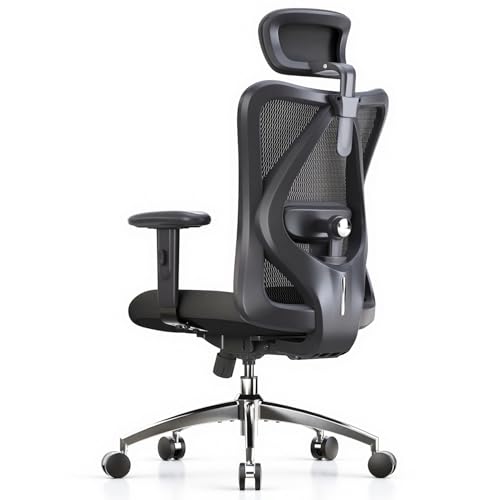
SIHOO M18 Ergonomic Office Chair
What We Like
- Four-point ergonomic support (head, back, hips, hands)
- Adjustable lumbar and headrest for custom fit
- Breathable mesh back keeps you cool
- Reclines up to 128° with tilt lock
Trade-offs
- Armrests adjust only 2D, not forward/backward
- At 38 pounds, it's heavier for moving
With four points of support, head, back, hips, and hands, this chair tackles lower back strain from every angle. The adjustable lumbar support and headrest let you dial in a fit that matches your spine, while the breathable mesh back keeps air moving during long work sessions. It’s a well-rounded choice for anyone who spends full days at a desk and wants reliable ergonomic features without stepping into premium price territory.
The trade-off comes in the armrests: they adjust in two directions (height and width) but don’t slide forward or pivot, which might leave some users wanting more flexibility. Compared to the Marsail chair’s 3D armrests, the SIHOO feels a bit less refined for those who need to fine-tune arm position. Still, for the core goal of supporting your lower back through a full workday, this chair delivers where it counts.
Marsail Ergonomic Office Chair

What We Like
- Highly adjustable lumbar support system
- Breathable mesh back promotes airflow
- 3D armrests for customized arm position
- Flip-up armrests slide under desk
Trade-offs
- Headrest adjusts in only two dimensions
- No seat depth adjustment available
With a lumbar support that moves 1.18″ forward and back and 2.16″ up and down, this chair lets you dial in lower back pressure exactly where you need it. The 3.14″ thick high-density foam seat and breathable mesh back work together to keep you comfortable during long hours at a desk. It’s a strong fit for anyone who wants to fine-tune support without stepping up to a premium price bracket.
The Marsail chair’s 2D adjustable headrest lets you tilt and raise it for a custom fit, which is a nice perk for a chair in this price range. Compared to the CASASIO with its 4-way lumbar and thicker 3.5″ cushion, the Marsail has a 3.14″ thick seat pad but offers flip-up armrests that make it easy to slide the chair under a desk when not in use. For the money, the adjustability here is hard to beat.
Product photos
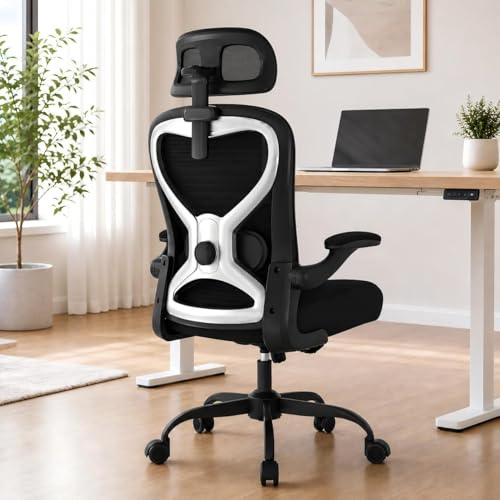
CASASIO Ergonomic Office Chair
What We Like
- 4-way adjustable lumbar support
- 3.5" virgin foam seat cushion
- Breathable mesh back
- Flip-up armrests for small spaces
Trade-offs
- No seat depth adjustment for taller users
- Flip-up armrests lack width or angle adjustment
The dual-direction adjustable lumbar cushion on this chair lets you move support up and down to target your lower back. That’s a real advantage for anyone who spends long hours at a desk and finds one-size-fits-all lumbar pads just don’t cut it. The 3.5-inch virgin foam seat is thick enough to keep hips and thighs comfortable even after a full workday, and the breathable mesh back helps you stay cool. With a 330-pound weight capacity and a reinforced metal base, it’s built to handle daily use without wobbling.
The trade-off here is that the seat isn’t adjustable in depth, so if you have longer legs, you might not get the thigh support you’d like. The flip-up armrests are handy for sliding the chair out of the way, but they only go up and down, no sliding forward or pivoting side to side. For the price, it’s a thoughtful choice for targeted lower back relief.
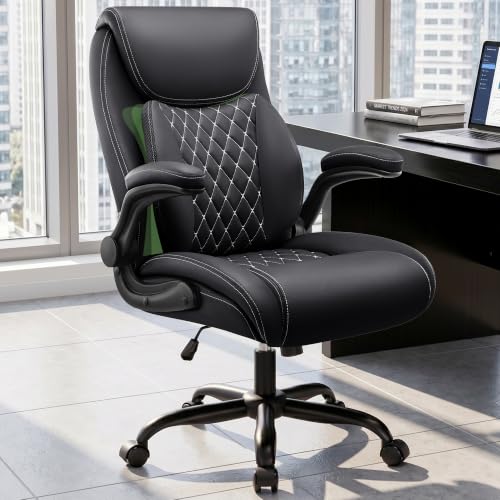
Stella Mia Ergonomic Executive Chair
What We Like
- 3D lumbar adjusts to your posture
- 350 lb capacity for all sizes
- 90° flip-up armrests save space
- Wipe-clean PU leather resists stains
Trade-offs
- No headrest for upper back support
- At 39 lb, heavier than some mesh chairs
A 350-pound weight capacity and a dual-layer lumbar system that actively conforms to your spine set this chair apart for anyone needing targeted lower back relief. The 3D lumbar support moves with you as you shift during the day, reducing fatigue without constant manual adjustment. It suits home office workers and gamers who want a sturdy, leather-wrapped seat that feels substantial and wipes clean easily.
People who want adaptive lumbar support and a polished appearance rather than maximum breathability will find this chair appealing. Its dual-layer backrest adds an independent lumbar system that actively follows the curve of your spine, adjusting as you shift during the day. That continuous real-time support helps reduce lower back fatigue during long work sessions. The commercial-grade PU leather resists stains and peeling, so a quick wipe keeps it looking fresh. With a 350-pound weight capacity and a steel base on smooth-rolling nylon casters, the chair feels stable and moves silently across any floor.
Product photos
MOLENTS Ergonomic Mesh Office Chair

What We Like
- Lumbar adjusts both up/down and forward/backward
- 3D armrests reduce arm and shoulder strain
- Breathable mesh keeps you cool during long hours
- Three recline positions from 90° to 120°
Trade-offs
- Assembly requires removing base leg from seat cushion
- At 35 lb, it's heavier than some mesh chairs
The MOLENTS Ergonomic Mesh Office Chair offers a level of lumbar customization that sets it apart: the support pad moves both up and down and forward and backward, so you can dial in exactly where it hits your lower back. That kind of adjustability is a real advantage if you’ve struggled with chairs that only offer one fixed bump. The 3D armrests let you shift arm position to match your desk height and typing posture, and the breathable mesh back keeps you from getting sticky during long stretches at your desk. With a seat height range from 19.5 to 23.3 inches, it fits a wide variety of desk setups and body sizes.
The MOLENTS chair offers more adjustment points for your upper body and lower back than the SIHOO M18, which has a 2D armrest and a simpler lumbar pad. During assembly, you’ll need to pull the base leg out of the seat cushion, a minor extra step. If you need a shorter or higher gas lift, the manufacturer can provide one upon request.
Product photos
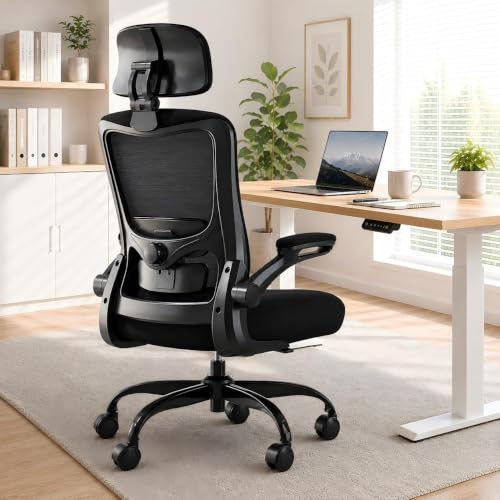
Zeonsit Ergonomic Office Chair
What We Like
- 4-way adjustable lumbar support
- 3.5-inch thick virgin foam cushion
- Breathable mesh back reduces heat
- Flip-up armrests for extra space
Trade-offs
- At 28 pounds, less portable than lighter chairs
- Flip-up armrests do not adjust forward or pivot
A 3.5-inch thick virgin foam cushion and 4-way adjustable lumbar support make this chair a strong ally for anyone spending eight or more hours at a desk. The mesh back promotes airflow so you don’t overheat, while the adjustable headrest and rocking function let you shift positions throughout a long workday. It’s built for sustained comfort, with a 330-pound capacity and a sturdy frame that feels solid under you.
At 28 pounds, this chair is light enough to move between rooms without straining, yet it supports up to 330 pounds, so it handles a wide range of body types. The flip-up armrests let you push the chair under a desk when not in use, which saves floor space. For long work sessions, the adjustable lumbar support and thick foam cushion keep pressure off your back and seat, making it a practical choice for all-day comfort.
Haworth Soji Ergonomic Office Chair

What We Like
- Fully assembled out of the box
- 4D armrests for personalized positioning
- Flexible mesh back adapts to movement
- 12-year warranty backs the build
Trade-offs
- No forward tilt for active sitting
- Lacks headrest for full neck support
A 350-pound weight capacity means this chair comfortably supports a wide range of body types, and the flexible mesh back moves with you rather than forcing you into a fixed posture. That makes the Soji a smart fit for anyone who shifts position often during long work sessions, since the lumbar support and seat depth adjust to match your frame without needing a manual. It arrives fully assembled, so you can roll it into place and start adjusting the 4D armrests right away, which is a real time-saver compared to chairs that require an hour of screwing parts together.
The Soji lacks forward tilt, a feature found on some chairs like the Steelcase Amia, which offers four points of adjustability. For users who need that specific function, the Amia is an alternative, though it weighs 54.5 pounds compared to the Soji’s 19.8 pounds.
Product photos
Herman Miller Classic Aeron Task Chair
What We Like
- Breathable Pellicle dissipates body heat
- Kinemat tilt keeps body aligned naturally
- Waterfall seat edge reduces thigh pressure
- 12-year warranty with Born-On-Date sticker
Trade-offs
- At 48 pounds, it's heavy to move
- No headrest for neck support
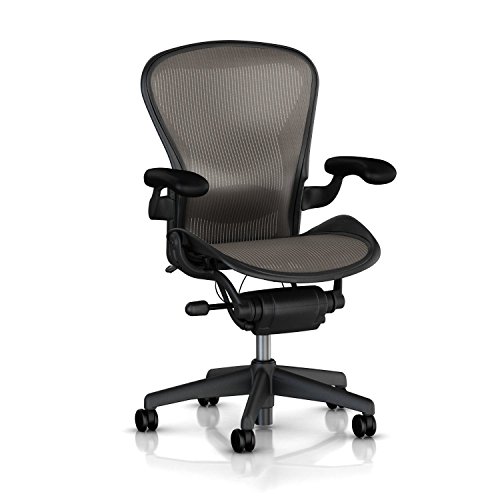
A 48-pound build signals serious engineering, and the patented Kinemat tilt mechanism lets your neck, shoulders, hips, knees, and ankles pivot in a natural rhythm as you recline. That coordinated motion reduces strain on the lower back, while the breathable Pellicle suspension wicks away body heat so you stay cool during long work sessions. The waterfall front edge of the seat takes pressure off your thighs, keeping blood flowing and helping you stay alert. This chair suits anyone who needs all-day comfort with minimal heat buildup and a design that actively supports spinal alignment.
At 48 pounds, this chair is built like a tank, you won’t be sliding it across the room on a whim. That heft comes with a 12-year warranty, far longer than the Haworth Soji’s coverage, so it’s a long-term investment in comfort. If you value a cool, breathable seat and precise ergonomic motion over portability, this classic design delivers lasting value.
Product photos
Steelcase Amia Office Chair
What We Like
- 4D arm support for height, width, pivot, depth
- Extra cushioning for 8-10 hour comfort
- LiveLumbar system adjusts to movement
Trade-offs
- At 54.5 pounds, it's heavy to move
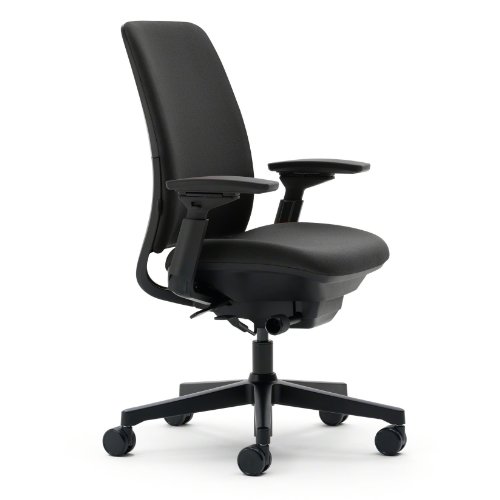
The trade-off is weight: at 54.5 pounds, this chair is built like a tank, so moving it between rooms or adjusting your setup regularly takes some effort. Compared to the Haworth Soji (19.8 pounds), the Amia is much heavier, but that solid construction also contributes to its stability and durability. If you don’t need a headrest and value a lumbar system that reacts to your every move, this is a thoughtful, long-term investment for your back health.
BestOffice Ergonomic Desk Chair
What We Like
- Breathable mesh back for airflow
- Adjustable seat height and swivel
- BIFMA-certified sturdy build
- Quick 10-15 minute assembly
Trade-offs
- Mid-back only, no headrest support
- No headrest for neck support
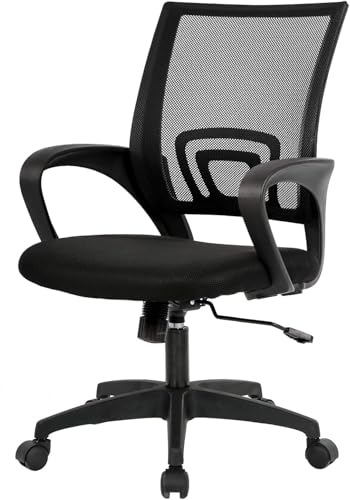
A 250-pound weight capacity and BIFMA certification mean this chair is built to last through daily use without breaking down, even if you’re on a tight budget. The mesh back encourages airflow so you stay cool during long work sessions, and the adjustable seat height (17.1 to 20.3 inches) lets you find a comfortable position for most desks. It’s a straightforward, no-frills pick for anyone who needs reliable lumbar support without spending a lot.
The mid-back design supports the lower and middle back but leaves the upper back and neck without support, so it’s best for focused desk work rather than lounging or reclining. Compared to the SIHOO M18, which includes a headrest and adjustable armrests, this chair offers less customization for those who need upper body support. For a straightforward, functional chair that covers the ergonomic basics at a budget-friendly price, it’s a practical choice.
Product photos
How We Evaluated Office Chairs For Lower Back Issues
We built this guide by analyzing product specifications, manufacturer documentation, expert round-ups from ergonomic specialists, and common themes in owner reviews. Our goal was to identify the chairs that offer genuine, adjustable support for the lower back rather than a one-size-fits-all foam pad.
The four criteria that mattered most were lumbar adjustability (how many directions the support moves), overall ergonomic adjustability (armrests, seat height, headrest), build quality and warranty, and the chair’s suitability for long sitting sessions. A chair that lets you fine-tune the lumbar curve to your spine’s natural shape is far more likely to relieve pressure than a fixed bump.
An evaluation based on research has limits: individual comfort is subjective. What works for one person’s back may not work for another. Chairs with multiple adjustment points give you the best chance of finding your ideal fit.
What To Look For In Office Chairs For Lower Back Issues
Finding the right chair means focusing on adjustability, support, and how the chair fits your specific body and work habits. The most expensive model is not always the best one for your back.
Look for a chair with lumbar support that adjusts in at least two directions (up/down and in/out). Pair that with adjustable armrests, seat height, and a breathable backrest to create a setup that keeps your spine aligned and your muscles relaxed throughout the day.
Lumbar Support Adjustability
The lumbar support is the single most important feature for lower back issues. A fixed lumbar pad may hit the wrong spot on your spine, making pain worse. Look for chairs that offer at least two-way adjustment (height and depth), and ideally four-way, so you can position the curve exactly where your lower back needs it. Chairs like the CASASIO with 4-way lumbar support or the Marsail with a highly adjustable system give you the most control.
Seat Cushion and Depth
A seat that is too short or too long can strain your lower back. You want a cushion that supports your thighs without pressing behind your knees. A waterfall edge helps reduce pressure on the backs of your legs. Thicker foam, like the 3.5-inch virgin foam in the CASASIO and Zeonsit chairs, provides better pressure relief for long hours. If you are taller, pay attention to whether the chair offers seat depth adjustment.
Overall Ergonomics and Adjustability
Your chair should adjust to you, not the other way around. Look for adjustable armrests (3D or 4D are best), seat height range that fits your desk, and a backrest that reclines. A headrest can take pressure off your upper back and neck, which in turn helps your lower back stay aligned. Breathable mesh backs keep you cool and reduce the urge to shift uncomfortably.
- Check that the lumbar support moves independently from the backrest.
- Ensure the seat height range lets your feet rest flat on the floor.
- Confirm the armrests adjust to a height that keeps your shoulders relaxed.
- Test the recline tension to see if it supports your preferred sitting angle.
- Verify the weight capacity matches your body type.
A chair that fits you at all adjustment points is far more effective than a premium model that does not.
Office Chairs For Lower Back Issues Compared
The table below compares the key features of each chair to help you see at a glance which models offer the adjustability and support your lower back needs.
| Product | Lumbar Support | Armrests | Material |
|---|---|---|---|
| SIHOO M18 Ergonomic Office Chair | Adjustable Lumbar Support | 2D Adjustable | Breathable Mesh |
| Marsail Ergonomic Office Chair | Adjustable Lumbar Support | 3D adjustable, flip-up | Mesh |
| CASASIO Ergonomic Office Chair | 4-Way Adjustable | Flip-up | Breathable Mesh |
| Stella Mia Ergonomic Executive Chair | 3D Lumbar Support | 90° flip-up padded | Commercial-grade PU leather |
| MOLENTS Ergonomic Mesh Office Chair | Adjustable up/down & forward/backward | 3D adjustable | Mesh |
| Zeonsit Ergonomic Office Chair | 4-way adjustable | Flip-Up | Breathable mesh |
| Haworth Soji Ergonomic Office Chair | Lumbar support | 4D armrests | Flexible mesh back |
| Herman Miller Classic Aeron Task Chair | Lumbar Pad | Fully Adj Vinyl Arms | Breathable Pellicle |
| Steelcase Amia Office Chair | LiveLumbar system | 4D arm support | Buzz2 Black Fabric |
| BestOffice Ergonomic Desk Chair | Lumbar Support | Ergonomic armrests | Mesh |
Frequently Asked Questions
What type of office chair is best for lower back pain?
A chair with adjustable lumbar support that lets you change both the height and depth of the curve is the most effective. Look for models with at least two-way lumbar adjustment, plus adjustable armrests and seat height, so you can customize the fit to your body.
Is a mesh or leather office chair better for lower back support?
Mesh chairs are generally better for lower back issues because they breathe, reducing heat buildup during long hours. Breathable backs like the Pellicle on the Herman Miller Aeron or the flexible mesh on the Haworth Soji keep you cool and comfortable, which helps you maintain good posture.
Do I need a chair with a headrest for lower back pain?
A headrest is not strictly necessary for lower back support, but it can help. By supporting your neck and upper back, a headrest allows your entire spine to stay aligned, which reduces strain on the lower back. If you lean back frequently, a headrest is a useful addition.
How much should I spend on an office chair for back issues?
Focus on value and adjustability rather than a specific price. A chair with solid lumbar adjustment, durable build, and a good warranty is worth paying more for. Budget-friendly options like the BestOffice Ergonomic Desk Chair can work for shorter days, while premium chairs like the Steelcase Amia offer long-term comfort for full-time desk workers.
Can an office chair fix my lower back pain?
An office chair cannot cure or treat a medical condition, but the right chair can significantly reduce discomfort by supporting proper posture and relieving pressure on the spine. If you have chronic back pain, consult a healthcare professional for a personalized plan.
The Bottom Line
For most people, the SIHOO M18 Ergonomic Office Chair is the best overall choice because it balances four-point ergonomic support with adjustable lumbar and headrest at a reasonable value. It suits anyone who spends long hours at a desk and wants a chair that adapts to their body.
If you need very precise lower back control, the Marsail Ergonomic Office Chair or the CASASIO with 4-way lumbar support are excellent alternatives. Budget-conscious shoppers should look at the BestOffice Ergonomic Desk Chair, which offers solid basic support for shorter workdays.
The single most important factor is lumbar adjustability. A chair that lets you move the support to exactly where your spine needs it will do more for your comfort than any other feature. Choose the one that fits your body, not the one with the most bells and whistles.
