10 Best Desk Mic in 2026
This post contains affiliate links. As an Amazon Associate, we earn from qualifying purchases.
For most home setups, the Logitech Blue Yeti USB Microphone is the best overall desk mic thanks to its four pickup patterns and onboard audio controls that adapt to any recording scenario. For a durable metal build with dual connectivity, the FIFINE K688 is a strong contender, while the Rode PODMICUSB delivers broadcast-quality sound for serious podcasters.
The challenge is finding a microphone that sounds great in your specific room. A bedroom with soft furnishings absorbs echo differently than a hard-walled kitchen or a noisy garage, and a bulky mic can overwhelm a small desk.
This guide is based on specifications, manufacturer data, expert round-ups, and patterns in owner feedback. We break down what to look for so you can choose a desk mic that fits both your voice and your space.
Top 10 Desk Mics in the Market
Certain content that appears on this site comes from Amazon. This content is provided "as is" and is subject to change or removal at any time.
The Best Desk Mics, Reviewed
Logitech Blue Yeti USB Microphone
What We Like
- Four pickup patterns for versatile recording
- Onboard audio controls for instant adjustments
- Adjustable desktop stand for positioning
- Blue VO!CE software for broadcast effects
Trade-offs
- At 3.5 pounds and nearly a foot tall, takes up noticeable desk space
- At 3.5 pounds, it's too heavy for a lightweight boom arm
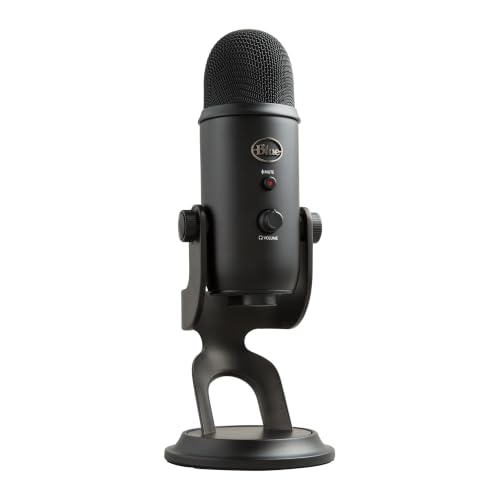
A three-capsule array with four pickup patterns means this mic can handle solo vocals, a two-person interview, a roundtable discussion, or even ambient room recording without swapping hardware. That flexibility makes it a natural fit for streamers, podcasters, and remote workers who need one mic to do many jobs. Onboard controls for gain, mute, pattern selection, and headphone volume put every adjustment at your fingertips, so you can dial in sound without digging through software menus.
The trade-off is size and weight: at 3.5 pounds and nearly a foot tall, it takes up noticeable desk space and isn’t as easy to reposition as lighter models like the Rode NTUSBMINI. If your setup is tight or you move your mic often, that heft can be a drawback. But for a stationary desk where versatility and hands-on control matter most, this mic delivers professional-grade results without the complexity of an XLR interface.
FIFINE K688 USB/XLR Dynamic Microphone
What We Like
- Metal build for durability
- USB and XLR dual connectivity
- Tap-to-mute and gain control
- Real-time monitoring with headphone jack
Trade-offs
- All function keys only work via USB
- No included boom arm or mic stand
- Requires close proximity for best recording
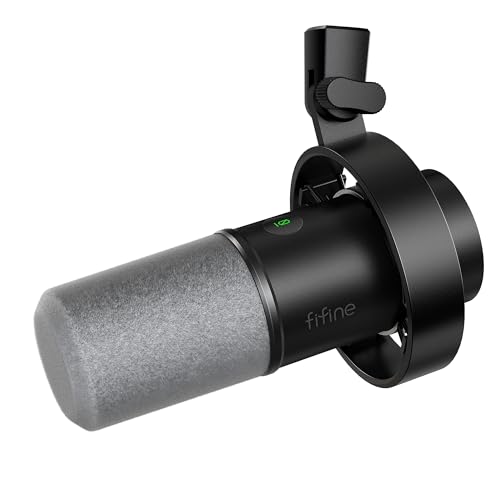
A 130dB max SPL means this dynamic mic handles loud vocals or instruments without distorting, keeping your audio clean and natural. The all-metal construction gives it a sturdy feel that stands up to daily use, making it a great fit for streamers or podcasters who want a reliable desk mic that won’t budge. Its cardioid pattern does a solid job rejecting background noise from fans or hard drives, so your voice stays front and center without extra processing.
The mute, gain, and monitoring controls only work over USB, not XLR, so if you plan to use it with a mixer, you lose those handy onboard features. Compared to the Rode PodMic USB, which includes a swing mount and Aphex DSP processing, the FIFINE K688 offers a more affordable metal build but requires you to buy a stand or arm separately. It’s a practical choice if you value durability and dual connectivity over all-in-one convenience.
Rode PODMICUSB Desk Mic

What We Like
- Dual XLR and USB-C connectivity
- APHEX DSP for studio-quality sound
- Dynamic capsule rejects room echo
- Zero-latency headphone monitoring
Trade-offs
- No onboard gain or mute control
- Requires free app to adjust DSP settings
The APHEX DSP processing built into this mic adds compression and presence over USB, which means your voice can sound more polished without needing an external mixer. Podcasters and streamers will appreciate that the dynamic capsule rejects keyboard clatter and room echo, keeping recordings clean in typical home environments. You can dial in the processing using the free app, but the effects are available as soon as you plug in.
At 1.9 pounds, the PodMic USB feels more substantial than the FIFINE K688, so your desk stand needs to be sturdy. It also lacks onboard gain or mute controls, which the K688 includes. If you prefer a lighter mic with more hands-on adjustments, that model may suit you better. But for a dynamic mic with dual XLR and USB-C connectivity and built-in DSP, this Rode is a strong contender.
Sennheiser Profile USB Cardioid Condenser Microphone
What We Like
- Plug-and-play USB-C setup
- Natural warm vocal sound
- Onboard gain, mix and volume dials
- Metal housing with German-engineered capsule
Trade-offs
- Only cardioid pattern limits room pickup options
- Cardioid pattern only, not for multi-speaker setups
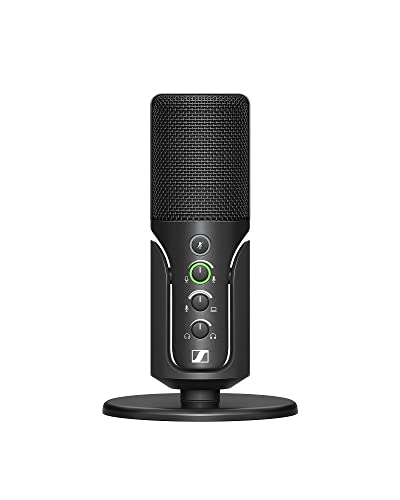
A single USB-C connection is all it takes to get warm, natural vocal sound from this Sennheiser microphone. The cardioid condenser capsule focuses on your voice while the metal housing keeps things durable, and the onboard dials for gain, mix and volume let you adjust on the fly without digging into software. For someone who wants to start streaming or podcasting without fussing over setup, this mic delivers exactly that simplicity.
Shure MV7+ USB-C & XLR Podcast Dynamic Mic

What We Like
- Real-time denoiser filters ambient noise
- Auto Level Mode adjusts gain automatically
- Multi-color LED touch panel with mute control
Trade-offs
- At 3.6 pounds, heavier than many desk mics
- Requires MOTIV Mix app for full customization
The MV7+ pairs a dynamic capsule with both USB-C and XLR outputs, so you can start with a simple plug-and-play setup and later upgrade to a professional audio interface without replacing the mic. Its built-in real-time denoiser and Voice Isolation Technology cut out fan hum and room echo, which makes it a strong fit for podcasters recording in untreated spaces. The LED touch panel lets you mute with a tap and customize the mic’s color from 16.8 million hues.
At 3.6 pounds, this mic is noticeably heavier than a condenser like the Rode NT-USB Mini, so you’ll want a sturdy desk stand or boom arm. The MOTIV Mix app is required to unlock the full suite of DSP effects and reverb, which adds a small step to your workflow. For podcasters who want broadcast-quality sound with flexible connectivity and noise cancellation, the MV7+ delivers a complete package that grows with your setup.
Rode NTUSBMINI Desk Mic

What We Like
- Magnetic desk stand detaches instantly
- Zero-latency headphone monitoring
- Built-in pop filter for voice
- Plug and play via USB-C
Trade-offs
- Fixed cardioid pattern limits room pickup
- No XLR output for pro interfaces
Weighing just 1.3 pounds and measuring about 7.3 inches long, this microphone takes up almost no desk space, a real win when every inch counts. The magnetic desk stand lets you pop it off in seconds to mount on a standard arm, so you can switch from a tidy desktop setup to a boom arm without tools. It’s built around a condenser capsule tuned for voice, with a built-in pop filter that cuts plosives before they hit the recording. Plug the USB-C cable into a Mac, PC, or iPad and you’re live with zero-latency headphone monitoring, all without installing a single driver. For anyone who wants a clean, compact desktop mic that sounds great on calls, streams, or quick recordings, this is a smart fit.
The Rode NT-USB Mini is a condenser mic, so it will pick up more room noise than a dynamic like the Shure MV7+, which isn’t ideal if your space is echoey or you share a room. It also lacks XLR output, so you can’t later plug it into a mixer or audio interface without an adapter. Compared to the bulkier Logitech Blue Yeti, this Rode is far easier to tuck into a small corner or toss in a bag. But if you need a mic that rejects background chatter or plan to upgrade to a pro setup down the line, you might prefer a dynamic USB/XLR hybrid. For most people working from a quiet desk, though, the NTUSBMINI delivers studio-quality sound in a footprint that barely registers.
Product photos
Audio-Technica AT2020USB-X Cardioid Condenser USB Microphone
What We Like
- 24-bit/96 kHz high-resolution audio
- Built-in headphone jack for zero-latency monitoring
- Soft-touch capacitive mute button
- Directional cardioid pickup reduces background noise
Trade-offs
- USB-only connection limits use with mixers
- No onboard gain or mix controls
A 24-bit/96 kHz sampling rate means this microphone captures far more detail than standard USB mics, giving your voice a clarity that feels almost live. That high-resolution audio makes it a natural fit for podcasters, voiceover artists, or anyone who wants their recordings to sound polished and professional straight out of the box. The built-in headphone jack allows you to directly monitor from your microphone, so you can hear yourself as you record. And the soft-touch capacitive mute button works silently, which is a small but thoughtful touch when you’re in the middle of a take.
The 24-bit/96 kHz sampling rate delivers extremely clear, natural sound reproduction, so your voice comes through with studio-quality detail for podcasting or streaming. It connects via USB-C, which is the modern standard for fast, reliable data transfer, and the included desk stand keeps the mic stable on your desktop. Reviewers note that the built-in headphone jack lets you monitor your audio directly from the mic, which helps you catch issues in real time.
Product photos
Shure MV6 USB Dynamic Microphone

What We Like
- Voice Isolation Technology reduces background noise
- Real-Time Denoiser and Digital Popper Stopper
- Zero-latency headphone monitoring via 3.5mm jack
- Tap-to-mute button for quick control
Trade-offs
- At 3.7 pounds, it's heavier than many desk mics
- No XLR output for pro audio interfaces
Shure’s Voice Isolation Technology is the key here: a dynamic cardioid capsule paired with digital processing that actively reduces keyboard clicks, fan hum, and room echo before they reach your stream or recording. That means you can game or podcast in a less-than-quiet space without your audience hearing every distraction. The Auto Level Mode keeps your volume consistent even when you lean back, and the Digital Popper Stopper handles plosives without a bulky external filter. For anyone who shares a room with a noisy PC or a mechanical keyboard, this mic turns your voice into the clear focal point.
The MV6 is a dedicated USB mic, so you won’t have the option to plug into an XLR mixer later. It’s also noticeably heavier than something like the FIFINE K688, so you’ll want a sturdy desk or boom arm to support it. If your priority is cutting out background chatter, this mic’s Voice Isolation Technology and Real-Time Denoiser work together to keep your audio clean.
Product photos
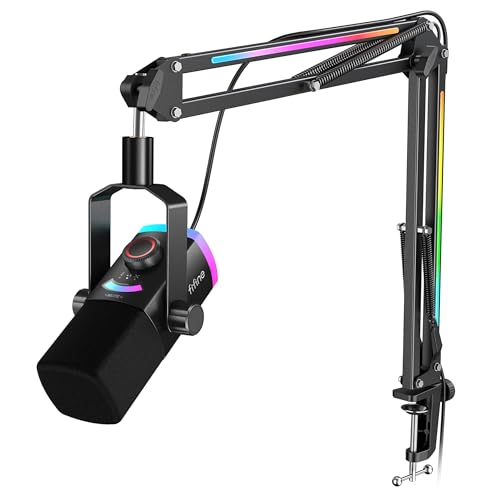
FIFINE AmpliGame AM8PROT Gaming Microphone Kit
What We Like
- XLR/USB hybrid for flexible setups
- Tap-to-mute with visible LED panel
- Silent 3-in-1 knob for gain and volume
- 240+ RGB combos on mic and boom arm
Trade-offs
- Mix control and RGB only work via USB
- Dynamic mic needs close positioning for best clarity
With both XLR and USB connectivity, this mic lets you start with a simple plug-and-play USB setup for PC, PS4, or laptop. You can later upgrade to a professional XLR audio interface without buying a new microphone. The 48kHz/24-bit recording and 75dB SNR keep your voice clear and free from background hum, even with multiple devices running nearby. It’s a smart choice for streamers and podcasters who want room to grow without replacing gear.
Some advanced features, like the mix control for balancing game audio and commentary, and the vibrant RGB lighting, only work over USB, not XLR. The Rode PODMICUSB includes Aphex DSP processing and a swing mount, but the FIFINE kit comes with a boom arm and windscreen. If you want a hybrid mic that can evolve with your setup and still look great on stream, this is it.
Product photos
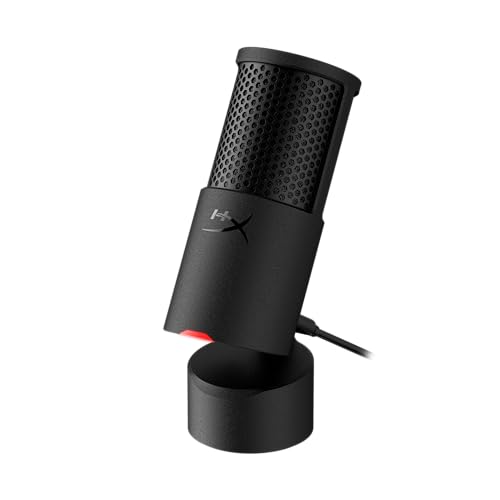
HyperX SoloCast 2 USB Condenser Gaming Microphone
What We Like
- Built-in suspension system reduces vibrations
- Integrated foam pop filter included
- Tap-to-mute with LED indicator
- Customizable audio filters via NGENUITY
Trade-offs
- Cardioid pattern limits pickup to front only
- No XLR output for professional setups
A built-in suspension system reduces vibrations from the outside, delivering shock mount benefits in a compact design that keeps your recording clean without extra gear. The cardioid polar pattern captures sound best from the front while reducing pickup from the sides and rear, making it ideal for focused vocal recording. Everything you need is included: a foam pop filter, a tiltable stand, and 3/8″ and 5/8″ threads for mounting on a mic arm. It’s a fuss-free setup for someone who values simplicity and clean audio.
You’re limited to USB-C connectivity, no XLR output for mixing boards or professional interfaces. That makes it less flexible than a hybrid mic like the Rode PODMICUSB, which offers both USB and XLR. But if you’re all-in on a simple USB workflow, the SoloCast 2 delivers studio-quality 24-bit/96kHz audio with customizable filters you can save right to the mic. The tap-to-mute with a red LED indicator lets you know when the mic is live, and the whole mic weighs just 0.7 pounds, so it’s easy to reposition. It’s a smart, compact choice for gamers and home streamers who want a clean setup without extra gear.
Product photos
How We Evaluated Desk Mics
We evaluated desk mics by examining technical specifications, manufacturer documentation, expert round-ups from audio professionals, and consistent patterns in user feedback across thousands of reviews. Our goal was to identify mics that deliver clear, reliable performance for real home environments.
The criteria that mattered most were audio quality and pickup pattern versatility, connectivity options (USB vs. XLR), build quality and durability, and physical footprint. A mic that sounds great but takes up half your desk or only works with one type of device isn’t practical for most users.
This guide synthesizes what the data and experienced users consistently report to help you make an informed choice for your specific room and use case.
What To Look For In Desk Mics
Choosing a desk mic means balancing sound quality, connectivity, and physical fit for your space.
Look for a pickup pattern that matches your room’s acoustics, a connection type that works with your gear, and a size that leaves room for your keyboard and monitor.
Pickup Pattern and Room Acoustics
The pickup pattern determines how a microphone captures sound. Cardioid patterns pick up sound from the front and reject noise from the sides and rear, making them ideal for noisy rooms like a living room or home office near a street. Omnidirectional patterns capture sound from all directions, which works well in quiet, treated spaces like a dedicated podcast room.
Bidirectional and stereo patterns are useful for two-person interviews or ASMR recording. If your room has hard floors and bare walls, a dynamic mic with a cardioid pattern will reject more echo than a condenser mic.
Connectivity: USB vs. XLR
USB mics plug directly into a computer with no extra gear, making them the simplest choice for remote workers, gamers, and beginner podcasters. XLR mics require an audio interface but offer higher sound quality and expandability for professional studios. Some mics offer both USB and XLR connectivity, giving you flexibility to start simple and upgrade later. If you plan to record with multiple people or use professional outboard gear, an XLR or hybrid mic is worth the investment.
Physical Size and Desk Footprint
A desk mic’s footprint matters more than you might think. A mic that’s nearly a foot tall and weighs over three pounds, like the Blue Yeti, can crowd a small desk or block your monitor. Compact mics with magnetic stands or built-in shock mounts save space and reduce vibrations from typing. For a minimalist desk or a cramped corner, look for a mic under six inches tall with a small base or detachable stand. Always measure your desk space before buying.
- Check the mic’s height and base diameter against your desk layout.
- Consider a boom arm if your desk surface is limited.
- Look for built-in pop filters and shock mounts to save on accessories.
- Confirm the cable length reaches your computer or interface.
- Verify the mic’s weight if you plan to use a lightweight boom arm.
A good rule of thumb: the mic should sit at mouth level, about six to twelve inches away, without blocking your screen or keyboard.
Desk Mics Compared
The table below compares the key specs and features of each recommended desk mic to help you narrow down your choice at a glance.
| Product | Type | Connectivity | Weight |
|---|---|---|---|
| Logitech Blue Yeti USB Microphone | Condenser | USB | 3.5 pounds |
| FIFINE K688 USB/XLR Dynamic Microphone | Dynamic | USB + XLR | 1.1 pounds |
| Rode PODMICUSB Desk Mic | Dynamic broadcast | XLR + USB-C | 1.9 pounds |
| Sennheiser Profile USB Cardioid Condenser Microphone | Cardioid condenser | USB-C | 0.8 pounds |
| Shure MV7+ USB-C & XLR Podcast Dynamic Mic | Dynamic | USB-C & XLR | 3.6 pounds |
| Rode NTUSBMINI Desk Mic | USB Condenser | USB-C | 1.3 pounds |
| Audio-Technica AT2020USB-X Cardioid Condenser USB Microphone | Cardioid condenser | USB-C | 1.7 pounds |
| Shure MV6 USB Dynamic Microphone | Dynamic | USB-C | 3.7 pounds |
| FIFINE AmpliGame AM8PROT Gaming Microphone Kit | Dynamic | XLR/USB Hybrid | N/A |
| HyperX SoloCast 2 USB Condenser Gaming Microphone | Condenser | USB-C to USB-A | 0.7 pounds |
Frequently Asked Questions
What is the best desk mic for a noisy room?
A dynamic microphone with a cardioid pickup pattern is best for rejecting background noise like keyboard clatter or room echo. The Shure MV6 and Shure MV7+ both feature built-in noise reduction technology, while the Rode PODMICUSB uses a dynamic capsule that naturally minimizes ambient sound.
What is the difference between USB and XLR microphones?
USB mics connect directly to a computer and are plug-and-play, making them ideal for beginners and remote workers. XLR mics require an audio interface but offer higher audio quality and compatibility with professional studio gear. Hybrid mics like the FIFINE K688 and Shure MV7+ give you both options in one device.
How do I choose the right pickup pattern for my desk mic?
Choose cardioid for solo recording in a noisy room, omnidirectional for capturing ambient sound or multiple speakers in a quiet space, and bidirectional for one-on-one interviews. The Logitech Blue Yeti offers all four patterns, letting you switch based on your setup.
What size desk mic should I get for a small desk?
Look for a compact mic under six inches tall with a small base or a detachable stand. The Rode NTUSBMINI has a magnetic desk stand that detaches easily, and the HyperX SoloCast 2 includes a built-in shock mount to save space. Avoid mics over three pounds if you plan to use a lightweight boom arm.
Can I use a desk mic for gaming and streaming?
Yes, many desk mics are designed for gaming and streaming. Look for features like tap-to-mute, real-time monitoring, and customizable audio filters. The HyperX SoloCast 2 and FIFINE AmpliGame AM8PROT include RGB lighting and gamer-friendly controls, while the Sennheiser Profile offers a natural vocal sound ideal for commentary.
The Bottom Line
For most people, the Logitech Blue Yeti is the best overall desk mic because its four pickup patterns and onboard controls handle everything from solo podcasting to group calls without needing extra gear. It’s a versatile workhorse that fits streamers, remote workers, and casual creators alike.
If your desk is tight on space, the Rode NTUSBMINI offers a compact design with a magnetic stand that won’t crowd your setup. For those who need professional-grade noise rejection in a busy room, the Shure MV7+ or MV6 deliver studio-quality sound with built-in denoising.
The most important factor is matching the mic to your room’s acoustics and your physical workspace. A great mic in the wrong environment will never sound its best, so prioritize pickup pattern and size before flashy features.
