10 Best Ergonomic Chairs in 2026
This post contains affiliate links. As an Amazon Associate, we earn from qualifying purchases.
For a chair that works as hard as you do, the ELABEST X100 Ergonomic Mesh Office Chair is our best overall pick. Its 3D lumbar support mimics the spine’s natural curve, and the 5D flip-up armrests and built-in footrest make it a true all-in-one solution. For those who need deep lumbar adjustability, the Marsail Ergonomic Office Chair offers a high weight capacity and breathable mesh, while the SIHOO B100 provides adaptive lumbar that moves with you.
Sitting for long hours in a chair that doesn’t fit your body can lead to discomfort and fatigue. The right ergonomic chair supports your posture, keeps you cool, and adjusts to your unique frame. For a dedicated home office or a corner of the living room, the key is finding the right balance of lumbar support, armrest adjustability, and seat comfort.
This guide is built on research: we looked at specifications, manufacturer details, expert round-ups, and patterns in owner feedback to identify the ten best ergonomic chairs. We focus on what actually matters for comfort and long-term use, so you can choose with confidence.
Top 10 Ergonomic Chairs in the Market
Certain content that appears on this site comes from Amazon. This content is provided "as is" and is subject to change or removal at any time.
The Best Ergonomic Chairs, Reviewed
ELABEST X100 Ergonomic Mesh Office Chair

What We Like
- 3D lumbar support mimics spine curvature
- 5D flip-up armrests with dense foam
- 18-inch extendable footrest with two angles
- BIFMA-certified heavy-duty build
Trade-offs
- At 43 pounds, it's heavy to move
- Footrest adds bulk under desk when stored
A 17-point micro-adjustment system, including a dynamic 3D lumbar support that auto-tracks with force-sensitive springs, means this chair actively adapts to your spine’s natural curve rather than forcing you into a fixed position. It’s designed for people who spend long hours at a desk and want support that moves with them. The 5D flip-up armrests tuck neatly under standard desks, and the 18-inch extendable footrest lets you shift from work to relaxation without leaving your seat.
Marsail Ergonomic Office Chair

What We Like
- 3D adjustable armrests for custom arm support
- Lumbar adjusts forward/back and up/down
- Breathable mesh back promotes airflow
- 330 lb weight capacity for durability
Trade-offs
- 2D headrest limits neck angle adjustment
- Armrests lack 4D adjustability found on some rivals
With a 330-pound weight capacity and a generously padded 3.14-inch thick foam seat, this chair is built to support longer workdays without sacrificing comfort. The lumbar support moves both forward and backward as well as up and down, so you can dial in exactly where it hits your lower back. That kind of tailored adjustability is rare at this level, making it a smart fit for anyone who needs precise back support rather than a one-size-fits-all curve.
The trade-off is the 2D headrest, which only tilts and adjusts in height, it won’t pivot to match your preferred neck angle like some rivals’ designs. If you prioritize a fully customizable lumbar experience over headrest flexibility, this chair delivers where it counts.
Product photos
SIHOO B100 Mesh Ergonomic Office Chair
What We Like
- Adaptive lumbar moves with your spine
- Full-mesh backrest keeps you cool
- Three lockable recline angles
- Widened seat cushion for even weight
Trade-offs
- No footrest included for full recline
- Flip-up armrests adjust only up, not forward or backward
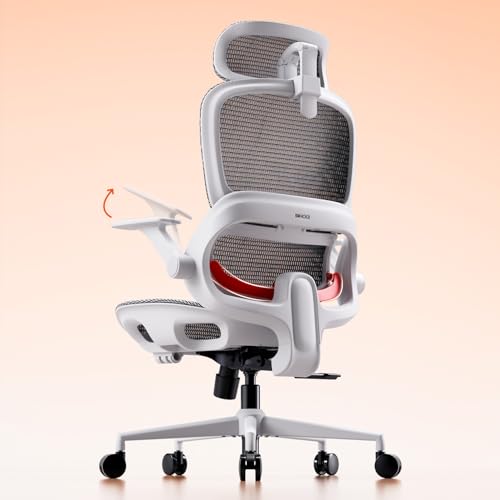
The adaptive lumbar support on the SIHOO B100 follows the natural curve of your spine as you shift from leaning forward to typing to sitting upright in meetings. So your lower back never feels forced into one position. With a seat height adjustable from 18.3 to 21.9 inches and a full-mesh backrest that keeps air circulating during long hours, this chair suits anyone who wants balanced support without overheating. The widened cushion spreads weight evenly across hips and thighs, making it a smart fit for full work shifts or study sessions.
The adaptive lumbar support follows your spine’s natural curve as you shift from leaning forward to typing to sitting upright, so your lower back stays supported without feeling locked in place. Three lockable recline angles (110°, 125°, and 135°) let you switch from focused work to a quick recharge, though there’s no footrest for full reclining. The full-mesh backrest keeps air moving, which helps you stay cool during long hours at your desk.
CASASIO Ergonomic Office Chair
What We Like
- 3D adjustable headrest for neck comfort
- Flip-up armrests save space
- Tilt and rock function with adjustable tension
Trade-offs
- No footrest included for full recline
- Dual-direction lumbar limits adjustment compared to 4-way models
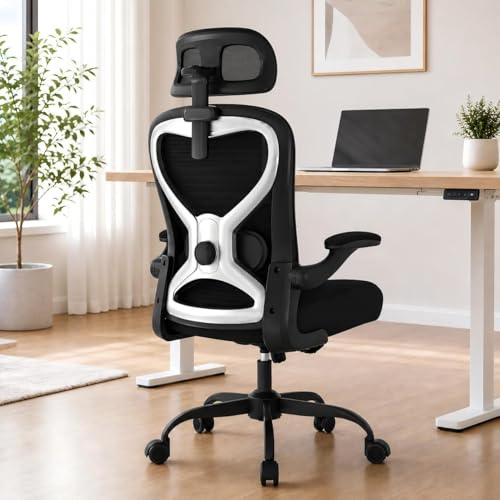
A 3.5-inch virgin foam seat that distributes weight evenly means you can sit for eight-plus hours without that familiar soreness in your hips and thighs. That’s the kind of all-day comfort that makes this chair a natural fit for anyone working long stretches at a desk. Add a 3D headrest that cradles your neck in multiple positions, and you’ve got a setup that supports you from head to hip through focused work or relaxed reading.
This chair skips a footrest, so if you love to fully recline and kick your feet up, you’ll want to look at the ELABEST X100, which includes one. But the flip-up armrests here let you tuck the whole chair neatly under a desk, a real bonus for small home offices or shared workspaces. At 30 pounds, it’s lighter than many heavy-duty ergonomic chairs, yet the reinforced metal base and BIFMA-tested construction still support up to 330 pounds. For all-day comfort without the bulk, this is a smart, space-friendly choice.
MOLENTS Ergonomic Office Chair

What We Like
- BIFMA X5.1 certified for durability
- Adjustable lumbar support up/down and forward/backward
- 3D adjustable armrests reduce shoulder strain
- Breathable mesh keeps you cool all day
Trade-offs
- No headrest for neck support
- Seat depth fixed at 18.9 inches
- Assembly requires removing base leg from seat bag
With official BIFMA X5.1 certification, this chair has passed rigorous industry testing for durability and safety, a concrete assurance that it can handle daily use without wobbling or failing. The adjustable lumbar support moves both up/down and forward/backward, so you can dial in lower-back pressure exactly where you need it. Paired with 3D armrests that adjust in height, width, and angle, it targets the two biggest sources of office discomfort: your back and your shoulders. The breathable mesh back also keeps air moving, which makes a real difference during extended work sessions.
That said, there is no headrest, so if you like to lean back and rest your neck during breaks, you will need to look elsewhere. The seat depth is fixed at 18.9 inches, which may feel snug for taller users who prefer more thigh support. Compared to the SIHOO B100, which includes a wide headrest, the MOLENTS focuses purely on core ergonomic adjustability without neck support. It is a solid fit if you prioritize certified build quality and targeted lumbar and arm support over extra features like a headrest or footrest.
Product photos
CAPOT Ergonomic Mesh Office Chair

What We Like
- Micro-adjust lumbar with 8 levels
- Enlarged cooling Aerovith mesh seat
- 400 lb stainless steel base
- 5-year warranty with free parts
Trade-offs
- No footrest included for full recline
- Seat depth not adjustable forward/back
- Armrests flip up but lack depth slide
A 2-inch range over 8 micro-adjust levels lets you dial the lumbar exactly to your L1-L5 spine, cutting lower back pressure by 50% according to the manufacturer. That precision is the reason this chair stands out for anyone who spends eight-plus hours at a desk and needs the support to move with them, not just push into one spot. The enlarged Aerovith mesh seat enhances support by 30% and ensures continuous cooling, while the stainless steel base supports up to 400 pounds.
Taller users near the 6’2″ limit may find the fixed seat depth presses against their thighs. And unlike the ELABEST X100, there’s no footrest for those moments when you want to tilt the backrest to 125 degrees and fully stretch out. The flip-up arms and silent PU wheels make it easy to tuck under a desk and reclaim space, but if you need a chair that doubles as a mini lounge for breaks, you’ll want to look at a model with an integrated footrest. For pure focused work with tailored lumbar support, this chair delivers.
Haworth Soji Ergonomic Office Chair

What We Like
- Fully assembled out of the box
- 4D armrests and seat depth adjustment
- GREENGUARD Gold and BIFMA Level certified
- 12-year warranty
Trade-offs
- No forward tilt for active sitting
A 350-pound weight capacity and a fully assembled design mean you can start working the moment the box arrives, no tools or patience required. The Soji’s flexible mesh back and 4D armrests let you dial in support for all-day comfort, while the seat depth adjustment helps taller or shorter users find their ideal position. GREENGUARD Gold and BIFMA Level certifications back its low emissions and durability, making it a responsible choice for a home office that doubles as a personal sanctuary.
This model skips forward tilt, a feature some users rely on for active posture shifts during intense focus sessions. Compared to the Steelcase Amia, which offers a different kind of upper back support, the Soji focuses on mesh breathability and quick adjustability instead. Still, the 12-year warranty and sustainable materials make it a long-term partner for everyday ergonomic comfort.
Product photos
Herman Miller Classic Aeron Task Chair
What We Like
- Breathable Pellicle keeps you cool
- Kinemat tilt for natural movement
- Waterfall seat edge reduces thigh pressure
- 12-year warranty with Born-On-Date
Trade-offs
- At 48 lb, it's heavy to move
- No headrest included
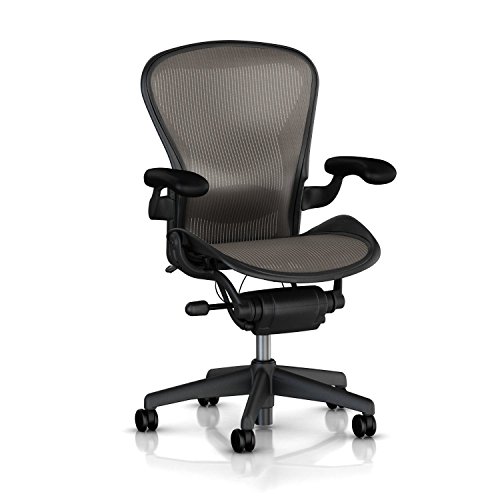
The breathable Pellicle suspension doesn’t just look sleek, it actively dissipates body heat as you work, so you stay cool and comfortable even during long sessions. That same mesh supports your body without trapping warmth, while the waterfall front edge takes pressure off your thighs to keep blood circulating and your focus sharp. This chair is built for someone who values lasting comfort and a design that moves with you, thanks to the Kinemat tilt mechanism that lets your neck, shoulders, hips, knees, and ankles pivot naturally. With a 12-year warranty and an official Born-On-Date sticker, it’s a long-term investment in how you sit.
Weight is a factor: at 48 pounds, this isn’t a chair you’ll want to shift around the room daily, and unlike the Steelcase Amia Office Chair, there’s no built-in headrest here. That makes it less ideal if you need to lean back for naps or prefer a taller backrest. But if your priority is a chair that breathes, supports, and lasts, the Classic Aeron delivers on those fronts without compromise.
Product photos
Steelcase Amia Office Chair
What We Like
- LiveLumbar adapts to your movement
- Extra cushioning for 8-10 hour sits
- 4D arm support adjusts height, width, pivot, depth
Trade-offs
- At 54.5 lb, it's heavy to move around
- No mesh back limits airflow for hot users
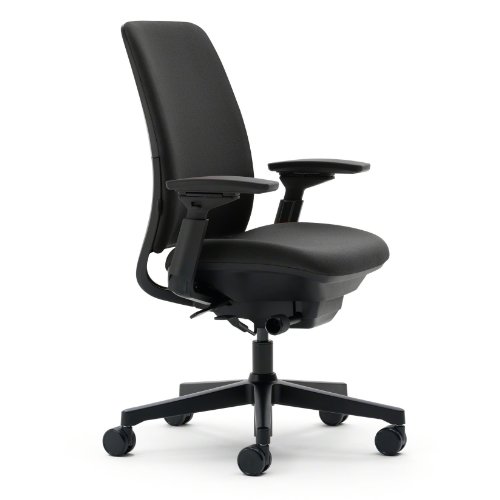
A hidden LiveLumbar system that moves with you means this chair delivers dynamic lower back support without the bulk of an external pad. The extra cushioning and flexible seat edges are designed to keep pressure off for full workdays, making it a strong match for anyone who spends eight to ten hours at a desk. The 4D arm support lets you dial in height, width, pivot, and depth, so your arms rest naturally during typing or leaning back.
The Steelcase Amia weighs 54.5 pounds, so once you place it in your home office, you won’t want to move it often. For comparison, the Haworth Soji is under 20 pounds, making it far easier to slide around. That weight is a trade-off: you get a stable, well-built chair that stays put, but rearranging your setup requires some effort. If you value long-term comfort and don’t need to frequently shift your seating position, this chair delivers.
Ergoa Ergonomic Mesh Office Chair
What We Like
- Dual-adjust lumbar and backrest
- 4D soft-padded armrests
- 11-position 3D headrest
- Breathable mesh fabric
Trade-offs
- At 48 lb, it's heavy to move
- No footrest included
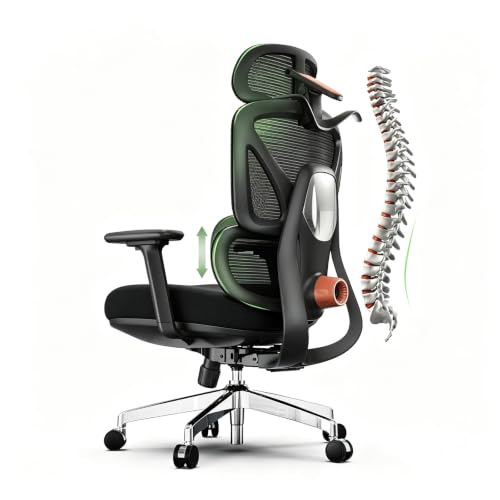
The Ergoa chair’s lumbar support has 8 positions and the backrest has 9, so you can fine-tune the fit to your spine’s natural curve. That dual-adjustment system lets you dial in support for extended work sessions, which is a step up from chairs that offer only a single fixed lumbar pad. Reviewers note it helps keep the lower back aligned during long stretches of work.
Weight is a factor: at 48 pounds, this chair is noticeably heavier than the Marsail Ergonomic Office Chair at 30.4 pounds, so you’ll want to set it up where it stays. The 4D armrests and removable 11-position headrest add versatility, but if you need a footrest for kicking back, the ELABEST X100 includes one built-in.
Product photos
How We Evaluated Ergonomic Chairs
Our evaluation started with the technical specifications: lumbar support types, armrest adjustability, seat dimensions, weight capacity, and certifications like BIFMA. We compared these against expert recommendations and analyzed patterns in owner feedback to understand what features consistently lead to satisfaction. No chair was tested in a lab; this is a research-led assessment designed to highlight the best options on the market.
The most important criteria for this category were lumbar support adjustability, armrest range of motion, and seat comfort for long sits. A chair that can adapt to your spine’s natural curve and support your arms at the right height makes a measurable difference in daily comfort. We also considered build quality, warranty, and whether a chair is certified for durability.
A research-based approach has limits: individual body types vary, and what feels great to one person may not work for another. We prioritized chairs with multiple points of adjustment because they give you the best chance of finding a comfortable fit. Always check the manufacturer’s recommended height range before buying.
What To Look For In Ergonomic Chairs
Choosing an ergonomic chair means looking beyond the price tag to find the features that actually support your body. The right chair should let you adjust the lumbar, armrests, seat height, and recline to match your proportions and work style.
Focus on lumbar support that adjusts in height and depth, armrests that move in at least three directions, and a seat that fits your thigh length. A breathable mesh back keeps you cool, and a solid warranty protects your investment.
Lumbar Support
The lower back bears the most strain during long sits. Look for lumbar support that adjusts both up and down and forward and backward. Adaptive lumbar, like the SIHOO B100’s design, moves with your spine as you shift positions. Micro-adjust lumbar, found on the CAPOT chair, offers eight levels of fine-tuning for precise support.
Armrest Adjustability
Armrests that only flip up are less useful than those that adjust in height, width, pivot, and depth. 4D armrests, as seen on the Steelcase Amia, let you dial in the perfect position to reduce shoulder strain. Even 3D adjustability, height, width, and pivot, is a significant upgrade over fixed armrests.
Seat Comfort and Material
A seat cushion that’s too firm or too soft can cause discomfort over time. Look for a waterfall edge that reduces pressure on the back of your thighs. Mesh seats, like those on the Haworth Soji, promote airflow, while cushioned seats, like the Steelcase Amia’s, provide plush support for very long workdays.
- Check the seat depth: your knees should be at a 90-degree angle with a few inches between the seat edge and the back of your knees.
- Ensure the chair’s weight capacity matches your needs.
- Verify the warranty length, 12 years is a strong sign of durability.
- Consider the chair’s footprint and weight if you plan to move it between rooms.
A good rule of thumb: the more points of adjustment, the better the chair will fit your body.
Ergonomic Chairs Compared
The table below compares the key features of our top picks, from lumbar support type to armrest adjustability, so you can see at a glance which chair fits your needs.
| Product | Lumbar Support | Armrests | Weight |
|---|---|---|---|
| ELABEST X100 Ergonomic Mesh Office Chair | 3D Synchro-Tilt | 5D Flip-Up | 43.0 pounds |
| Marsail Ergonomic Office Chair | 1.18" fwd/back, 2.16" up/down | 3D | 30.4 pounds |
| SIHOO B100 Mesh Ergonomic Office Chair | Adaptive Lumbar Support | Flip-up | 35.5 pounds |
| CASASIO Ergonomic Office Chair | 4-Way Lumbar | Flip-up | 30.0 pounds |
| MOLENTS Ergonomic Office Chair | Adjustable Lumbar Support | 3D | 35.0 pounds |
| CAPOT Ergonomic Mesh Office Chair | 2 inches / 8 levels | 4D Flip-up | 38.0 pounds |
| Haworth Soji Ergonomic Office Chair | lumbar | 4D | 19.8 pounds |
| Herman Miller Classic Aeron Task Chair | Lumbar Pad | Fully adjustable vinyl | 48.0 pounds |
| Steelcase Amia Office Chair | LiveLumbar system | 4D | 54.5 pounds |
| Ergoa Ergonomic Mesh Office Chair | 8 positions, 2.36" | 4D soft-padded | 48.0 pounds |
Frequently Asked Questions
What is the best ergonomic chair for lower back pain?
The ELABEST X100 is our top pick because its 3D lumbar support mimics the spine’s natural curve, providing targeted lower back support. For adaptive support that moves with you, the SIHOO B100 is also an excellent choice.
How much should I spend on an ergonomic chair?
Value is more important than a specific price. A mid-range chair with good lumbar and armrest adjustability often provides the best balance of comfort and cost. Premium models like the Herman Miller Aeron offer exceptional build quality and long warranties for those who can invest more.
Are mesh ergonomic chairs better than cushioned ones?
Mesh chairs, like the Haworth Soji, promote airflow and keep you cool, making them ideal for warm environments. Cushioned chairs, like the Steelcase Amia, offer plush support for very long sits but may retain heat. The best choice depends on your climate and personal comfort preference.
How do I know if an ergonomic chair fits me?
Your feet should rest flat on the floor with your knees at a 90-degree angle. The seat depth should leave two to three inches between the back of your knees and the seat edge. The lumbar support should sit in the curve of your lower back, and your armrests should allow your elbows to rest at a 90-degree angle.
What does BIFMA certification mean?
BIFMA X5.1 certification means a chair has passed industry-standard tests for durability, stability, and safety. Chairs like the MOLENTS Ergonomic Office Chair carry this certification, giving you confidence that the chair will withstand daily use over time.
The Bottom Line
The ELABEST X100 Ergonomic Mesh Office Chair earns our best overall spot because it combines advanced lumbar support, highly adjustable armrests, and a built-in footrest in a BIFMA-certified build. It’s the chair for anyone who wants one solution that covers all the bases for long workdays at home.
If your priority is deep lumbar adjustability and a high weight capacity, the Marsail Ergonomic Office Chair is a strong choice. For those who need a chair that adapts to shifting postures, the SIHOO B100‘s dynamic lumbar support is hard to beat. Budget-conscious shoppers should focus on the features that matter most to their body, not the price tag.
The single most important factor in choosing an ergonomic chair is lumbar support adjustability. A chair that can be tuned to fit your spine’s natural curve will make the biggest difference in your daily comfort. Start there, and the rest will follow.
