10 Best Desk Chairs For Back Pain in 2026
This post contains affiliate links. As an Amazon Associate, we earn from qualifying purchases.
The TRALT Ergonomic Office Chair earns our best overall spot because its adjustable lumbar support mirrors the spine’s natural curve, and the high-resilience foam seat holds up through full workdays. For those who need even more targeted lower back support, the SIHOO M18 offers four-point contact, while the Marsail provides a highly customizable fit with 3D armrests.
Back pain at a desk often comes from a chair that doesn’t match your body’s shape or support your spine through hours of sitting. Lumbar support that actually adjusts, a seat that doesn’t sag, and breathable materials that keep you cool make the real difference.
We evaluated these chairs by analyzing specifications, manufacturer documentation, expert round-ups, and patterns in owner feedback. This guide focuses on the features that matter most for back pain relief, so you can choose with confidence.
Top 10 Desk Chairs For Back Pain in the Market
Certain content that appears on this site comes from Amazon. This content is provided "as is" and is subject to change or removal at any time.
The Best Desk Chairs For Back Pain, Reviewed
TRALT Ergonomic Office Chair

What We Like
- Adjustable lumbar matches spine's curve
- High-resilience foam won't flatten
- Breathable mesh back prevents heat buildup
- BIFMA-certified lift prevents sinking
Trade-offs
- Flip-up armrests lack width or angle adjustment
- Heavy 28-pound base makes repositioning difficult
A 330-pound weight capacity and BIFMA-certified lifting mechanism mean this chair won’t sag or sink on you mid-afternoon, a common failure in budget office seating. The adjustable lumbar support lets you dial in the exact depth your lower back needs, while the high-resilience molded foam seat holds its shape far longer than budget foam that flattens within months. The breathable mesh back keeps air moving so you stay cool during long work sessions, and the metal-core base adds stability without wobble. For anyone dealing with back pain who needs reliable all-day support at a reasonable investment, this chair delivers where cheaper options cut corners.
The trade-off comes in adjustability: the flip-up armrests are convenient for tucking the chair away, but they don’t offer the width or angle adjustments found on the SIHOO M18, which has 2D armrests for more personalized arm positioning. The 19.7-inch seat width provides ample room for most users. If you prioritize a stable, long-lasting seat and adjustable lumbar over multi-directional armrests, this is the stronger pick. The mesh back breathes beautifully in warm rooms, but if your home office sits in a drafty corner, you might want a chair with a cushioned back instead.
Product photos
SIHOO M18 Ergonomic Office Chair
What We Like
- Adjustable lumbar and back support
- Breathable mesh backrest keeps you cool
- Four support points for head, back, hips, hands
- Reclines and locks at three angles
Trade-offs
- Armrests adjust in only two dimensions
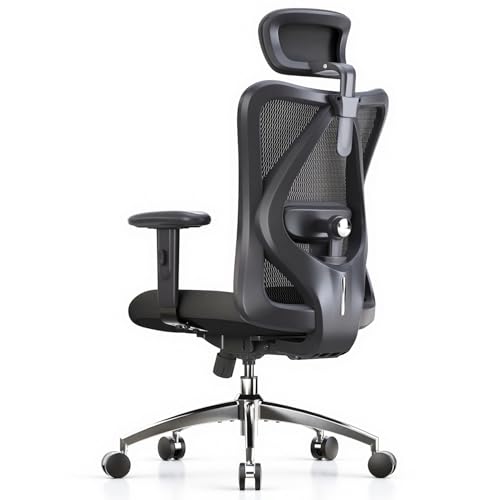
With four points of support, head, back, hips, and hands, the SIHOO M18 is built to keep you comfortable through long stretches at a desk. Its adjustable lumbar and back support let you dial in the exact fit for your spine, which is exactly what anyone shopping for back pain relief needs. The breathable mesh backrest also helps you stay cool during all-day use, and the chair supports up to 330 pounds, making it a sturdy option for a wide range of body types.
The trade-off here is the armrests: they adjust in only two dimensions, so you won’t get the same fine-tuned arm positioning you’d find on a model like the Marsail with its 3D armrests. That said, the M18’s focused lumbar adjustability and easy assembly in just eight steps make it a smart pick for anyone who wants targeted back support without a complicated setup. It’s a practical, no-nonsense chair that puts your spine first.
Marsail Ergonomic Office Chair

What We Like
- Highly adjustable lumbar support for precise fit
- 3D armrests with flip-up for versatility
- Breathable mesh backrest keeps you cool
- Thick foam seat for long-term comfort
Trade-offs
- No seat depth adjustment for taller users
- Heavier than the TRALT Ergonomic Office Chair
A 1.18-inch forward-and-back and 2.16-inch up-and-down adjustable lumbar support means you can dial in exactly where the chair cradles your lower back. This makes it a strong choice for anyone whose back pain stems from a poor fit. The 3D armrests move forward, back, and swivel left or right, so you can find the perfect arm position for typing, reading, or just relaxing. Add in a breathable mesh back that molds to your spine and a generously padded 3.14-inch thick foam seat, and you have a chair built to support you through long workdays without overheating or sinking. It’s a thoughtful design that prioritizes personalization over one-size-fits-all comfort.
At 30.4 pounds, this chair is heavier than the TRALT Ergonomic Office Chair (28.0 pounds), which may be a consideration if you need to move the chair often. But if your priority is a highly customizable lumbar and arm support system that adapts to your body, the Marsail delivers tailored relief that’s hard to beat at this level.
Product photos
CASASIO Ergonomic Office Chair
What We Like
- 4-way adjustable lumbar support
- 3.5" virgin foam seat cushion
- 3D adjustable headrest
- Tilt & rock with adjustable tension
Trade-offs
- Flip-up armrests lack height/width adjustment
- No seat depth adjustment for taller users
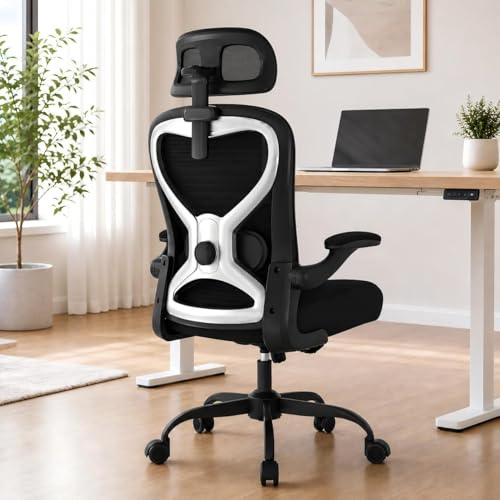
A 3.5-inch virgin foam seat cushion distributes weight evenly to prevent soreness during eight-plus-hour workdays, making this chair a standout for anyone who lives at their desk. The contoured mesh back follows your spine while the dual-direction adjustable lumbar cushion lets you dial in lower-back support precisely, reducing fatigue session after session. Combined with a 3D adjustable headrest that cradles your neck at just the right angle, it’s built to keep you comfortable from morning to night.
The trade-off comes with the flip-up armrests: they’re great for tucking under a desk in a small space, but they don’t adjust in height or width the way some rivals do. Compared to the SIHOO M18, which offers 2D armrests, the CASASIO’s armrests are simpler and may not suit everyone’s preferred arm position. Still, for long hours of focused work where seat and back comfort matter most, this chair delivers where it counts.
CAPOT Ergonomic Mesh Office Chair

What We Like
- Micro-adjust lumbar with 8 levels
- 400 lb weight capacity
- Breathable Aerovith mesh seat
- 5-year warranty with free parts
Trade-offs
- Limited to users 5'5" to 6'2"
- Heavier at 38 pounds
- No seat depth adjustment
With 2 inches of lumbar travel across 8 levels, this chair lets you dial in support exactly where your lower back needs it, reducing pressure by 50% according to the manufacturer. The breathable Aerovith mesh seat keeps you cool during long sits, while the 400-pound capacity and BIFMA certification promise durability. It’s a smart pick for anyone who spends eight-plus hours at a desk and wants precise, repeatable lumbar alignment without guessing.
The trade-off is that the lumbar system, while wonderfully adjustable, only targets a specific height range (5’5″ to 6’2″), so taller or shorter users may not find the same relief. If micro-adjustment is your priority, this chair delivers where others offer only basic support.
Nexthro Ergonomic Office Chair
What We Like
- Adjustable lumbar support in two directions
- Thick high-density foam seat cushion
- 400-pound weight capacity
Trade-offs
- Armrests only flip up, no depth or width adjustment
- No headrest included for neck support
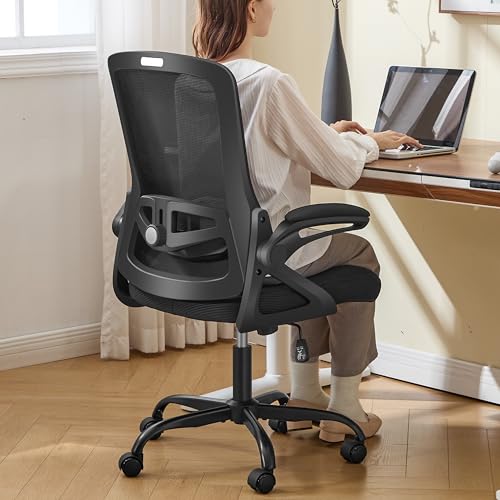
With a 400-pound weight capacity, this chair supports a wide range of body types without feeling flimsy. The adjustable lumbar moves 1″ forward and back and 3.15″ up and down, letting you tailor lower-back support to your preference. The 3.2-inch thick high-density foam seat cushion resists sagging over time, so it stays comfortable during long workdays.
Product photos
Herman Miller Classic Aeron Task Chair
What We Like
- Breathable Pellicle suspension dissipates body heat
- Kinemat tilt lets body pivot naturally
- Waterfall seat edge reduces thigh pressure
- 12-year warranty with Born-On-Date sticker
Trade-offs
- At 48 lb, it's heavy to move
- No headrest included
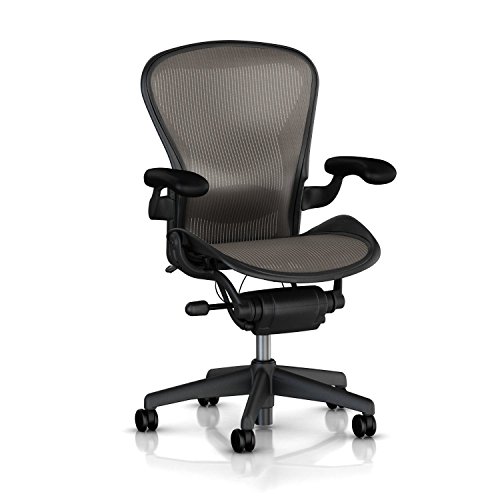
The Pellicle suspension is a breathable mesh that dissipates body heat while you work, keeping you cool and comfortable. Combined with the Kinemat tilt mechanism, which lets your neck, shoulders, hips, knees, and ankles pivot naturally, this chair supports your body’s movement rather than forcing you into a static position. The waterfall front edge of the seat also takes pressure off your thighs, helping blood circulate and keeping you alert. This makes the Aeron a good fit for anyone who wants a chair that adapts to their movement throughout the day.
At 48 pounds, this chair is significantly heavier than many alternatives like the TRALT Ergonomic Office Chair, which weighs only 28 pounds. That heft makes it less convenient to move between rooms or adjust frequently. Also, there’s no headrest, so if you need neck support, you’ll want to look elsewhere. But for those who prioritize breathable support and a chair that moves with you, the Aeron’s thoughtful engineering and 12-year warranty make it a long-term investment in comfort.
Product photos
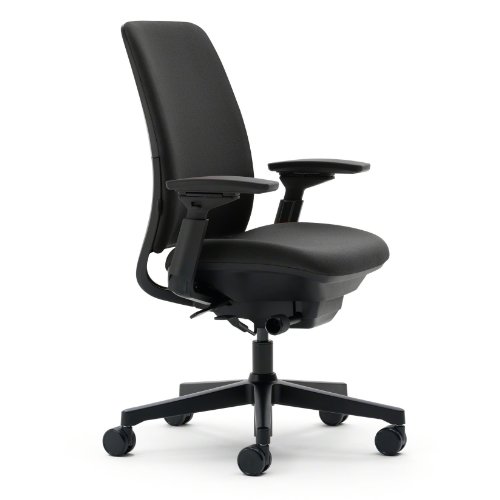
Steelcase Amia Office Chair
What We Like
- Hidden LiveLumbar adapts to movement
- 4D arm adjustments for personalized fit
- Pressure-free sitting for 8-10 hours
Trade-offs
- At 54.5 pounds, it's heavy to move
- No headrest included for neck support
The Steelcase Amia’s hidden LiveLumbar system automatically adjusts to your every shift, delivering dynamic lower back support that moves with you rather than forcing you into a fixed position. That responsive lumbar support, combined with a seat that has flexible edges and extra cushioning, makes this chair a strong match for anyone spending 8 to 10 hours seated and wanting pressure-free comfort. The 4D armrests let you dial in height, width, pivot, and depth, so your shoulders and wrists stay relaxed while you work.
The Amia doesn’t include a headrest, so if you need neck support for leaning back, you’ll want to look elsewhere. It’s also on the heavier side at 54.5 pounds, which means moving it between rooms takes more effort than a lighter chair like the Marsail Ergonomic Office Chair at 30.4 pounds. But for someone whose main priority is responsive, dynamic lumbar support that works without manual fuss, the Amia delivers a level of tailored back care that few chairs in this guide can match.
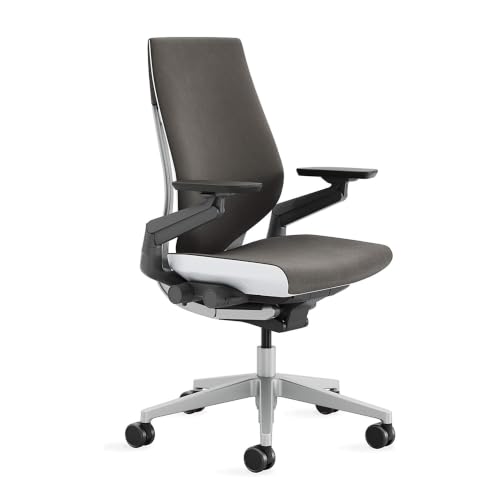
Steelcase Gesture Office Chair
What We Like
- 360-degree arms for any posture
- Full recline with upright lock
- Contoured back supports spine naturally
- Intuitive adjustments within arm's reach
Trade-offs
- At 70 pounds, very heavy to move
- Wheels only for carpet, not hard floors
The Steelcase Gesture’s 360-degree arms and full recline range let you shift freely between typing, leaning back, and everything in between, without ever losing support. Its contoured back follows your spine’s natural curve, so even after hours at a desk, you’re not fighting the chair. This is the pick for anyone who spends long stretches seated and wants a precise, intuitive fit that adapts as you move.
Heft is the main consideration: at 70 pounds, it’s not a chair you’ll casually rearrange, and it’s built for carpet, so hard-floor users need different casters. Compared to the lighter, more portable TRALT Ergonomic Office Chair, the Gesture is a stationary investment in all-day comfort. If your priority is a chair that disappears beneath you during marathon work sessions, this one delivers.
Product photos
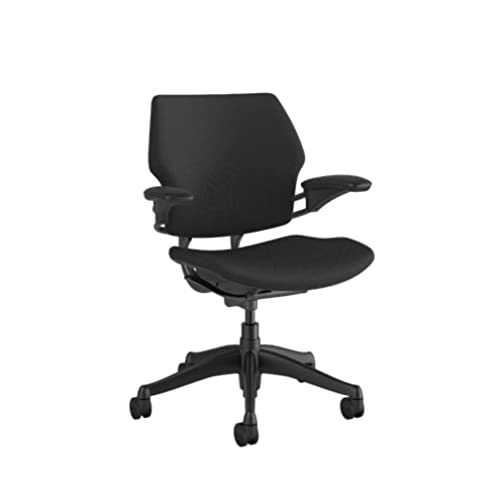
Humanscale Freedom Office Chair
What We Like
- Backrest automatically adapts to spine
- Recline maintains near consistent eye level
- Contoured cushions reduce concentrated loads
- Height adjustable Duron arms
Trade-offs
- No headrest for neck support
- Armrests adjust only in height
The pivoting backrest on this chair automatically responds to your spine as you lean back, so you don’t have to fiddle with levers or knobs to get the right support. That responsive recline also keeps your eye level nearly steady, which means you can lean back without losing your view of the screen. For someone who shifts positions often during the workday and wants a chair that moves with them, this design feels intuitive. The contoured cushions follow your body’s shape, spreading your weight more evenly and reducing pressure points that can lead to discomfort over long hours.
The Freedom chair’s backrest automatically adapts as you lean back, keeping your eye level nearly consistent and opening the angle between your torso and legs for better circulation. At 34 pounds, it’s solid but not the lightest to roll around, so plan to set it up and leave it. Compared to the SIHOO M18, which offers an adjustable headrest and lumbar support, the Freedom focuses on a simpler, more automatic recline experience rather than a long list of adjustments.
Product photos
How We Evaluated Desk Chairs For Back Pain
This evaluation draws on manufacturer specifications, expert round-ups, and common owner feedback to identify what makes a desk chair effective for back pain. The focus is on design features and adjustability options that consistently support spinal health during seated work.
The most important criteria were lumbar support adjustability, seat cushion quality and durability, overall ergonomic adjustability (armrests, headrest, seat depth), and build quality reflected in weight capacity and warranty. A chair that can’t be tuned to your body won’t relieve pain, and a seat that flattens after a few months creates new problems.
We also considered the range of body sizes each chair accommodates and the practical trade-offs, such as weight and mobility. No chair is perfect for everyone, so we note where each pick excels and where it falls short.
What To Look For In Desk Chairs For Back Pain
Choosing a chair for back pain means prioritizing adjustability and support over style or price. Focus on the features that let you tailor the chair to your spine.
Look for adjustable lumbar support that moves both vertically and in depth, a seat cushion that won’t compress over time, and enough arm and head adjustments to keep your body aligned.
Lumbar Support Adjustability
The most critical feature for back pain is lumbar support that you can actually move. The best chairs let you adjust both the height and the depth of the lumbar pad so it fits the natural curve of your lower spine. Fixed lumbar bumps often hit the wrong spot. Look for chairs with at least two dimensions of lumbar adjustment, like the SIHOO M18 or the CAPOT with its eight micro-adjust levels.
Seat Cushion Quality and Durability
A seat that sags after a few months puts pressure on your lower back and hips. High-resilience foam or thick virgin foam, like the 3.5-inch cushion in the CASASIO, holds its shape longer. Mesh seats, such as the Aerovith mesh in the CAPOT, offer breathability but may not suit everyone. Check the weight capacity rating as a clue to build quality.
Overall Ergonomic Adjustability
Armrests, headrests, and seat depth all affect how your spine aligns. 3D or 4D armrests let you adjust height, width, angle, and depth. A headrest supports your neck when you recline. Seat depth adjustment is important for taller users to avoid pressure behind the knees. The Steelcase Gesture’s 360-degree arms and the Humanscale Freedom’s automatic recline are examples of advanced adjustability.
- Test lumbar support height and depth before you buy.
- Confirm the seat cushion material and thickness.
- Check armrest adjustment dimensions.
- Verify the chair’s height range matches your body.
- Look for a warranty that covers parts and labor.
A chair that fits you today will still fit you tomorrow if it offers enough adjustability.
Desk Chairs For Back Pain Compared
The table below compares the key features of each chair, including lumbar support adjustability, seat cushion type, weight capacity, and warranty length.
| Product | Seat Foam / Material | Lumbar Support | Weight |
|---|---|---|---|
| TRALT Ergonomic Office Chair | High-resilience molded foam | Adjustable depth | 28.0 pounds |
| SIHOO M18 Ergonomic Office Chair | N/A | Adjustable lumbar support | 38.0 pounds |
| Marsail Ergonomic Office Chair | 3.14" thick high-density foam | 1.18" forward/back, 2.16" up/down | 30.4 pounds |
| CASASIO Ergonomic Office Chair | 3.5" virgin foam | 4-way adjustable | 30.0 pounds |
| CAPOT Ergonomic Mesh Office Chair | Aerovith Mesh | 2 inches / 8 levels | 38.0 pounds |
| Nexthro Ergonomic Office Chair | 3.2" high-density foam | 1" forward/back, 3.15" up/down | 28.9 pounds |
| Herman Miller Classic Aeron Task Chair | Pellicle suspension | Lumbar Pad | 48.0 pounds |
| Steelcase Amia Office Chair | Extra cushioning | Hidden LiveLumbar system | 54.5 pounds |
| Steelcase Gesture Office Chair | N/A | N/A | 70.0 pounds |
| Humanscale Freedom Office Chair | Contoured, sculpted cushions | N/A | 34.0 pounds |
Frequently Asked Questions
What is the best desk chair for lower back pain?
The TRALT Ergonomic Office Chair is our best overall pick because its adjustable lumbar support matches the spine’s natural curve and its high-resilience foam seat won’t flatten over time. For more targeted support, the SIHOO M18 offers four-point contact for head, back, hips, and hands.
How should I adjust my office chair to relieve back pain?
Start by setting the seat height so your feet rest flat on the floor and your knees are at a 90-degree angle. Adjust the lumbar support so it fits into the curve of your lower back. Position your armrests so your shoulders are relaxed and your elbows form a 90-degree angle.
Do mesh or foam chairs work better for back pain?
Both can work, but they serve different needs. Mesh backs, like those on the Herman Miller Aeron, keep you cool and provide flexible support. Foam seats, like the thick high-density foam in the Nexthro, offer more cushioning. The best choice depends on your preference for breathability versus plushness.
Is a headrest important for back pain?
A headrest can help reduce neck and upper back strain, especially if you recline during the day. Chairs like the CASASIO include a 3D adjustable headrest, while others like the Steelcase Amia do not. If you experience neck pain, look for a chair with a headrest that adjusts in height and angle.
What weight capacity do I need in an ergonomic chair?
Weight capacity indicates overall build quality and durability. Chairs like the CAPOT and Nexthro support up to 400 pounds, while lighter-duty chairs may support less. Choose a chair rated well above your weight to ensure the frame, gas lift, and seat base last.
The Bottom Line
For most people dealing with back pain at a desk, the TRALT Ergonomic Office Chair offers the best balance of supportive lumbar adjustment, durable foam, and breathable mesh. It is built for full workdays and backed by BIFMA certification for safety and reliability.
If your budget is tighter, the Nexthro Ergonomic Office Chair still provides adjustable lumbar support and a thick foam seat with a 400-pound capacity. For those who need the most precise fit, the Marsail and SIHOO M18 offer deeper adjustability in lumbar and armrests.
The single most important factor in choosing a desk chair for back pain is lumbar support that you can adjust to fit your spine. Without that, no other feature will make up for the mismatch.
