10 Best Desk Lamps For Computer Work in 2026
This post contains affiliate links. As an Amazon Associate, we earn from qualifying purchases.
The BenQ e-Reading Desk Lamp is our best overall pick because its ultrawide 35.4-inch by 26.7-inch illumination and auto-dimming modes adapt perfectly to both screen and paper tasks. For a budget-friendly clamp-on design, the Airlonv LED Desk Lamp with Clamp offers excellent value, while the Honeywell HJ1BK Architect Desk Lamp delivers the best eye-caring design with high CRI.
The real challenge with computer desk lighting is balancing screen visibility with task illumination. Too much glare on your monitor causes eye strain, while too little light makes reading documents difficult. You need a lamp that covers your workspace evenly without washing out your screen.
We researched dozens of desk lamps by analyzing specifications, manufacturer documentation, expert round-ups, and patterns in owner feedback. This guide focuses on the ten best options for computer work, highlighting key features like auto-dimming, color temperature control, and flicker-free certification to help you choose with confidence.
Top 10 Desk Lamps For Computer Work in the Market
Certain content that appears on this site comes from Amazon. This content is provided "as is" and is subject to change or removal at any time.
The Best Desk Lamps For Computer Work, Reviewed
BenQ e-Reading Desk Lamp

What We Like
- Ultrawide 35.4" x 26.7" illumination
- Auto-dimming screen and paper modes
- 13 color temperatures and 23 brightness levels
- Flicker-free and RG0 blue light certified
Trade-offs
- At 10.6 lbs, it is heavier than many desk lamps
- Its 10.6-pound weight makes it less portable than lighter models
A 35.4-inch-wide beam means this lamp can light up an entire work surface, from keyboard to notebook, without leaving dark corners. It adjusts brightness and color temperature automatically, switching between a screen mode that cuts glare and a paper mode for reading. The high CRI of over 95 keeps colors true, which matters if you review documents or craft. That combination of wide coverage and smart dimming makes it a top choice for anyone who spends hours at a computer.
At 10.6 pounds, this lamp is noticeably heavier than most, so it stays put on a desk but won’t be easy to move around. Compared to the 2.3-pound LEPOWER Desk Lamp, the BenQ is much heavier. If your desk is small or you frequently rearrange your setup, the weight might feel limiting. But for a dedicated workstation where consistent, eye-friendly light matters, it delivers.
Product photos
Honeywell HJ1BK Architect Desk Lamp
What We Like
- CRI≥97 for accurate color rendering
- Flicker-free, glare-free light reduces eye strain
- 31.5-inch dual-section head covers wide area
- Stepless dimming and 4 color temperatures
Trade-offs
- No clamp option limits placement on thick desks
- 31.5-inch head requires substantial desk space
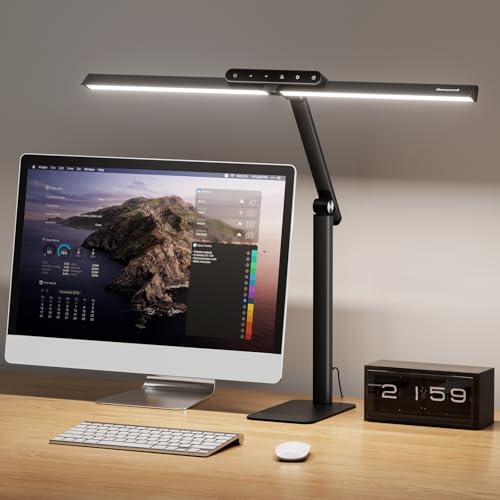
A 31.5-inch dual-section head with 156 Sunturalux chips delivers 1200 lumens of uniform, flicker-free light that mimics natural sunlight. That means you can work under a large monitor setup or drafting table without harsh shadows or eye fatigue. The CRI of 97 or higher means colors stay true, which matters for architects and designers reviewing prints or digital renders. With four color temperatures from warm 3000K to cool 5700K and stepless dimming from 10 to 100 percent, you can dial in the exact ambiance for late-night coding or daytime reading, and the memory function saves your preferred 4000K setting so you won’t need to readjust every time.
The lamp uses a weighted silicone base rather than a clamp, which keeps it stable on most desks but lacks the mounting flexibility of clamp-style models like the Micomlan Architect Desk Lamp. At 3.7 pounds it’s not heavy, but the wide 31.49-inch head means you’ll need a decent amount of desk space to accommodate its footprint. For anyone who wants a wide, eye-friendly light with precise color control and doesn’t need to clamp it to a thin edge, this is a thoughtful design that puts comfort first.
Product photos
Airlonv LED Desk Lamp with Clamp

What We Like
- Stepless dimming from 1% to 100%
- 360° adjustable gooseneck for precise aim
- 17-inch wide bar lights full desk
- Fits monitors up to 30 inches
Trade-offs
- Clamp only fits desks up to 2.36 inches thick
A 17-inch wide lamp bar that spans your entire monitor and then some means you get even, shadow-free light across your whole keyboard and paperwork. That wide spread, combined with stepless dimming from 1% to 100% and a full range of color temperatures from warm 2700K to cool 6500K, makes it easy to dial in exactly the brightness and tone you need for hours of computer work. The long, flexible gooseneck bends 360 degrees, so you can point light precisely where you want it, whether that’s over a blueprint, a soldering iron, or a notebook. It’s a practical, budget-friendly choice for anyone who wants a clamp-on lamp that adapts to their task, not the other way around.
The trade-off is that the clamp only fits desktops up to 2.36 inches thick, so it won’t work on a chunky workbench or an old-school library table. And unlike the BenQ e-Reading Desk Lamp, which offers auto-dimming, this Airlonv keeps things simple, no extras, just solid, adjustable light. If you need a lamp that can clamp onto a thinner desk and you don’t mind plugging it into a wall outlet, this is a straightforward, effective pick. But if your desk is thicker than two and a half inches, you’ll want to look at a lamp with a base instead.
Product photos
Micomlan Architect Desk Lamp

What We Like
- Dual light source with CRI 95
- 7 rotatable parts for flexible positioning
- Ultra-wide metal clamp fits thick desks
- Timing and memory functions
Trade-offs
- Clamp-only design limits placement options
- No base included for non-edge surfaces
A dual light source with a CRI of 95 means this lamp casts even, natural light across your whole desk, no harsh shadows or tired eyes after hours of computer work. The 7 rotatable parts let you freely adjust the direction, angles and positions of the lamp head. It’s a thoughtful pick for anyone who wants balanced illumination and precise control over their workspace lighting, especially if you prefer a clamp mount that frees up desk real estate.
The lamp’s clamp fits desk edges up to 2.5 inches thick, so you’ll need a sturdy surface to attach it, no base option here. With seven rotating parts, you can aim the dual light source precisely where you need it, which helps reduce shadows on your work. Compared to the BenQ e-Reading model, which has a heavier base and different form factor, this lamp relies entirely on its clamp for mounting.
Product photos
Micomlan Led Desk Lamp with Clamp

What We Like
- 7 rotatable joints for flexible positioning
- 45° angled asymmetric light reduces screen glare
- Built-in light sensor auto-adjusts brightness
- CRI>90 with flicker-free, anti-glare light
Trade-offs
- Main and auxiliary lights controlled separately
- Clamp mount limits placement options
- Auxiliary lights add width to the lamp
The 45° angled asymmetric light is the standout feature here, it directs illumination onto your desk and keyboard rather than your screen, cutting down reflected glare that causes eye strain during long work sessions. With 7 rotatable joints and three light bars, you can shape the coverage to suit your setup, whether that means spreading light across a wide desk or concentrating it on a detailed task. The built-in light sensor adds a layer of convenience, automatically adjusting brightness as the room light changes. This lamp is a strong fit for anyone who spends hours at a computer and wants ambient fill light that won’t fight with their monitor.
One drawback is that the main light and the two auxiliary lights must be turned on or off separately, which adds a small step each time you want to switch between task and ambient modes. Still, the flexibility of those multiple joints and the ability to rotate the bilateral bars vertically or horizontally give you a level of customization that many clamp lamps can’t match. For a dedicated computer workstation, the glare-reducing design alone makes it worth considering.
Product photos
ONEMIX 42-Inch Desk Lamp
What We Like
- 1800 lumens for bright coverage
- 25 lighting combinations
- Remote control with timers
Trade-offs
- Requires a desk edge up to 2.75 inches thick for clamp
- No base included for placement on desks without edge
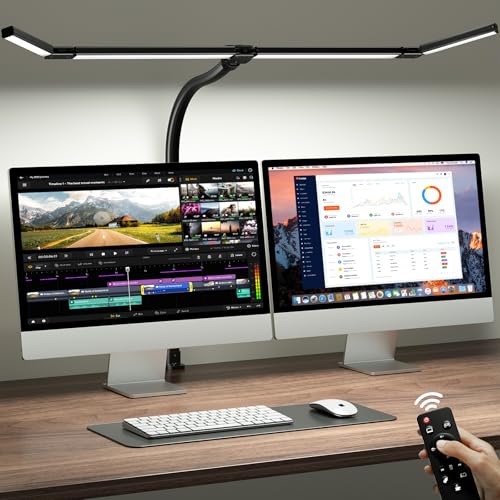
With 1800 lumens spread across four independently adjustable panels, this lamp floods a wide workspace with even, flicker-free light. The 42-inch span and flexible gooseneck let you direct light to the precise spot you need, making it a good fit for anyone who wants broad, customizable illumination for long hours at a computer or detailed tasks.
The trade-off is its size: at 42 inches wide, it demands a large desk and the heavy-duty clamp requires a sturdy edge up to 2.75 inches thick. If your workspace can accommodate it, the 25 lighting combinations and remote control make it easy to dial in the perfect light for work, reading, or winding down.
Galnolt LED Desk Lamp
What We Like
- Three light bars with 270° rotation
- 360° flexible gooseneck for precise aiming
- Stepless dimming from 1% to 100%
- Memory function recalls last settings
Trade-offs
- Gooseneck holds position but lacks clamp option
- No clamp option limits placement on thin desks
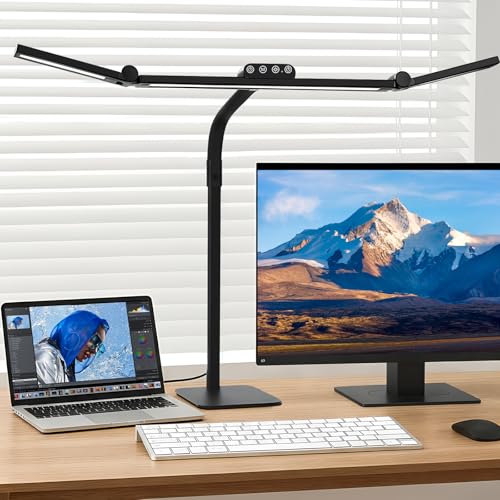
The 28.2-inch gooseneck bends in any direction and holds tight, so you can aim light precisely where you want it, over a keyboard, a sketchbook, or a dual-monitor setup, without fighting a stiff arm. Three independent light bars rotate 270°, giving you broad 80-inch coverage that floods your whole work surface, not just a small circle. With stepless dimming from 1% to 100% and a color range from warm amber (2700K) to cool daylight (6500K), you can dial in the perfect mood for focused work or late-night reading. The high CRI (>90) and flicker-free design keep colors accurate and reduce eye strain during long sessions.
At 3.1 pounds, the weighted base keeps the lamp steady on most surfaces, but it lacks a clamp option, so it won’t work on desks with no flat space or on very thin tabletops. For comparison, the BenQ e-Reading Desk Lamp uses a heavier 10.6-pound base, though its arm doesn’t offer the same 360-degree flexibility. If you need to snake light around monitors or into tight corners, the Galnolt’s bendable neck is a clear advantage. It’s ideal for anyone who wants pinpoint control over their lighting without sacrificing wide, even coverage.
Product photos
LEPOWER Desk Lamp

What We Like
- RG0 certified eye-caring lamp beads
- 50 lighting modes for any task
- 200% wider panel casts 800 LM
- 360° gooseneck aims light anywhere
Trade-offs
- No clamp mount for monitor arms
- Fixed base takes up desk space
Five color temperature settings and ten brightness levels combine to give you 50 distinct lighting modes, so you can fine-tune the illumination for any task. Whether you need a warm, dim glow for winding down or a cool, bright beam for focused work, the touch controls and slide bar make adjustments effortless. The smart memory function remembers your last setting, so you won’t have to start from scratch each time you turn it on. This flexibility helps reduce eye strain by letting you match the light to your activity and surroundings.
The 12-watt power draw is modest, so this lamp works best as a dedicated task light rather than a room-filling fixture. The weighted base keeps it stable on a desk, but you cannot clamp it to a monitor arm or shelf. For someone who wants precise, eye-friendly light without a premium price tag, this lamp delivers on the essentials.
Product photos
LitONES LED Desk Lamp

What We Like
- Adjustable to serve as webcam light
- Edge-lit diffused LED helps reduce eye strain
- Five pivot joints for versatile positioning
Trade-offs
- At 4.4 lb, heavier than some portable lamps
- Base takes up desk space (7.9 x 7.5 inches)
The lamp sits on a metal base that measures about 7.9 by 7.5 inches and weighs 4.4 pounds, which keeps it stable on your desk. Since it’s not fixed with a clamp, you can easily move it to wherever you need it, and it works on any type of desk. If you prefer a clamp-on design, the Micomlan Architect Desk Lamp with Clamp might be a better fit for your setup.
LitONES Tall LED Desk Lamp
What We Like
- Ultra-tall 40-inch reach
- 50 customizable lighting modes
- CRI>97.8 for accurate color
- Smart memory and 45-min timer
Trade-offs
- No clamp option for desks without clearance
- Sturdy metal base adds 2.9 pounds to desk load
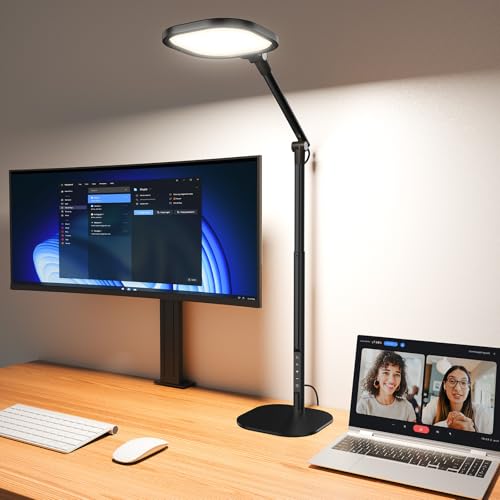
The LitONES Tall LED Desk Lamp reaches a full 40 inches, making it one of the few lamps that can tower over dual or triple monitor setups and standing desks. With 50 lighting combinations across five color temperatures and ten brightness levels, plus a CRI above 97.8, it delivers light that mimics natural daylight and shows true skin tones, ideal for video calls, streaming, or any task where color accuracy matters. The edge-lit design scatters light evenly to create a broad, flicker-free field, and the smart memory function recalls your last setting, so you don’t have to readjust each time you turn it on.
At just 2.9 pounds, the LitONES Tall LED Desk Lamp is light enough to move around easily, but the metal base with non-slip pads may not feel as planted as a heavier model like the Honeywell HJ1BK Architect Desk Lamp at 3.7 pounds. The LitONES adjusts from 14 inches to 40 inches tall, so it can tower over dual monitors or a standing desk, reaching areas shorter lamps miss. For someone with a compact desk who wants a heavier base, the Honeywell is an alternative, but the LitONES offers more height and lighting flexibility.
Product photos
How We Evaluated Desk Lamps For Computer Work
This guide is based on product specifications, manufacturer documentation, expert round-ups, and common themes in owner feedback. We focused on the features that directly impact comfort and productivity during extended computer use.
We prioritized four criteria that matter most for this category. First, light coverage, a lamp must illuminate your entire desk area without creating harsh shadows or hotspots. Second, adjustability in both brightness and color temperature allows you to match lighting to your task and time of day. Third, flicker-free and low-blue-light certification helps reduce eye fatigue during long sessions. Finally, the mounting style, clamp, base, or gooseneck, determines how well the lamp fits your specific desk setup.
A research-led evaluation has limits: we cannot report on long-term durability or real-world performance beyond what owners share in their feedback. However, by cross-referencing multiple expert sources and user experiences, we identified the models that consistently meet the needs of computer workers.
What To Look For In Desk Lamps For Computer Work
Choosing a desk lamp for computer work means balancing screen visibility with task lighting. The right lamp reduces glare, minimizes eye strain, and adapts to your changing needs throughout the day.
Look for a lamp with adjustable brightness and color temperature, flicker-free certification, and a head design that distributes light evenly across your desk without reflecting off your monitor.
Light Coverage and Distribution
The lamp’s head shape and size determine how much of your desk it illuminates. A wide, rectangular head, like the BenQ’s 35.4-inch span, casts light across a full keyboard and documents without creating a single bright spot. Asymmetric light designs, such as the Micomlan Led Desk Lamp with Clamp‘s 45-degree angled beam, direct light forward and down to avoid screen glare. For dual-monitor setups, look for a lamp that covers at least 30 inches horizontally.
Adjustability and Color Temperature
Your lighting needs change throughout the day. Cooler light boosts alertness during focused work, while warmer light eases eye strain in the evening. The best lamps offer stepless dimming and multiple color temperatures. The BenQ provides 13 color temperatures and 23 brightness levels, while the LEPOWER Desk Lamp offers 50 lighting modes for precise control.
Eye Strain Reduction Features
Flicker-free circuitry and low-blue-light certification (like RG0) are critical for reducing eye fatigue during long sessions. High CRI (Color Rendering Index) ratings, such as the Honeywell’s CRI≥97, ensure colors appear natural and accurate on paper documents. Auto-dimming sensors, found on the BenQ and Micomlan Led Desk Lamp with Clamp, adjust brightness based on ambient light, so you never have to fiddle with settings as the room darkens.
- Check for flicker-free certification in the product specifications.
- Look for RG0 or similar low-blue-light certification.
- Verify the CRI rating if you work with printed materials.
- Confirm the lamp has a memory function to recall your preferred settings.
- Measure your desk space to ensure the lamp’s base or clamp fits.
A desk lamp with auto-dimming and adjustable color temperature is the single best investment for reducing eye strain during computer work.
Desk Lamps For Computer Work Compared
The table below compares the ten desk lamps across key features to help you quickly see which model fits your workspace and workflow.
| Product | Color Temp Range | Weight | Dimensions |
|---|---|---|---|
| BenQ e-Reading Desk Lamp | 2700K–5700K | 10.6 lbs | L 8.7 inches, W 8.7 inches, H 24.4 inches |
| Honeywell HJ1BK Architect Desk Lamp | 3000K-5700K | 3.7 pounds | L 13.8 inches, W 28.1 inches, H 31.5 inches |
| Airlonv LED Desk Lamp with Clamp | 2700K-6500K | N/A | L 1.8 inches, W 17.0 inches, H 35.0 inches |
| Micomlan Architect Desk Lamp | 4 modes | 2.0 pounds | L 46.0 inches, W 2.0 inches, H 2.7 inches |
| Micomlan Led Desk Lamp with Clamp | 3000K-6500K | 2.5 pounds | L 39.4 inches, W 2.4 inches, H 28.2 inches |
| ONEMIX 42-Inch Desk Lamp | 3200K-6500K | N/A | L 42.0 inches, W 0.8 inches, H 27.7 inches |
| Galnolt LED Desk Lamp | 2700K–6500K | 3.1 pounds | L 7.8 inches, W 28.2 inches, H 29.5 inches |
| LEPOWER Desk Lamp | 5 temps | 2.3 pounds | L 7.5 inches, W 5.3 inches, H 17.7 inches |
| LitONES LED Desk Lamp | N/A | 4.4 pounds | L 7.9 inches, W 7.5 inches, H 26.7 inches |
| LitONES Tall LED Desk Lamp | 2700K-6500K | 2.9 pounds | L 10.0 inches, W 8.0 inches, H 43.0 inches |
Frequently Asked Questions
What is the best type of desk lamp for computer work?
A lamp with a wide, adjustable head that distributes light evenly across your desk is ideal. Look for models with flicker-free circuitry, adjustable color temperature, and auto-dimming features to reduce eye strain during long sessions.
How bright should a desk lamp be for computer use?
The right brightness depends on your ambient room lighting and the task at hand. A lamp with stepless dimming from 1% to 100% lets you dial in the perfect level. Generally, you want enough light to read documents without washing out your screen.
Should I get a clamp-on or a base desk lamp?
Clamp-on lamps save desk space and work well for monitor desks with an edge up to about 2.5 inches thick. Base lamps offer more placement flexibility and stability but take up surface area. Choose based on your desk design and how much space you have.
What is CRI and why does it matter for a desk lamp?
CRI, or Color Rendering Index, measures how accurately a light source reveals colors compared to natural sunlight. A CRI of 90 or higher is recommended for tasks that require color accuracy, such as design work or reading printed materials.
Can a desk lamp help reduce eye strain from computer screens?
Yes, a well-designed desk lamp reduces eye strain by providing even, flicker-free light that minimizes glare on your monitor. Features like auto-dimming and adjustable color temperature help your eyes adapt more easily to changing light conditions throughout the day.
The Bottom Line
The BenQ e-Reading Desk Lamp is our best overall pick for anyone who wants a wide, adjustable light that automatically adapts to both screen and paper tasks. Its ultrawide illumination, auto-dimming modes, and extensive color temperature options make it ideal for long work sessions at a computer.
If your budget is tighter, the LEPOWER Desk Lamp offers 50 lighting modes and RG0 eye-caring certification at an affordable price point. For those who need a clamp-on design that fits a standard monitor desk, the Airlonv LED Desk Lamp with Clamp provides stepless dimming and a flexible gooseneck for precise aiming.
The single most important factor in choosing a desk lamp for computer work is finding one that reduces glare on your screen while providing enough light for your tasks. Focus on models with flicker-free certification, adjustable color temperature, and a head shape that matches your desk size.
