10 Best Desks For Cable Management in 2026
This post contains affiliate links. As an Amazon Associate, we earn from qualifying purchases.
The DeskShow 60×30 Electric Standing Desk earns our Best Overall spot because its flip-top cable management system hides cords completely. It also comes with a power strip and desk pad included. For a premium option with built-in grommets, the Vari Ergo Electric Standing Desk is a top choice. The UPLIFT V3 Laminate Standing Desk handles heavy setups with its 355 lb capacity and sturdy FlexMount cable manager.
A desk with good cable management isn’t just about looks, it keeps cords from tangling, protects your gear from accidental pulls, and makes cleaning easier. The real challenge is finding a desk that fits your room layout, supports your equipment, and hides the mess without requiring a degree in engineering.
This guide is based on manufacturer specifications, expert round-ups, and patterns in owner feedback. We focused on desks that offer real, built-in cable solutions, not just a hole in the desktop, so you can find the right fit for your space and setup.
Top 10 Desks For Cable Management in the Market
Certain content that appears on this site comes from Amazon. This content is provided "as is" and is subject to change or removal at any time.
The Best Desks For Cable Management, Reviewed
DeskShow 60×30 Electric Standing Desk

What We Like
- Flip-top cable management hides cords
- Dual-beam frame reduces wobble at height
- Includes desk pad and power strip
- Three memory presets for quick height changes
Trade-offs
- At 78 lb, assembly requires two people
- Lift speed of 0.8 in/s is slower than some rivals
- 250 lb capacity limits very heavy multi-monitor setups
A flip-top rear panel that opens to reach your power strip and cords then closes to hide everything is the single most practical cable solution on this list. Two storage baskets keep adapters and excess length off the desktop, so your workspace stays clean in any home office or gaming setup. The dual-beam steel frame with four support rods keeps monitors steady at full height, and the included clamp power strip with three AC outlets and two USB ports means you don’t need to buy extras. With a 60×30 inch surface and three memory presets, this desk suits anyone who wants a tidy, adjustable workstation without hunting for accessories.
At 250 pounds, this desk’s capacity handles multi-monitor workstations and gaming rigs without breaking a sweat, so you can load it up with heavy gear. The 78-pound frame is on the heavier side, which helps keep the desk planted during use, though you’ll want a second set of hands for setup. Its 0.8-inch-per-second lift speed is quiet at under 45 dB, meaning height changes are smooth and won’t disturb anyone nearby.
Product photos
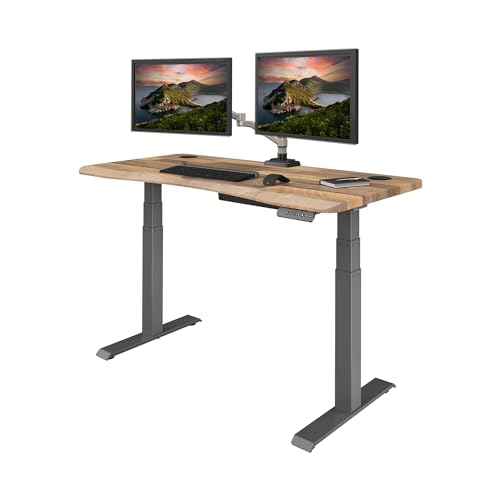
Vari Ergo Electric Standing Desk
What We Like
- Built-in dual grommets for wire organization
- Quiet electric lift with 4 memory presets
- No-tool assembly in minutes
- Spacious 54" surface fits dual monitors
Trade-offs
- 200 lb capacity is lower than some competitors
- Heavy 104.1 lb frame requires two people to move
A 54-inch wide surface with dual grommets built right into the desktop means your cables stay tucked and tidy without needing an add-on tray. That thoughtful integration is what makes this desk a standout for anyone who wants a clean, professional-looking workspace from the moment it’s assembled. The quiet electric lift and four programmable height settings let you switch between sitting and standing throughout the day, while the smooth waterfall front edge keeps your forearms comfortable during long hours. It’s a premium pick for the home office where style and organization matter equally.
The trade-off comes in the weight capacity. The 200-pound limit is lower than the 355 pounds offered by the UPLIFT V3 Laminate model. That means if you plan to load up with heavy monitors, a large desktop computer, or multiple accessories, you’ll need to keep an eye on the total. For most users with a standard dual-monitor setup and a laptop, though, it’s more than enough, and the built-in cable management keeps everything looking intentional and uncluttered.
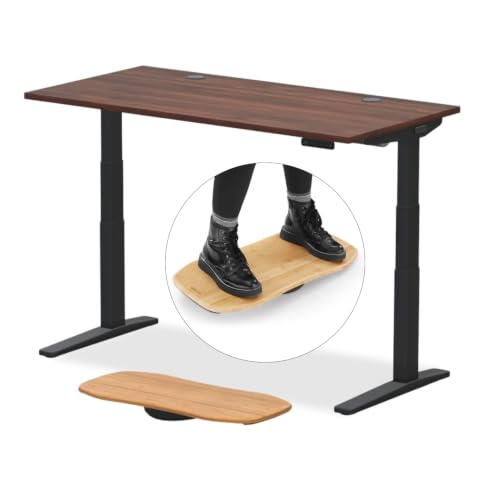
UPLIFT V3 Laminate Standing Desk
What We Like
- 355 lb capacity handles heavy setups
- Quiet German dual motors lift fast
- FlexMount cable manager with 10 wraps
- 15-year warranty covers all parts
Trade-offs
- At 124 lb, it's heavy to move
A 355-pound weight capacity means this desk can carry multiple monitors, a full tower PC, and heavy peripherals without breaking a sweat. The dual German motors lift 33% faster than two-stage frames, so you’re not waiting around when switching from sitting to standing. For anyone with a serious tech load, think triple monitors or a loaded desktop, this is the desk that won’t flinch. The FlexMount cable manager and ten included wraps keep all those cords tucked away, making it a natural fit for cable management.
The trade-off is weight: at 124 pounds, it’s a beast to set up or rearrange, so plan your spot before assembly. Compared to the lighter DeskShow 60×30 (78 lb), this one is far more stable under a heavy load but less portable. The laminate top resists stains and scratches, which is practical for daily use, though those wanting natural wood grain might prefer the UPLIFT V3 Bamboo version. If your setup is heavy and you want it clean, this desk delivers.
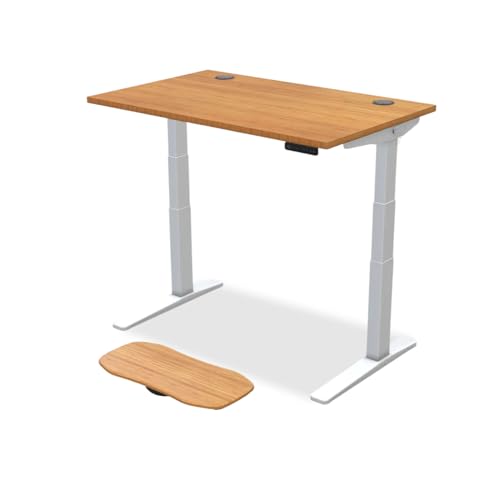
UPLIFT V3 Bamboo Standing Desk
What We Like
- Solid bamboo top 40% harder than oak
- Quiet dual German motors
- Includes FlexMount Cable Manager and wraps
- Rocker-X Board for active standing
Trade-offs
- 124 lb base is heavy to move
A 1-inch solid bamboo desktop that’s 40% harder than oak means this desk can handle years of daily use without showing wear. The dual German motors lift up to 355 pounds quietly enough for conference calls, and the included FlexMount Cable Manager tucks cords out of sight right out of the box. If you want a standing desk that blends natural materials with serious durability, this is a thoughtful pick.
At 124 pounds, the V3 Bamboo is a substantial piece of furniture that’s not easy to reposition once assembled. The 48-inch width is a bit snug for sprawling setups, but the bamboo desktop is 40% harder than oak, so it resists dents and scratches well over years of daily use. If you value a warm, eco-friendly surface and don’t need a huge work area, this desk delivers where it counts.
Veken 55 Inch Electric Standing Desk

What We Like
- Quiet motor under 52 dB
- Built-in cable management
- Memory presets for height
- Spacious 55-inch desktop
Trade-offs
- Desktop made of two boards
- Weighs 42.1 pounds, making it less portable
A motor that stays under 52 decibels means you can raise or lower this desk mid-call without anyone on the other end hearing a thing. That quiet operation, paired with memory presets that let you switch between sitting and standing heights, makes it a natural fit for home offices or study spaces. The 55-inch surface gives you room for multiple monitors, and the built-in cable management keeps cords tucked away so your desk stays neat and uncluttered.
If a smooth single-piece top matters more to you, the DeskShow 60×30 offers a flip-top cable management system and a heavier build, but it also costs more and weighs nearly twice as much.
Product photos
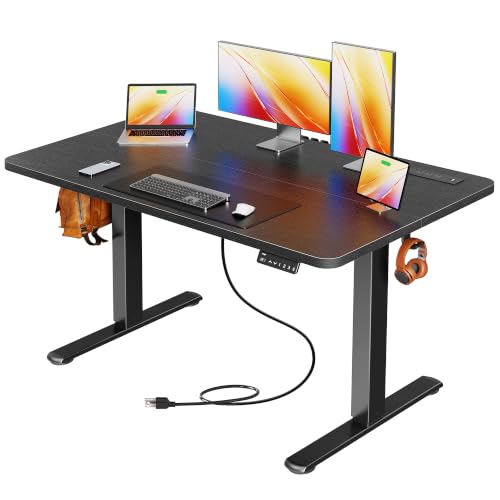
Huuger 48×24 Electric Standing Desk
What We Like
- Integrated cable management system
- Quiet motor under 35 dB
- Anti-collision safety technology
Trade-offs
- 48-inch width limits multi-monitor setups
- Single motor, not dual-motor
With six built-in power ports, four AC outlets plus USB and Type-C, this desk turns cord chaos into a single tidy connection point. The integrated cable management system routes everything neatly beneath the surface, so you don’t need extra strips or clips to keep things organized. Its 28.7-to-46.5-inch height range and three memory presets make switching between sitting and standing effortless, while the ultra-quiet motor (under 35 dB) won’t interrupt calls or late-night work. If you want a streamlined, power-ready setup from the start, this is a thoughtful, space-saving option.
At 48 inches wide, it’s compact enough for smaller rooms but may feel tight if you need extra surface area. Still, the built-in outlets and cable management mean you won’t need add-ons, a real convenience for a tidy desk. It’s a well-rounded, quiet standing desk that prioritizes power and organization over raw expandability.
Product photos
Respawn 1063 Gaming Desk
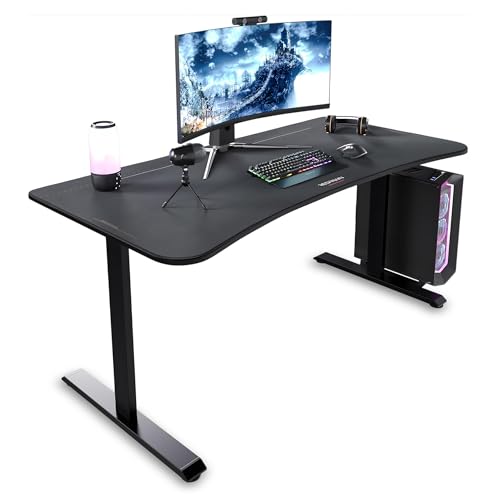
What We Like
- Full-surface 5mm mouse pad stays in place
- Oversized wire trough for cable management
- Supports dual monitors or ultra-wide setup
- Ergonomic curved front edge
Trade-offs
- Fixed height at 28.54 inches limits ergonomic adjustability
- At 68 pounds, it's heavy to reposition
- 175 lb capacity is lower than many standing desks
The 63-inch surface gives you room for an ultra-wide monitor or dual displays, and the full-surface 5mm mouse pad covers the entire desktop. This desk is built for gamers and creators who want a spacious, organized workspace with clean cable management. The oversized wire trough keeps cords tucked away, and the T-leg frame provides stability while leaving plenty of legroom. The curved front edge brings you closer to the action, which can help with immersion during gaming or work.
The fixed height of 28.54 inches means this desk won’t adjust like the DeskShow 60×30 Electric Standing Desk if you need to alternate between sitting and standing. It’s also heavier than some options, and the 175 lb weight capacity is lower than many standing desks, so it’s best suited for a permanent seated setup. If you prioritize a smooth mouse surface and cable management over height adjustability, this desk delivers a clean, dedicated workspace.
Grandder 55×32 Electric Standing Desk
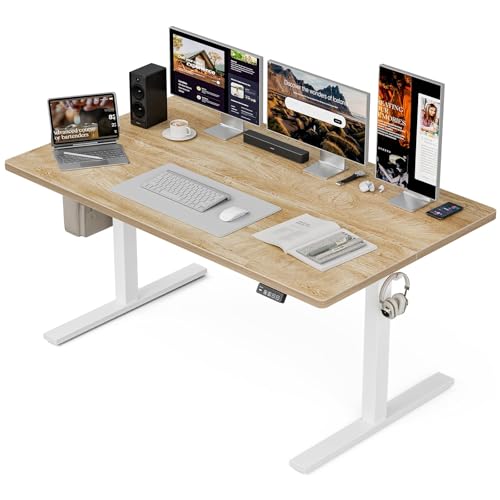
What We Like
- 31.5-inch depth fits ultrawide monitors
- 176 lb capacity with stable steel frame
- Quiet operation under 45 dB
- Anti-collision safety technology
Trade-offs
- No built-in cable management tray or grommets
- Only two height presets, fewer than some competitors
Engineered with an industrial-grade steel frame and T-shaped legs, this desk supports up to 176 pounds without wobbling, making it stable enough for heavy monitors and equipment. Rigorously tested through 55,000 lift cycles, it ensures over ten years of reliable, smooth transitions for daily use. Reviewers note that the sturdy construction holds up well even with frequent height adjustments, providing a dependable workstation for home office or gaming setups.
This desk focuses on depth and stability rather than cable management, there’s no built-in tray, grommet holes, or power strip, so you’ll need to add your own cord organization. Compared to the DeskShow 60×30 Electric Standing Desk, which includes a flip-top cable management tray and a clamp power strip, the Grandder puts the burden on you to keep wires tidy. Its two height presets also feel limited next to the three presets on the DeskShow or the four on the Vari ComfortEdge. For buyers who prioritize a spacious, ergonomic work surface over built-in cable solutions, this desk delivers where it counts.
Vari ComfortEdge Electric Standing Desk

What We Like
- Sloped front edge for wrist comfort
- Dual motors with four memory presets
- Scratch-resistant laminate top
- Slide-lock assembly simplifies setup
Trade-offs
- At 122 lb, it's heavy to move alone
- 200 lb capacity limits heavy monitor setups
A 200-pound weight capacity means this desk handles a computer, monitor, and daily essentials without strain, but it’s not built for an overloaded workstation. The sloped front edge is the standout feature here, it gives your wrists and forearms a softer contact point during long typing or mouse sessions, which makes a real difference in comfort. With dual motors and four memory presets, switching between sitting and standing heights is quick and personalized. The 60×30-inch scratch-resistant laminate top offers plenty of room for your gear, and the slide-lock assembly cuts down on setup time. This desk suits anyone who prioritizes ergonomic wrist support and a smooth, adjustable work surface.
At 122 pounds, the Vari ComfortEdge Electric Standing Desk delivers a rock-solid feel that keeps monitors and equipment steady during height transitions. That heft comes from the steel T-style legs and 1.25-inch-thick laminate top, which together support up to 200 pounds of gear. The trade-off is maneuverability: owners report that repositioning the desk within a room requires two people, so it’s best to decide on placement before assembly. The slide-lock legs attach to the preinstalled frame, simplifying setup compared to traditional builds, but the overall weight means you won’t want to rearrange often. For a stable, wobble-free workstation, the mass is a benefit rather than a drawback.
Product photos
YOMILUVE 55 Inch Desk with Outlets
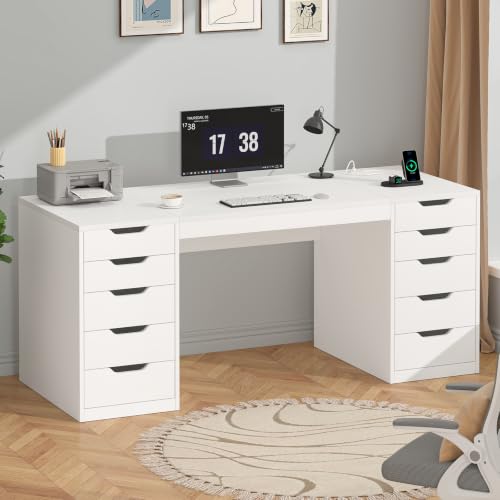
What We Like
- 10 deep drawers for storage
- Built-in power strip with USB-C
- Scratch-resistant desktop
- Space-saving 18.9-inch depth
Trade-offs
- At 80 lb, heavy to move
- Fixed height, not adjustable
- 18.9-inch depth limits monitor size
With ten deep drawers, this desk swallows up files, books, and office odds and ends, so your workspace stays clutter-free. The built-in power strip with two outlets, a USB port, and a Type-C port keeps four devices charged and ready, which is a real help when you’re juggling a laptop, phone, and tablet. It suits anyone who values hidden storage over a sprawling open surface, especially in a tight corner or small room where every inch counts.
Product photos
How We Evaluated Desks For Cable Management
This guide draws from manufacturer documentation, expert round-ups, and common themes in owner feedback. We analyzed specs, materials, and user-reported strengths and trade-offs to identify the best options for different needs.
We prioritized four criteria. First, the cable management system itself, does the desk include a trough, tray, grommets, or wraps, and how easy is it to use day-to-day? Second, build quality and stability, especially for standing desks where wobble at height is a common complaint. Third, surface size and weight capacity, since a desk that can’t hold your monitors and gear is useless. Fourth, assembly complexity and portability, because a desk you dread setting up or can’t move alone may not suit your lifestyle.
A research-led approach has limits: we can’t speak to long-term durability or motor reliability beyond what owners report. We recommend checking warranty terms and reading recent buyer reviews for the model you’re considering.
What To Look For In Desks For Cable Management
The best desk for cable management keeps your cords organized without extra accessories. Look for a built-in trough or tray, grommets for routing wires, and a design that matches your room’s layout.
Cable Management System
The core feature is how the desk hides and routes cables. A flip-top or hinged cable trough lets you access wires without lifting the desk. Some desks include removable wraps or clips that bundle cords together. Others rely on grommets, holes in the desktop, that let you drop cables down to a tray below. For the cleanest look, choose a desk with a covered trough that hides everything from view.
Desk Size and Weight Capacity
Measure your room and your equipment before choosing a width and depth. A 48-inch desk works for a single monitor and laptop, while 55 to 60 inches fits dual monitors or an ultra-wide. Depth matters too: 24 inches is standard, but 30 inches or more gives room for deep monitors and a keyboard. Weight capacity is critical for standing desks, 200 lb supports most setups, but heavy multi-monitor rigs need more capacity.
Height Adjustability
Standing desks let you switch between sitting and standing, which reduces strain during long work sessions. Look for a quiet motor, memory presets for your preferred heights, and a stable frame that doesn’t wobble at full extension. Fixed-height desks are simpler and often cheaper, but they limit ergonomic adjustment.
- Measure your room width and depth before choosing a desk size
- Count your devices and their cable lengths to plan routing
- Check the desk’s weight and assembly instructions, some need two people
- Look for a warranty of at least 5 years on the frame and motor
- Consider a desk with built-in power outlets to reduce visible cords
A desk with a covered cable trough and at least two grommets will handle most home office setups.
Desks For Cable Management Compared
The table below compares key specs for each desk in our guide, so you can quickly see which model fits your room and equipment needs.
| Product | Dimensions (W x D) | Weight Capacity | Cable Management |
|---|---|---|---|
| DeskShow 60×30 Electric Standing Desk | 60 x 30 in | 250 lbs | Flip-top panel + baskets |
| Vari Ergo Electric Standing Desk | 54 x 26 in | 200 lbs | Dual grommets |
| UPLIFT V3 Laminate Standing Desk | 60 x 30 in | 355 lbs | FlexMount + 10 wraps + 2 grommets |
| UPLIFT V3 Bamboo Standing Desk | 48 x 30 in | 355 lb | FlexMount Cable Manager included |
| Veken 55 Inch Electric Standing Desk | 55.1 x 23.6 in | N/A | Built-in |
| Huuger 48×24 Electric Standing Desk | 47.2 x 23.6 in | 220 lbs | Built-in power outlet & cable manager |
| Respawn 1063 Gaming Desk | 63 x 31.5 in | 175 lb | Oversized wire trough |
| Grandder 55×32 Electric Standing Desk | 55.1 x 31.5 in | 176 lbs | N/A |
| Vari ComfortEdge Electric Standing Desk | 60 x 30 in | 200 lb | N/A |
| YOMILUVE 55 Inch Desk with Outlets | 55 x 18.9 in | N/A | Built-in power strip |
Frequently Asked Questions
What is the best desk for hiding cables?
The DeskShow 60×30 Electric Standing Desk is our Best Overall pick because its flip-top cable management system hides all cords inside the frame, and it includes a power strip for easy plug-in access.
Do standing desks have good cable management?
Many electric standing desks include built-in cable trays, grommets, or wraps. The UPLIFT V3 models come with a FlexMount Cable Manager and wraps, while the Vari Ergo has dual grommets for routing wires neatly.
How do I organize cables on a desk without built-in management?
Use adhesive cable clips under the desktop, a cable tray that mounts to the frame, and zip ties to bundle cords together. A power strip with a long cord can also be mounted underneath to reduce visible wires.
What size desk do I need for dual monitors?
A desk at least 55 inches wide and 24 inches deep will comfortably fit two monitors and a laptop. The Grandder 55×32 Electric Standing Desk offers extra depth for ultrawide screens.
Is a fixed-height desk better than a standing desk for cable management?
Fixed-height desks are simpler to set up and often have fewer moving parts, but standing desks with built-in cable troughs can be just as tidy. The YOMILUVE 55 Inch Desk with Outlets is a good fixed-height option with integrated storage and charging.
The Bottom Line
The DeskShow 60×30 Electric Standing Desk is our Best Overall pick for anyone who wants a complete, ready-to-use desk with excellent cable hiding and included accessories. It suits home offices, studios, and gaming setups where a tidy appearance matters.
If your budget allows for a premium build, the Vari Ergo Electric Standing Desk offers a quiet lift and dual grommets for a clean look. For heavy monitor rigs, the UPLIFT V3 Laminate Standing Desk supports up to 355 lb and includes a FlexMount cable manager that keeps everything organized.
The single most important factor is choosing a desk with a cable management system that matches your setup, a covered trough for full hiding, or grommets for simple routing. Measure your space and count your devices first, and you’ll find a desk that keeps both your gear and your cords in order.
