9 Best Desk Chairs For Hip Pain in 2026
This post contains affiliate links. As an Amazon Associate, we earn from qualifying purchases.
For hip pain, the Herman Miller Classic Aeron Task Chair stands out for its Kinemat tilt that supports natural hip movement and its breathable Pellicle suspension that reduces pressure points. The Steelcase Amia Office Chair offers exceptional cushioned comfort, while the CASASIO Ergonomic Office Chair delivers thick foam support for all-day relief.
Sitting for hours with hip pain means every inch of the seat, from the cushion contour to the edge design, affects your comfort. The right chair reduces pressure on the hips, supports natural movement, and keeps you cool enough to stay seated without fidgeting.
This guide is based on manufacturer specifications, expert round-ups, and patterns in owner feedback. We focused on seat cushioning, lumbar support adjustability, and ergonomic features that directly impact hip comfort. Our nine picks cover a range of budgets and needs so you can find the right fit.
Top 9 Desk Chairs For Hip Pain in the Market
Certain content that appears on this site comes from Amazon. This content is provided "as is" and is subject to change or removal at any time.
The Best Desk Chairs For Hip Pain, Reviewed
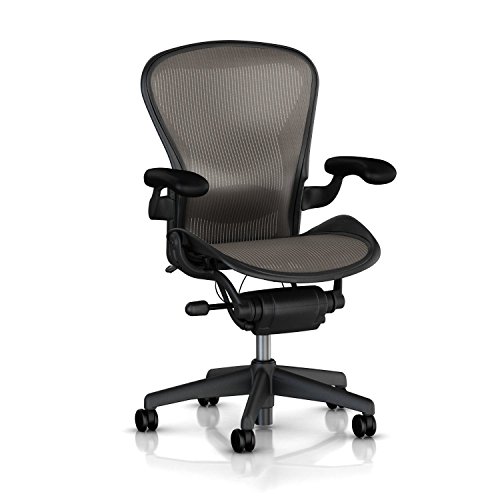
Herman Miller Classic Aeron Task Chair
What We Like
- Kinemat tilt for natural hip movement
- Breathable Pellicle suspension dissipates heat
- Waterfall seat edge reduces thigh pressure
- 12-year warranty with Born-On-Date sticker
Trade-offs
- At 48 lb, it is heavy to move
- No headrest included for neck support
- Carpet casters limit use on hard floors
The patented Kinemat tilt mechanism lets your neck, shoulders, hips, knees, and ankles pivot naturally, which directly addresses the need for pressure relief around the hips during long sits. The breathable Pellicle suspension dissipates body heat while providing unparalleled support, and the waterfall front edge of the seat takes pressure off your thighs to keep blood circulating. This chair is built for anyone who spends hours at a desk and wants a design that works with the body’s natural movements rather than against them.
The trade-off is weight: at 48 pounds, this is not a chair you’ll want to slide around the room often, and the carpet casters limit easy rolling on hard floors. Compared to the lighter CASASIO Ergonomic Office Chair at 30 pounds, the Aeron feels more substantial and less portable. But if you prioritize long-term comfort and a 12-year warranty that backs the build, the solid construction is a fair price for the stability and support it provides.
Product photos
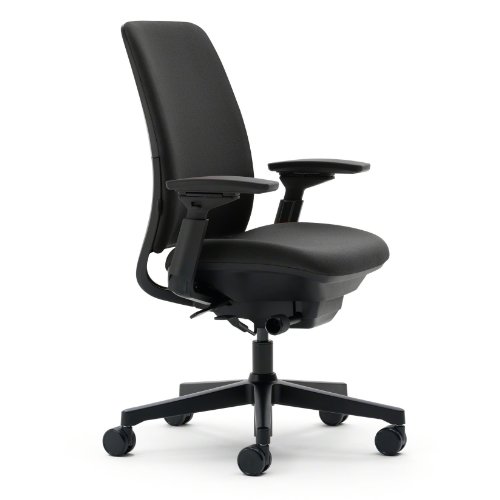
Steelcase Amia Office Chair
What We Like
- Hidden LiveLumbar system adjusts to movement
- Extra cushioning and flexible seat edges
- 4D arm support for personalized fit
Trade-offs
- At 54.5 lb, it is heavy to move
- No headrest for neck support
The hidden LiveLumbar system adjusts to your movement, providing dynamic lower back support without requiring manual adjustments. The extra cushioning and flexible seat edges help make long sits of 8 to 10 hours more comfortable. This chair suits those who want a supportive ergonomic seat that adapts to their body rather than forcing them into a fixed position.
At 54.5 pounds, the Steelcase Amia is a heavy chair that you won’t want to move often, so it’s best kept in one spot. The CASASIO Ergonomic Office Chair weighs just 30 pounds, making it much easier to shift around. If you need a chair that rolls easily between desks or stores away, the Amia might feel cumbersome. But for steady, cushioned comfort day after day, it delivers where it counts.
Product photos
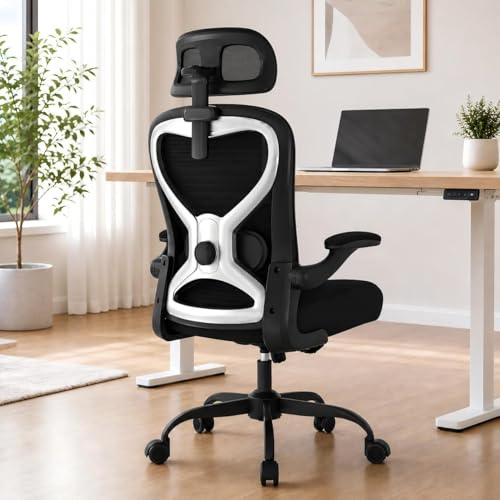
CASASIO Ergonomic Office Chair
What We Like
- 3.5" virgin foam seat for hips
- 4-way adjustable lumbar cushion
- 3D adjustable headrest for neck support
- Tilt & rock motion for circulation
Trade-offs
- Flip-up armrests lack width or height adjustment
- No seat depth adjustment for different leg lengths
The 3.5-inch virgin foam seat is the key feature here, distributing weight evenly to prevent soreness in the hips and thighs even after eight hours of sitting. That thick cushion, paired with a dual-direction adjustable lumbar support that lets you dial in exactly where your lower back needs relief, makes this chair a strong match for anyone dealing with hip pain who spends long days at a desk. The breathable mesh back keeps you cool, and the 3D headrest cradles your neck during typing, reading, or leaning back to rest.
The armrests flip up to tuck under a desk, but they don’t adjust in width or height, so you can’t fine-tune them to your elbow position. That’s a notable difference from the Herman Miller Embody, which offers fully adjustable arms for a more customized fit. Still, for the price, and with a 5-year warranty and 90-day returns, the CASASIO delivers the all-day hip and lumbar comfort that many pricier chairs promise but don’t always deliver.
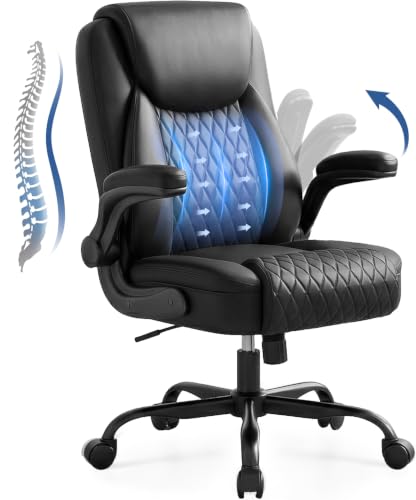
GTPOFFICE Executive Office Chair
What We Like
- Built-in lumbar support eases back pain
- Thickened spring cushion contours to hips
- Flip-up armrests save space
- Breathable PU leather keeps you cool
Trade-offs
- PU leather less breathable than mesh-backed chairs
- Flip-up armrests lack depth for prolonged elbow support
At just 22 pounds, this chair is remarkably light, making it easy to move around your home office or tuck under a desk when not in use. The built-in lumbar support and winged mid-back are designed to follow your spine’s natural curve, which can help reduce pressure on your lower back during long work sessions. The thickened spring cushion with high-density foam contours to your hips and thighs, dispersing weight evenly to cut down on fatigue. This is a smart pick if you need affordable pressure relief without sacrificing ergonomic basics.
The GTPOFFICE Executive Office Chair weighs just 22.0 pounds, making it easy to move around your workspace, but the PU leather upholstery can feel warmer than mesh alternatives. The diamond-stitched panel helps airflow compared to standard PU, yet it’s not as breathable as a mesh back. Flip-up armrests let you slide the chair flush under a desk when not in use, a real space-saver for compact home offices. Assembly takes only 20-30 minutes with simple instructions, and the one-year warranty backs your purchase.
Hbada Ergonomic Desk Chair

What We Like
- 12 cm thick W-shaped cushion
- 5 cm adjustable lumbar support
- Flip-up armrests save space
- Breathable mesh backrest
Trade-offs
- Armrests only flip up, no other adjustments
A 12 cm thick W-shaped cushion is the standout feature here, designed to follow the natural curves of your hips and legs and reduce pressure during long hours at a desk. That makes this chair a thoughtful pick for anyone whose hip pain flares up with standard flat seats. The adjustable lumbar support adds another layer of relief, letting you dial in lower back comfort with a 5 cm range of motion. It’s a lightweight, breathable mesh option that won’t dominate a small home office or bedroom corner.
Product photos
CAPOT Ergonomic Mesh Office Chair

What We Like
- Micro-adjust lumbar support reduces pressure by 50%
- Aerovith mesh seat keeps you cool
- 400 lb capacity with stainless steel base
- 5-year warranty with free parts
Trade-offs
- Armrests are soft but not padded thickly
- No seat angle adjustment for hip tilt
Its micro-adjust lumbar support moves 2 inches across 8 levels to target the L1-L5 spine, cutting lower back pressure by half. The breathable seat keeps you from overheating even after eight hours at a desk. This chair suits people from 5’5″ to 6’2″ who need cooling relief and precise lower back alignment without sacrificing stability, the stainless steel base holds up to 400 lbs.
The cushion dimensions are 19.3 inches deep and 20 inches wide, which provides decent support for most users, though those with very long legs might want a deeper pan. The armrests are wide and flip up 90 degrees to slide under the desk, freeing up workspace, and they have a soft, non-peeling surface. For someone who values a cool seat and precise lumbar adjustment over extra seat-angle options, this chair delivers on its core features.
Product photos
Marsail Ergonomic Office Chair

What We Like
- 3.14" thick high-density foam seat
- Adjustable lumbar support forward/back and up/down
- 3D armrests with flip-up design
- 330 lb weight capacity
Trade-offs
- No seat angle or depth adjustment
A 3.14-inch thick high-density foam seat supports up to 330 pounds and the wider seat distributes weight for better support during long sits. Combined with a lumbar support that moves both forward/back and up/down, it lets you adjust the fit to your lower back while the foam supports your seat. This chair is best for people who want a thick foam cushion and adjustable lumbar support.
The mesh back is breathable and responsive, but some users may prefer a padded backrest for upper body comfort. Compared to the CASASIO model, which has a 3.5-inch cushion and 4-way lumbar, the Marsail has a slightly thinner foam seat and the same 330 lb weight capacity. If you want a thick foam seat and adjustable lumbar support, the Marsail offers those features at a competitive price.
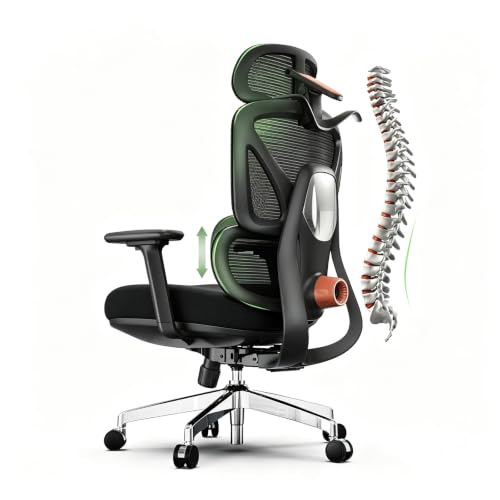
Ergoa Ergonomic Mesh Office Chair
What We Like
- 8-position adjustable lumbar support
- 9-position adjustable backrest
- 4D soft-padded flip-up armrests
- Breathable mesh keeps you cool
Trade-offs
- 48 lb weight makes repositioning difficult
- No seat depth adjustment for taller users
The breathable mesh keeps you from getting clammy during long sits, and the 4D armrests let you position your arms to take pressure off your shoulders and hips alike. It’s a chair built for customization, not one-size-fits-all comfort.
At 48 pounds, the Ergoa is noticeably heavier than the 30-pound CASASIO chair, so moving it around a home office isn’t effortless.
Product photos
GABRYLLY Ergonomic Office Chair
What We Like
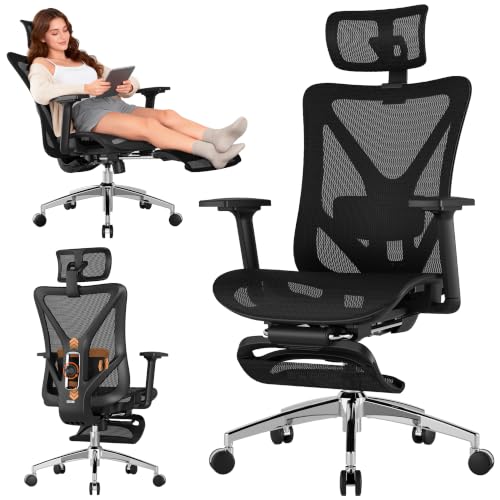
- Retractable steel footrest for leg support
- 2-way adjustable lumbar support
- 3D adjustable armrests reduce shoulder strain
- 135° recline with lockable positions
Trade-offs
- Footrest adds weight and complexity
- Height range limited to 5'3"–6'
With a 300-pound weight capacity and a sturdy steel base, it feels solid even when you recline to one of three lockable positions (90°, 110°, or 135°).
The mesh seat, while breathable and durable, offers less cushioning than padded models, something to consider if you prefer a softer feel under your hips. At 38.7 pounds, it’s not the lightest chair, but the silent wheels and easy assembly (15-25 minutes) help offset that. For anyone who values the ability to rest their feet and recline fully while still getting solid lumbar support, this chair delivers a lot of function.
Product photos
How We Evaluated Desk Chairs For Hip Pain
Each chair’s specifications, including seat cushion thickness, foam density, and edge design, were reviewed. Manufacturer documentation covered weight capacity, adjustability ranges, and warranty terms. Expert round-ups from ergonomic specialists helped identify which features matter most for hip pressure relief.
Three criteria guided our evaluation. First, seat cushion construction, thicker high-density foam or suspension systems that conform without bottoming out. Second, lumbar support adjustability, since lower back alignment directly affects hip position. Third, overall adjustability including armrests, seat depth, and tilt mechanisms that let you find a neutral sitting posture.
A research-led evaluation cannot replace trying a chair yourself. Hip pain varies by individual, so we prioritized chairs with strong return policies and generous warranties. Owner feedback patterns helped us understand which chairs work for different body types and sitting habits.
What To Look For In Desk Chairs For Hip Pain
Focus on seat cushion thickness and contour, lumbar support adjustability, and the chair’s ability to accommodate your height and weight. These three factors determine how well a chair relieves hip pressure over a full workday.
Seat Cushion Construction
The cushion is the first line of defense against hip pain. Look for high-density foam at least three inches thick, or a suspension system like the Aeron’s Pellicle that distributes weight evenly. A waterfall seat edge reduces pressure behind the thighs, which helps keep your hips properly positioned. Memory foam or virgin foam holds its shape longer than standard foam.
Lumbar Support Adjustability
Adjustable lumbar support keeps your pelvis in a neutral position, reducing strain on the hip joints. Chairs with height and depth adjustment let you dial in the curve of your lower back. Some models offer forward-back adjustment (like the Marsail) or multi-position settings (like the Ergoa’s 8-position lumbar). Without proper lumbar support, your hips roll backward and increase pressure on the sit bones.
Seat Depth and Width
A seat pan that is too short or too narrow forces your hips into an awkward angle. Look for a depth that accommodates your legs and a width that gives your hips a couple inches to spare. Seat depth adjustment is ideal for taller users, though many chairs in this category lack it. The Aeron’s three sizes help match different body types.
- Measure your hip width at the widest point before shopping
- Check the chair’s weight capacity against your body weight
- Look for a five-year warranty or longer on the seat mechanism
- Test the armrest adjustability, fixed armrests can strain shoulders and hips
- Consider the chair’s weight if you need to move it between rooms
A chair that fits your body dimensions will always outperform one that does not, regardless of cushion thickness.
Desk Chairs For Hip Pain Compared
The table below compares our nine picks across the features that matter most for hip pain relief, including seat cushion type, lumbar adjustability, and weight capacity.
| Product | Weight | Lumbar Support | Armrests | Seat Material |
|---|---|---|---|---|
| Herman Miller Classic Aeron Task Chair | 48.0 pounds | Lumbar Pad | Fully Adj Vinyl Arms | Pellicle suspension mesh |
| Steelcase Amia Office Chair | 54.5 pounds | Hidden LiveLumbar system | 4D (height, width, pivot, depth) | Buzz2 Black Fabric |
| CASASIO Ergonomic Office Chair | 30.0 pounds | 4-way adjustable cushion | Flip-up | 3.5" virgin foam |
| GTPOFFICE Executive Office Chair | 22.0 pounds | Built-in, winged mid-back | 90° flip-up, padded | PU leather |
| Hbada Ergonomic Desk Chair | 29.5 lb | 5 cm height adjustment | Flip-up | Breathable Mesh |
| CAPOT Ergonomic Mesh Office Chair | 38.0 pounds | 2 inches / 8 levels | 4D Flip-up | Aerovith Mesh |
| Marsail Ergonomic Office Chair | 30.4 pounds | 1.18" forward/back, 2.16" up/down | 3D adjustable, flip-up | Mesh |
| Ergoa Ergonomic Mesh Office Chair | 48.0 pounds | 8 positions, 2.36" travel | 4D soft-padded, flip-up | Breathable Mesh |
| GABRYLLY Ergonomic Office Chair | 38.7 pounds | 2-way adjustable | 3D adjustable | Mesh |
Frequently Asked Questions
What type of desk chair is best for hip pain?
A chair with a thick, high-density foam seat or a weight-distributing suspension system works best. Look for adjustable lumbar support to keep your pelvis aligned and a waterfall seat edge that reduces pressure behind the thighs. The Herman Miller Aeron’s Pellicle suspension and the CASASIO’s 3.5-inch virgin foam are two effective approaches.
How thick should the seat cushion be for hip pain?
Aim for at least three inches of high-density foam. The Marsail offers 3.14-inch thick foam, while the Hbada uses a 12-centimeter thick W-shaped cushion. Thicker foam resists bottoming out and maintains its shape over long sitting sessions.
Is a mesh seat or foam seat better for hip pain?
Both can work, but they address different needs. Mesh seats like the CAPOT’s Aerovith mesh keep you cool and distribute weight evenly. Foam seats like the CASASIO’s virgin foam provide more conforming pressure relief. Your choice depends on whether heat buildup or pressure points bother you more.
Can a desk chair with lumbar support help hip pain?
Yes, adjustable lumbar support helps maintain a neutral pelvis position, which reduces strain on the hip joints. When your lower back is properly supported, your hips stay in a natural alignment rather than rolling backward and increasing pressure on the sit bones.
What weight capacity should I look for in a desk chair for hip pain?
Choose a chair rated for at least 50 pounds above your body weight to ensure the cushion and mechanism hold up over time. The CAPOT supports up to 400 pounds, while the Marsail handles 330 pounds. A higher weight capacity usually means a sturdier frame and longer-lasting foam.
The Bottom Line
The Herman Miller Classic Aeron Task Chair is our top pick for desk workers with hip pain who want a highly adjustable chair with natural movement support. Its Kinemat tilt and Pellicle suspension actively reduce pressure while you shift positions throughout the day. If the Aeron’s weight or lack of headrest gives you pause, the Steelcase Amia offers exceptional cushioned comfort with its hidden LiveLumbar system.
Budget-conscious shoppers should look at the GTPOFFICE Executive Office Chair for built-in lumbar support and hip-cushioning foam at an accessible price point. Those who need a footrest for leg support during breaks will appreciate the GABRYLLY Ergonomic Office Chair with its retractable steel footrest and 135-degree recline.
The single most important factor in choosing a desk chair for hip pain is fit. A chair that matches your body dimensions will always outperform one that does not, regardless of cushion thickness or adjustability features.
