10 Best Desk Gadgets in 2026
This post contains affiliate links. As an Amazon Associate, we earn from qualifying purchases.
The Elgato Stream Deck Mini Macro Keypad takes our top spot because its six customizable LCD keys put your most-used shortcuts at your fingertips, saving time across Zoom, Teams, Office, and Adobe. For a budget-friendly organizer, the COMFYROOM Desk Organizer keeps small items tidy without taking over your desk, while the Vobot USB-C Docking Station with Screen adds a clever programmable display to your hub.
A great desk gadget does more than look good, it solves a real problem, whether that’s reducing clutter, improving your posture, or keeping your coffee warm through a long work session. The trick is matching the gadget to your daily habits and desk size.
This guide draws on manufacturer specifications, expert round-ups, and patterns in owner feedback to help you find the right tool for your workspace. We cover ten categories, from charging and cooling to stress relief and ergonomic support.
Top 10 Desk Gadgets in the Market
Certain content that appears on this site comes from Amazon. This content is provided "as is" and is subject to change or removal at any time.
The Best Desk Gadgets, Reviewed
Elgato Stream Deck Mini Macro Keypad

What We Like
- 6 customizable LCD keys for shortcuts
- Works with Zoom, Teams, Office, Adobe
- Multi-action sequencing with precise timing
- Compact 0.4-pound design
Trade-offs
- Requires software setup on computer
- Limited to 6 keys for macro assignments
Six customizable LCD keys let you assign tedious keyboard shortcuts to a single tap, so you can switch between Zoom mute, Photoshop layers, or Excel formulas without fumbling. It’s the kind of simple, focused tool that fits neatly beside your keyboard and works with the apps you already use every day. For anyone who wants to cut through digital clutter and move faster through repetitive tasks, this little pad delivers exactly that. The drag-and-drop setup means you can have it running in minutes, and the multi-action sequencing lets you chain multiple commands together with precise timing.
Six keys won’t cover every workflow if you rely on a long list of shortcuts, but that focus makes the Stream Deck Mini a dedicated shortcut tool without extra bulk or complexity. It’s not a desk organizer or a charging station, it does one thing and does it well, ideal for anyone who wants a streamlined macro keypad.
Product photos
Vobot USB-C Docking Station with Screen

What We Like
- Built-in 2-inch IPS app screen
- 7 ports including 4K@60Hz HDMI
- Programmable with MicroPython
- Pre-installed apps like Pomodoro and Weather
Trade-offs
- No audio jack or SD card slot
- Screen is not a touchscreen
- PD charger not included
A 2-inch IPS app screen built right into a compact USB-C hub turns this little dock into a command center for your desk. With seven ports including 4K@60Hz HDMI, 5Gbps USB-C and USB-A, and Gigabit Ethernet, it handles both connectivity and a dose of desk personality. The screen runs apps like Pomodoro, Weather, Stocks, and even a PC hardware monitor, all controlled by a side knob and button. For anyone who likes their workspace to feel personal and productive, this dock adds a layer of smart desk gadgetry without taking up more room than a pen.
The trade-off is that the screen isn’t a touchscreen, so you’ll use the knob and button to navigate apps, and there’s no audio jack or SD card slot if those are essential. It also needs a separate PD charger (100W recommended), so factor that into your setup.
Product photos
COMFYROOM Desk Organizer with Drawers

What We Like
- 6 compartments plus 2 drawers
- Transparent drawers for quick visibility
- Compact size saves desk space
- Durable ABS plastic with smooth edges
Trade-offs
- Small size limits larger item storage
- Only one color option (white)
Six compartments and two drawers pack serious organization into a footprint just 5.5 by 8.3 inches, small enough to tuck beside a monitor without stealing your mouse space. That makes it a natural fit for students, remote workers, or anyone who needs to tame a cluttered desktop without sacrificing surface area. The transparent drawers let you spot a stray paperclip or lipstick at a glance, and the smooth ABS plastic won’t snag sleeves or scratch your desk.
At just 0.8 pounds, this plastic desk organizer is light enough to move around easily, yet the tough ABS material keeps it sturdy on your desk. The smooth edges and non-toxic build make it safe for daily use, and the bright white finish gives your workspace a clean, classy look without the weight of heavier options.
SKYDUE 360 Rotating Pen Organizer

What We Like
- 360-degree rotation for easy access
- Non-slip pad keeps it stable
- 5 compartments in a compact footprint
- Versatile for office, art, or kitchen
Trade-offs
- No built-in dividers for separating small items
- Not ideal for storing tall items like scissors
With five compartments and a full 360-degree swivel, this organizer puts every pen, marker, or brush within easy reach without hogging your desk. The non-slip pad keeps it planted on smooth surfaces, so you won’t send it spinning when you grab a pencil. It’s a smart fit for anyone who wants quick access to a variety of small tools, artists, students, or home cooks, and values a tidy, clutter-free workspace.
A simple, space-savvy way to keep frequently used items at your fingertips, this rotating holder does the job neatly. Its five compartments provide enough storage without dominating your desktop, and the 360-degree rotation makes grabbing a pen or brush effortless. A non-slip pad on the base keeps the organizer firmly in place on smooth surfaces, so it won’t slide around while you work. Reviewers find it versatile enough for office supplies, art tools, or even kitchen condiments and makeup brushes. Built from durable materials, it holds up well to daily use and stays a practical addition to any desk, bedroom, or living room.
Product photos
House Gem Coffee Mug Warmer

What We Like
- Fast heating to 176°F
- LED display with color-coded lights
- 2-12 hour timed auto shut-off
- Smart memory remembers preferred settings
Trade-offs
- Only works with flat-bottom mugs
- Plastic cups not recommended
- Mug base must be completely dry
Three temperature settings up to 176°F mean you can keep your coffee, tea, or cocoa at just the right warmth. The large 5.2-inch glass plate fits most flat-bottom ceramic, glass, and stainless-steel mugs, so it works with your favorite cup. A clear LED display and color-coded lights show which heat level is active, and the smart memory feature remembers your preferred setting for next time. The adjustable 2-12 hour timer and 4-hour default auto shutoff add safety and convenience for long work sessions.
The House Gem Coffee Mug Warmer heats your drink to 176°F and keeps it there. It works best with flat-bottom ceramic, glass, or stainless-steel mugs that are completely dry on the base, so plastic cups aren’t recommended. That means you’ll want to pick your mug carefully, but if you’re a coffee or tea drinker who values a consistently warm beverage through a long work session, the House Gem delivers with safety features like a 4-hour default auto shutoff and an adjustable timer up to 12 hours.
Anker 112W 6-Port Desktop Charger

What We Like
- Charges up to 6 devices at once
- 30W USB-C fast charges MacBook Air
- Includes silicone cable organizer
- Compact and lightweight design
Trade-offs
- USB-C charging cables not included
- 30W max only on one USB-C port
- No fast charging for larger laptops
Six ports and 112 watts of total power mean this single desktop charger can juice up your phone, tablet, earbuds, and even a MacBook Air all at the same time. For anyone with a growing collection of devices, it replaces a tangle of wall warts with one tidy block that takes up very little desk space. The included silicone cable organizer keeps cords from wandering, so your workspace stays as neat as your charging setup is capable.
Only one port delivers that 30W speed; the other USB-C and USB-A ports top out at lower rates, so if you need to fast-charge multiple laptops simultaneously, you will hit a limit. Compared to the Vobot USB-C Docking Station, which adds a screen and extra connectivity, the Anker focuses purely on power delivery without any data or display features. That makes it a better fit if your priority is straightforward, high-capacity charging for a household of gadgets rather than a hub for your workstation.
MEKASS L-Shaped Elbow Pad Set
What We Like
- L-shaped design wraps desk edges
- Slow-rebound memory foam for comfort
- Non-slip rubber base stays put
- Easy to clean Lycra surface
Trade-offs
- Only 11.8 inches long per pad
- No wrist angle adjustment built in
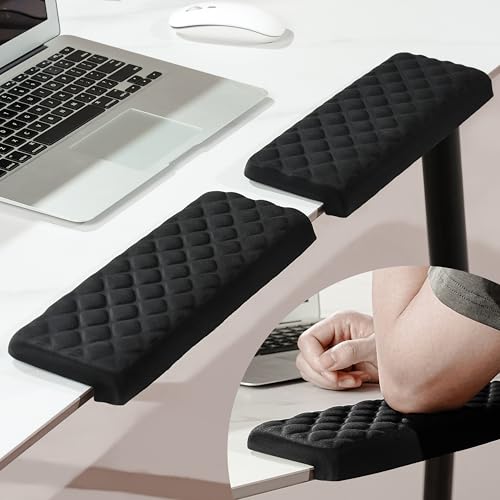
The L-shaped cutout wraps around your desk edge so your forearm rests on soft memory foam instead of a hard corner. The non-slip rubber base keeps everything steady during fast typing or gaming sessions, and the smooth Lycra surface is easy to clean with a damp cloth. That combination suits anyone who spends hours at a desk and wants to reduce pressure on elbows and wrists without adding bulk.
The L-shaped design wraps around desk edges to provide comfortable arm and elbow support, reducing pressure and discomfort from prolonged contact. Each cushion measures 11.8 inches by 4.3 inches by 0.78 inches, allowing you to adjust spacing for flexible positioning on straight or L-shaped desks.
Wecsv Kinetic Desk Spinning Toy
What We Like
- Silent spinning with zero noise
- Anti-slip silicone base pad
- Compact portable mini size
- Fully detachable for easy cleaning
Trade-offs
- Battery not included, tool only
- Requires flat surface to spin properly
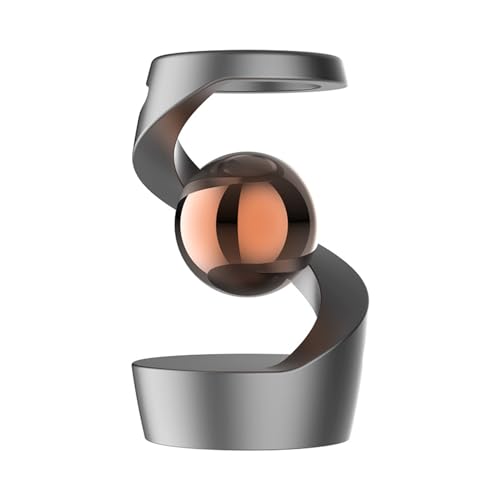
A rotation time of 150 to 300 seconds means you can set this little gyro spinning and watch it glide through its mesmerizing orbit for several minutes before it slows down. Made from solid aluminum alloy with a detachable structure, it feels substantial in hand yet stays quiet enough for a library-like office. The anti-slip silicone base keeps it firmly planted on wood, glass, or any smooth surface, so you can fidget without knocking it over. For anyone who needs a moment of calm during a hectic workday, this spinning toy offers a gentle, screen-free way to reset your focus.
At just 0.3 pounds, it’s a small, lightweight object, so it won’t satisfy someone who wants a heavier, more substantial desk fidget. This toy is purely about relaxation and visual calm. It doesn’t require batteries or charging, just a flat desk and a gentle twist. If your goal is a quiet, elegant desktop ornament that doubles as a stress reliever, this spinning gyro fits the bill without adding noise or clutter.
Product photos
SWEETFULL Small USB Desk Fan
What We Like
- 360° adjustable airflow direction
- Removable front cover for easy cleaning
- USB powered for versatile placement
Trade-offs
- No battery included, requires USB power source
- Too small to cool a whole room
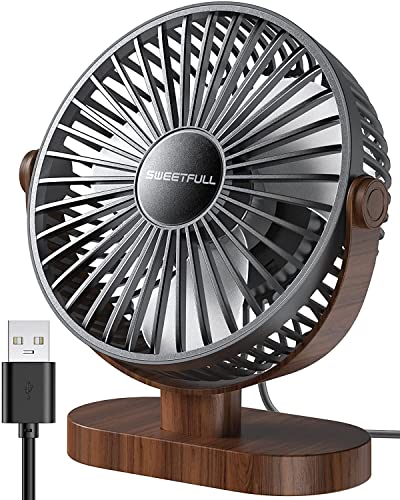
A noise level under 25 dB means this little fan can sit inches from your face without distracting you during a video call or deep focus session. That whisper-quiet hum appeals to anyone who works in a shared office, a quiet library, or a bedroom where silence matters. The 360-degree tilt lets you aim the breeze exactly where you need it, and at just 10 ounces, it’s light enough to move from desk to nightstand without a second thought.
It’s a personal fan, not a room cooler. With a 5.8-inch blade and no battery, you’ll need to keep it plugged into a laptop, power bank, or USB adapter, which limits where you can place it. For focused, quiet personal cooling, this one delivers exactly what it promises.
Product photos
Divoom MiniToo Retro Pixel Speaker
What We Like
- Customizable pixel screen with 70+ clock faces
- Built-in alarm, white noise, and Pomodoro timer
- Bluetooth 5.3, USB, and TF card playback
- Compact retro PC-style design
Trade-offs
- Requires app for screen customization
- No Wi-Fi for streaming services
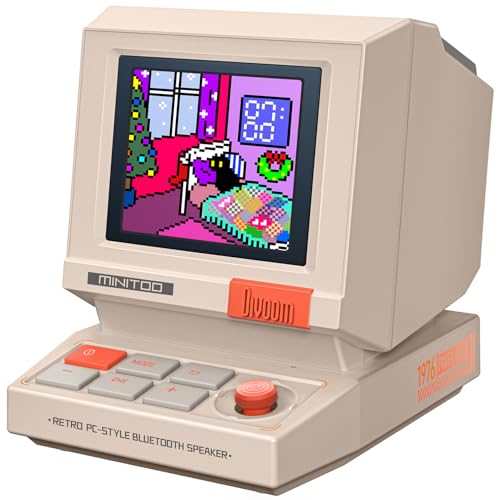
A 5W near-field speaker means this little retro cube is built for close-up listening, perfect for a desk where you want clear vocals and warm bass without shaking the whole room. The 1.77-inch pixel screen is the real star here: you can customize it with over 70 clock faces, animations, and text messages through the Divoom app, making it a playful companion for your workspace. It also doubles as an alarm clock, white noise machine, and Pomodoro timer, all accessible without pulling out your phone. This is a gadget for anyone who wants their desk to feel more personal and less utilitarian.
The 5W speaker, while great for near-field audio, won’t power a party or fill a large office. For focused desk use, this is a charming, multifunctional tool. It’s best for creators, gamers, or anyone who wants a bit of retro personality and practical desk tools in one compact package.
How We Evaluated Desk Gadgets
We started by studying product specs, manufacturer documentation, and expert round-ups to understand what makes a desk gadget genuinely useful. For each category, we looked at the core function, does it do its job reliably, quietly, and without adding friction to your workflow?
The criteria that mattered most were build quality, compact footprint, and ease of use. A gadget that takes up too much desk space or requires constant fiddling defeats its purpose. We also prioritized features that serve real daily needs, like multi-device charging, programmable shortcuts, and adjustable airflow.
An evaluation based on research can’t replace direct experience, but it does let us compare a wide field of products across consistent criteria. By cross-referencing owner feedback with technical specs, we identified the gadgets that work well for most users.
What To Look For In Desk Gadgets
Before you shop, think about the one task you want to simplify, then look for a gadget that handles it without creating new clutter.
Choose desk gadgets that solve one specific problem well, fit your available space, and integrate easily with your existing devices and routines.
Size and Desk Footprint
A gadget that takes up too much room can make your workspace feel cramped rather than organized. Measure your available desk area before buying, and look for compact designs that leave room for your monitor, keyboard, and mouse. The Elgato Stream Deck Mini, for example, weighs just 0.4 pounds and fits beside a keyboard, while the SKYDUE rotating organizer keeps pens and tools in a small circular footprint.
Power and Connectivity
If you’re adding a gadget that plugs in, check whether it needs a wall outlet, a USB port, or batteries. Multi-device chargers like the Anker 112W 6-Port Desktop Charger can power several devices from one outlet, reducing cable clutter. For USB-powered items like the SWEETFULL desk fan, make sure your computer or hub has a free port nearby.
Build Quality and Durability
Desk gadgets get handled daily, so materials matter. Look for ABS plastic with smooth edges on organizers, non-slip bases on rotating stands, and slow-rebound memory foam on ergonomic pads. Owner feedback often highlights whether a gadget feels sturdy or flimsy after a few weeks of use.
- Check whether the gadget’s base has a non-slip pad or rubber grip to keep it stable.
- For electronic gadgets, confirm that cables are detachable and replaceable.
- Read whether the surface is easy to clean, especially for items near drinks or snacks.
- Verify that moving parts, like rotating organizers or fan heads, move smoothly without wobbling.
- Look for timed auto shut-off on heating gadgets for safety.
A well-built desk gadget should feel solid in hand and stay put during everyday use.
Desk Gadgets Compared
The table below compares our ten picks across key specs so you can quickly see which gadget fits your desk setup.
| Product | Dimensions | Weight | Key Feature |
|---|---|---|---|
| Elgato Stream Deck Mini Macro Keypad | 2.4 x 2.3 x 3.3 inches | 0.4 pounds | 6 customizable LCD keys |
| Vobot USB-C Docking Station with Screen | 4.9 x 1.6 x 1.8 inches | 0.3 pounds | 7-in-1 (HDMI, USB-C, USB-A, Ethernet) |
| COMFYROOM Desk Organizer with Drawers | 5.5 x 8.3 x 4.7 inches | 0.8 pounds | 6 sections + 2 drawers |
| SKYDUE 360 Rotating Pen Organizer | 5.5 x 5.5 x 5.3 inches | 0.6 pounds | 5 slots |
| House Gem Coffee Mug Warmer | 5.9 x 5.9 x 1.2 inches | 1.0 pounds | 130°F, 150°F, 176°F |
| Anker 112W 6-Port Desktop Charger | 3.0 x 3.2 x 1.3 in | 10.65 oz | 3 USB-C + 3 USB-A |
| MEKASS L-Shaped Elbow Pad Set | 11.8 x 4.3 x 0.78 in | 0.9 lb | Non-Slip Rubber |
| Wecsv Kinetic Desk Spinning Toy | 1.5 x 1.5 x 2.5 in | 0.3 lb | 150-300 seconds |
| SWEETFULL Small USB Desk Fan | 6.5 x 2.5 x 7.4 inches | 0.4 pounds | Under 25 dB |
| Divoom MiniToo Retro Pixel Speaker | 3.9 x 3.9 x 4.7 inches | 0.4 pounds | 5W |
Frequently Asked Questions
What is the best desk gadget for productivity?
The Elgato Stream Deck Mini Macro Keypad is our top choice for productivity. Its six customizable LCD keys let you trigger shortcuts, launch apps, and run multi-action sequences with precise timing, working with popular software like Zoom, Teams, Office, and Adobe.
How do I keep my desk organized without spending a lot?
The COMFYROOM Desk Organizer with Drawers is an affordable option that adds six compartments and two transparent drawers to your desk. Its compact size saves space while keeping small items like stationery and office supplies visible and easy to reach.
What desk gadget helps with wrist and elbow pain?
The MEKASS L-Shaped Elbow Pad Set provides slow-rebound memory foam support for your forearms on hard desk edges. The L-shaped design wraps around the corner of your desk, and the non-slip rubber base keeps the pads from sliding during use.
Can I charge multiple devices from one desk gadget?
Yes. The Anker 112W 6-Port Desktop Charger can charge up to six devices at once, with one USB-C port delivering 30W for fast charging a MacBook Air. It also includes a silicone cable organizer to keep cords tidy.
What is a good desk gadget for stress relief?
The Wecsv Kinetic Desk Spinning Toy offers silent, smooth spinning on an anti-slip silicone base. Its compact size and minimalist design make it a discreet desk accessory that provides a calming sensory break without distracting coworkers.
The Bottom Line
For most people, the Elgato Stream Deck Mini Macro Keypad delivers the biggest productivity boost in the smallest package. Its customizable keys streamline repetitive tasks, and its compact 0.4-pound design won’t crowd your workspace.
If your budget is tighter, the COMFYROOM Desk Organizer with Drawers keeps your essentials tidy for very little. For those who need a central charging hub with a clever screen, the Vobot USB-C Docking Station with Screen adds useful apps and ports to your setup.
The best desk gadget is the one that solves the specific frustration you face every day, whether that’s a cold coffee, a cluttered drawer, or an awkward elbow position. Pick the tool that matches your routine, and your desk will work better for you.
