10 Best Ergonomic Office Chairs in 2026
This post contains affiliate links. As an Amazon Associate, we earn from qualifying purchases.
The Herman Miller Classic Aeron Task Chair earns our Best Overall spot thanks to its patented Kinemat tilt that lets you move naturally while seated, breathable Pellicle mesh that keeps you cool, and a 12-year warranty that backs long-term durability. For those who want maximum adjustability, the Herman Miller Embody offers advanced ergonomic support. The ELABEST Ergonomic Mesh Office Chair delivers BIFMA-certified value for budget-conscious shoppers.
Sitting for hours each day puts real strain on your back, hips, and shoulders. The right ergonomic chair supports your spine’s natural curve, encourages movement, and keeps pressure off your thighs. But with so many options promising comfort, it’s easy to get lost in specs and claims.
This guide is built on research: we looked at manufacturer specifications, expert round-ups, and patterns in owner feedback to identify the chairs that truly deliver on ergonomics and durability. We’ve ranked 10 models across different needs and budgets to help you find the right fit for your home office.
Top 10 Ergonomic Office Chairs in the Market
Certain content that appears on this site comes from Amazon. This content is provided "as is" and is subject to change or removal at any time.
The Best Ergonomic Office Chairs, Reviewed
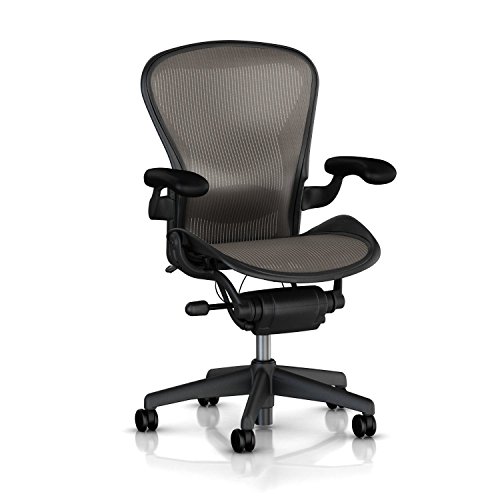
Herman Miller Classic Aeron Task Chair
What We Like
- Patented Kinemat tilt for natural movement
- Breathable Pellicle suspension dissipates heat
- Waterfall seat edge reduces thigh pressure
- 12-year Herman Miller warranty included
Trade-offs
- Heavy at 48 pounds, harder to move
- No headrest for neck support
The patented Kinemat tilt mechanism lets your neck, shoulders, hips, knees, and ankles pivot naturally, so you stay comfortable even during long stretches at your desk. This chair’s breathable Pellicle suspension actively dissipates body heat, keeping you cool while providing unmatched support. The waterfall front edge takes pressure off your thighs, promoting circulation and focus. It’s a premium choice for anyone who spends hours seated and values a design that adapts to the body’s natural movements.
At 48 pounds, this chair is heavier than some mesh alternatives, so moving it around the office takes a bit more effort. The vinyl arms are durable but may feel less breathable than mesh options. Still, the 12-year warranty and sturdy build make it a long-term investment for those who prioritize support over portability. If you need a lighter seat, other models may be easier to shift, but the Classic Aeron offers refined support that’s hard to match.
Product photos
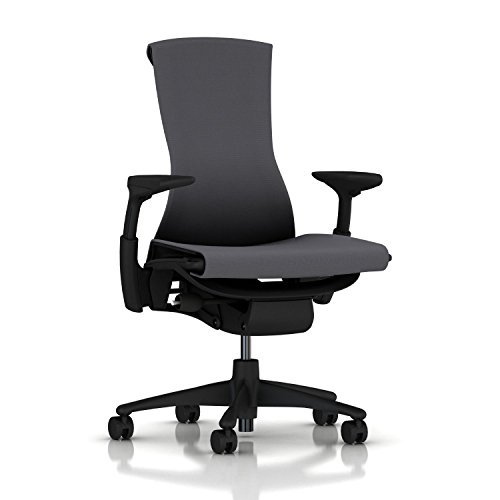
Herman Miller Embody Ergonomic Office Chair
What We Like
- Pixelated support conforms to micro-movements
- Backfit adjustment aligns with spine's curve
- Four-layer seat design for airflow
- Developed with over 20 PhDs and physicians
Trade-offs
- At 52 lb, it is heavy to move
- Carpet casters are not designed for hard floors
The Embody’s pixelated support uses a dynamic matrix of pixels that conforms to your body’s micro-movements. It distributes weight evenly and encourages healthy circulation, which helps during long stretches at a desk. Designed with input from over 20 physicians and PhDs, the chair’s Backfit adjustment lets you align the backrest with your spine’s natural curve. Support stays constant whether you lean forward or recline. This is a chair built for those who prioritize advanced ergonomics and want a seat that adapts to them, not the other way around.
At 52 pounds, this chair is noticeably heavier than many competitors, the Haworth Soji, for example, weighs just under 20 pounds, so moving it around the room takes real effort. The Rhythm fabric is tight and smooth to the touch, and it’s designed to prevent heat buildup, which keeps you comfortable during long work sessions. For buyers who value cutting-edge support over portability, this is a worthy investment.
Product photos
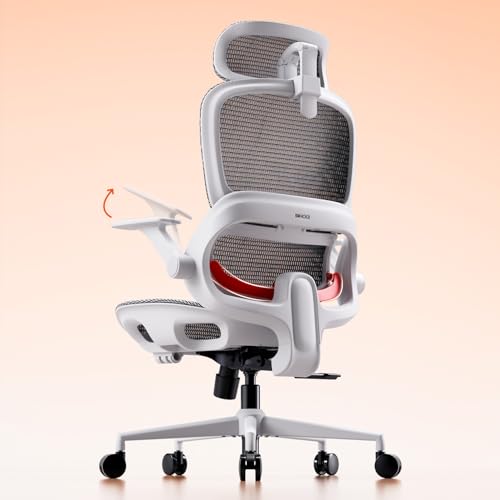
SIHOO B100 Mesh Ergonomic Office Chair
What We Like
- Adaptive lumbar follows spine's natural curve
- Three lockable recline angles up to 135°
- Breathable full-mesh back keeps you cool
- Widened seat cushion for even weight distribution
Trade-offs
- Flip-up armrests lack depth or width adjustment
- At 35.5 lb, heavier than some mesh chairs
The SIHOO B100’s adaptive lumbar support moves with your spine as you shift from leaning forward to typing to sitting upright, so your lower back stays supported without that stiff, forced feeling you get from static pads. That dynamic follow-along design is what makes this chair a smart pick for anyone who spends long hours at a desk and tends to change positions throughout the day. The breathable full-mesh back keeps air moving, which helps you stay cool during marathon work sessions or late-night gaming, and the widened seat cushion spreads your weight evenly across your hips and thighs so you don’t get sore after hours of sitting.
The trade-off is that the flip-up armrests only fold out of the way. They don’t offer depth or width adjustment, so if you need to dial in arm position precisely for tasks like drafting or precision mouse work, you may miss that fine-tuning. Compared to the ELABEST Ergonomic Mesh Office Chair, which also has adjustable lumbar and armrests, the SIHOO gives you a more adaptive back support that reacts to your movement rather than a fixed pad you set once. At 35.5 pounds, it’s not the lightest chair to move around, but the reinforced metal base and SGS-certified gas lift make it feel solid and stable up to 300 pounds.
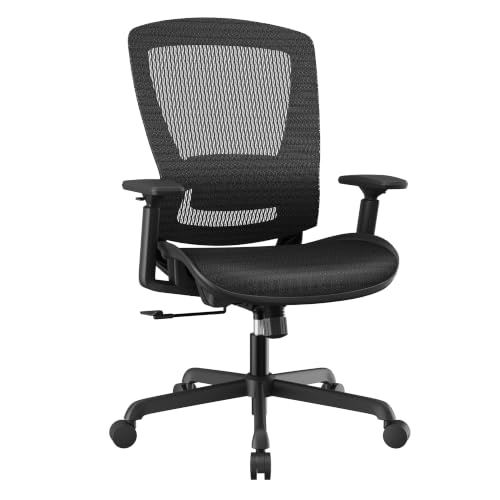
ELABEST Ergonomic Mesh Office Chair
What We Like
- BIFMA 5.1 commercial-grade durability
- 3D adjustable armrests reduce neck strain
- Ultra-breathable mesh seat prevents heat buildup
- Synchro-tilt with 3 lockable positions
Trade-offs
- No headrest for neck support during recline
- Fixed seat depth limits adjustment for leg length
BIFMA 5.1 certification means this chair is built to hold up under daily commercial use, a rare stamp of durability at this price level. The synchro-tilt mechanism with three lockable positions and adjustable tension lets you dial in your recline for long typing sessions, while the 3D armrests (height, width, angle) keep your shoulders relaxed during coding or reading. The full-mesh seat breathes actively, so you stay cool even after eight hours, and the bionic-curve backrest with adjustable lumbar supports your spine’s natural shape. This chair is a smart pick for anyone who wants a tough, comfortable workhorse without stepping up to premium price tags.
The SIHOO B100 offers a wider headrest for those who want neck support during recline, but the ELABEST focuses on core ergonomic adjustments where they matter most: lumbar, arms, and tilt. If you need a chair that can handle multi-shift use and keep you comfortable without overheating, this is a reliable, no-nonsense option that delivers where it counts.
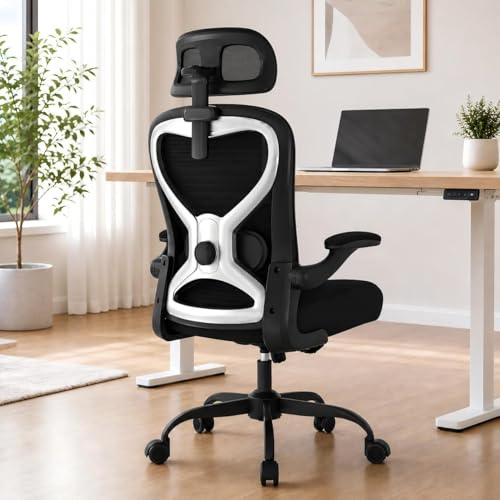
CASASIO Ergonomic Office Chair
What We Like
- Virgin foam seat for all-day comfort
- 4-way adjustable lumbar cushion
- 3D adjustable headrest
- Flip-up armrests for small spaces
Trade-offs
- Armrests cannot be adjusted for width or depth
- No forward tilt mechanism for active sitting
A 3.5-inch virgin foam seat cushion that distributes weight evenly is the key to this chair’s all-day comfort promise, preventing soreness even after eight-plus hours of sitting. The contoured mesh back aligns with your spine, and the dual-direction adjustable lumbar cushion lets you dial in lower back support precisely. With a 3D headrest that cradles your neck and a tilt-and-rock function that moves with your body, it’s built for long work sessions where you want to stay focused without fidgeting.
The flip-up armrests let you tuck the chair neatly under a desk, which is handy for small home offices or shared workspaces. Some competitors, like the Branch Ergonomic Chair Pro, offer 5D armrests with more adjustment options, but the CASASIO’s design prioritizes space-saving. At 30 pounds, the chair is lighter than many heavy-duty models, yet its reinforced metal base supports up to 330 pounds and passes BIFMA stress tests. For someone who values a plush, supportive seat and needs a compact chair that can disappear under a desk, this is a smart pick.
MOLENTS Ergonomic Mesh Office Chair

What We Like
- Adjustable lumbar support up/down and forward/backward
- Breathable mesh for long hours of comfort
- 3D armrests reduce arm and shoulder strain
- Three recline positions for work and rest
Trade-offs
- At 35.0 pounds, heavier than some mesh chairs
- Assembly requires removing base leg from seat packaging
With lumbar support that moves both up and down and forward and backward, this chair lets you dial in lower-back relief exactly where you need it. The breathable mesh back keeps air flowing, so long work sessions don’t leave you feeling sticky or overheated. It’s a thoughtful choice for people who sit at a desk all day and want targeted support without sacrificing comfort.
At 35 pounds, this chair feels solid and well-built, with BIFMA X5.1 certification backing its durability for daily use. The seat depth measures 18.9 inches, and the breathable mesh keeps you cool during long work sessions. If you value adjustable lumbar support and a sturdy frame over a deeper seat, this model delivers where it counts.
Product photos
CAPOT Ergonomic Mesh Office Chair

What We Like
- Micro-adjust lumbar with 8 levels
- 400 lb weight capacity
- Cooling Aerovith mesh seat
- 5-year warranty with free parts
Trade-offs
- At 38 lb, not lightweight to move
- Headrest only fits 5'5" to 6'2"
- No seat depth adjustment listed
A 2-inch micro-adjust lumbar with 8 distinct levels lets you dial in support exactly where your L1-L5 spine needs it, cutting lower back pressure by 50%. That kind of precision helps during those long desk sessions, and the breathable Aerovith mesh seat keeps you cool while reducing pelvic pressure by 20%. A steel base supports up to 400 lbs, and BIFMA X5.1 certification confirms the chair’s durable build.
Weight is the main compromise: at 38 pounds, it’s not something you’ll casually roll between rooms, and the headrest range tops out at 6’2″, so taller users may feel cramped. Compared to the SIHOO B100, which offers adaptive lumbar but no micro-adjust, the CAPOT gives you far more control over lower back support. If precise lumbar alignment is your priority over a lighter frame, this chair delivers where it counts.
Haworth Soji Ergonomic Office Chair

What We Like
- Fully assembled out of the box
- 4D armrests for personalized fit
- 12-year warranty for long-term peace of mind
- Eco-friendly with recycled and recyclable materials
Trade-offs
- Does not include forward tilt adjustment
- Hard casters are designed only for carpet
Weighing just 19.8 pounds, the Soji is easy to move around your workspace or tuck away when not in use. Its flexible mesh back keeps air circulating, and adjustments include seat height, depth, lumbar support, and 4D armrests. For home office users who want ergonomic features without a heavy frame, this chair delivers a practical, space-friendly setup.
At just 19.8 pounds, the Soji is remarkably light for an ergonomic chair, so moving it from desk to desk is effortless. The trade-off is that it skips forward tilt, a feature found on some competitors like the Branch Ergonomic Chair Pro. Hard casters are designed for carpet, and with a 12-year warranty and fully assembled delivery, the Soji offers a hassle-free, sustainable setup ready to work the moment it arrives.
Product photos
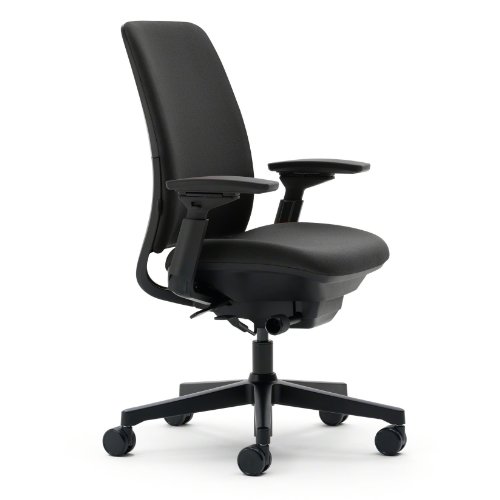
Steelcase Amia Office Chair
What We Like
- Hidden LiveLumbar adapts to your movement
- 4D arm support for height, width, pivot, depth
- Flexible seat edges for pressure-free sitting
- Carbon Neutral certified sustainable choice
Trade-offs
- At 54.5 pounds, it's heavy to move
- Lacks headrest for tall users
The Steelcase Amia Office Chair uses a hidden LiveLumbar system that adjusts to your movement, providing dynamic lower back support without bulky hardware. The seat has flexible edges and extra cushioning, which the manufacturer says enables pressure-free sitting for 8-10 hours. With 4D arm support that adjusts in height, width, pivot, and depth, you can tailor the armrests to your preferred position. It’s a chair designed for sustained comfort during long workdays.
At 54.5 pounds, this chair is built like a tank, meaning you won’t want to slide it across the room daily. Compared to the Haworth Soji at 19.8 pounds, the Amia is clearly heavier. It also lacks a headrest, so if you’re over six feet and need upper neck support, you might want to look elsewhere. But for lower-back and seat comfort during long work sessions, the Amia’s LiveLumbar and cushioning make it a strong option.
Branch Ergonomic Chair Pro

What We Like
- 14 points of adjustment
- 5D adjustable armrests
- Two-way lumbar cushion
- Forward tilt for active sitting
Trade-offs
- At 42 lb, heavier than some mesh chairs
- No headrest included in design
With 14 separate points of adjustment, this chair lets you dial in everything from seat depth to armrest pivot angle. It can adapt to nearly any body shape or sitting habit. The 5D armrests move in height, width, depth, pivot, and pad position, which means your arms stay supported while typing, mousing, or leaning back to think. That kind of fine-tuning makes it a strong fit for people who sit at a desk all day and want to avoid the one-size-fits-all approach of simpler chairs. The padded two-way lumbar cushion also adjusts vertically, so you can target exactly where your lower back needs support.
Weight is the main compromise: at 42 pounds, it’s noticeably heavier than mesh options like the MOLENTS Ergonomic Mesh Office Chair, which weighs 35 pounds and may be easier to move around a home office. That heft comes from the high-density foam seat cushion and sturdy build, so you gain long-term comfort and durability, but it’s not a chair you’ll want to slide across the room every day. If you value personalized fit over portability, this chair gives you the adjustments to make it yours.
Product photos
How We Evaluated Ergonomic Office Chairs
To narrow down the field, we started with the core ergonomic features that matter most for long-term sitting comfort: lumbar support adjustability, seat depth and width, armrest customization, and recline range. We compared each chair’s published specs against what experts and experienced owners report as essential for reducing pressure points and supporting natural posture.
We also weighed build quality and durability. Chairs with BIFMA certification, long warranties, and high weight capacities scored higher because they’re built to last through years of daily use. Materials like breathable mesh and high-density foam were evaluated for heat dissipation and pressure relief.
A research-led evaluation has limits: we haven’t spent weeks sitting in each chair ourselves. Instead, we’ve synthesized what the data and user consensus say about fit, comfort, and longevity. Your best chair is the one that matches your body dimensions and work habits, so we’ve highlighted each model’s strengths and trade-offs to help you decide.
What To Look For In Ergonomic Office Chairs
Choosing an ergonomic chair means understanding how each adjustment affects your sitting posture. Focus on the features that solve your specific discomforts, whether that’s lower back pain, shoulder tension, or thigh pressure.
Look for adjustable lumbar support, seat depth that fits your leg length, armrests that let your shoulders relax, and a recline mechanism that encourages movement. A chair that fits your body is more important than one with the longest feature list.
Lumbar Support
Your lower back needs consistent support to maintain the spine’s natural S-curve. Some chairs offer a fixed lumbar curve, while others let you adjust height, depth, or tension. Adaptive lumbar designs, like the one in the SIHOO B100, move with you as you shift positions. For pinpoint control, look for micro-adjust options with multiple levels, such as the CAPOT Ergonomic Mesh Office Chair‘s 8-level system.
Seat Depth and Width
A seat that’s too short won’t support your thighs, and one that’s too long can press behind your knees. Ideally, you want 2 to 4 inches of space between the back of your knee and the seat edge. Waterfall seat edges, like the one on the Herman Miller Aeron, reduce pressure on the underside of your thighs. Width matters too: a wider seat cushion distributes weight more evenly, which is especially helpful for larger body types.
Armrest Adjustability
Armrests should let you rest your arms with your shoulders relaxed, not hunched. Basic chairs offer height adjustment only, while 3D armrests add width and pivot, and 4D or 5D options include depth and angle. The Branch Ergonomic Chair Pro‘s 5D armrests give you the most customization, while the CASASIO’s flip-up armrests trade adjustability for space-saving convenience.
- Test the recline range: a chair that locks at multiple angles lets you switch between focused work and relaxed leaning.
- Check the weight capacity: heavier users need a chair rated for their size to ensure stability and durability.
- Consider the casters: hard casters work on carpet, while soft casters protect hardwood floors.
- Look at the warranty length: longer warranties signal confidence in build quality.
A good rule of thumb: the more adjustments you can make, the better your chances of dialing in a comfortable fit for your unique body.
Ergonomic Office Chairs Compared
The table below compares the 10 ergonomic office chairs side by side, highlighting their key features, weight, and best-use scenarios to help you narrow your choices.
| Product | Weight | Dimensions | Lumbar Support |
|---|---|---|---|
| Herman Miller Classic Aeron Task Chair | 48.0 pounds | L 17.0 inches, W 27.0 inches, H 42.0 inches | Lumbar Pad |
| Herman Miller Embody Ergonomic Office Chair | 52.0 pounds | L 29.0 inches, W 29.5 inches, H 43.5 inches | Backfit Adjustment |
| SIHOO B100 Mesh Ergonomic Office Chair | 35.5 pounds | L 27.6 inches, W 28.3 inches, H 44.1 inches | Adaptive Lumbar Support |
| ELABEST Ergonomic Mesh Office Chair | 36.0 pounds | L 26.4 inches, W 28.5 inches, H 45.3 inches | Adjustable Lumbar Support |
| CASASIO Ergonomic Office Chair | 30.0 pounds | L 20.0 inches, W 20.0 inches, H 50.0 inches | 4-way Lumbar |
| MOLENTS Ergonomic Mesh Office Chair | 35.0 pounds | L 27.8 inches, W 28.0 inches, H 43.3 inches | Adjustable up/down, forward/backward |
| CAPOT Ergonomic Mesh Office Chair | 38.0 pounds | L 22.0 inches, W 25.2 inches, H 40.0 inches | 2 inches over 8 levels |
| Haworth Soji Ergonomic Office Chair | 19.8 pounds | L 27.0 inches, W 28.0 inches, H 39.0 inches | Lumbar Support |
| Steelcase Amia Office Chair | 54.5 pounds | L 24.8 inches, W 26.6 inches, H 42.5 inches | Hidden LiveLumbar system |
| Branch Ergonomic Chair Pro | 42.0 pounds | L 27.0 inches, W 29.3 inches, H 40.0 inches | 2-Way Vertical Cushion |
Frequently Asked Questions
What is the best ergonomic office chair for back pain?
The Herman Miller Classic Aeron Task Chair is a top choice for back pain because its patented Kinemat tilt lets your spine move naturally, and the breathable Pellicle mesh reduces pressure points. For those who need targeted lower back support, the SIHOO B100‘s adaptive lumbar follows your spine’s curve as you shift.
How much should I spend on an ergonomic office chair?
Value varies widely. Budget-friendly options like the ELABEST Ergonomic Mesh Office Chair offer BIFMA-certified durability and solid ergonomic adjustments at an accessible price. Premium chairs like the Herman Miller Embody come with advanced engineering and longer warranties, which can be worth the investment if you sit for long hours.
What is the difference between mesh and foam office chairs?
Mesh chairs, like the Herman Miller Aeron, are highly breathable and keep you cool during long sitting sessions. Foam chairs, such as the CASASIO Ergonomic Office Chair, provide a plush, cushioned feel that some users find more comfortable for all-day support. Your choice depends on whether you prioritize airflow or a softer seat.
How do I adjust an ergonomic office chair for proper posture?
Start by setting the seat height so your feet rest flat on the floor and your knees are at a 90-degree angle. Adjust the lumbar support to fit the curve of your lower back, then set the armrests so your shoulders are relaxed. Finally, position the seat depth so there’s a few inches between the back of your knee and the seat edge.
Do I need a headrest on an ergonomic office chair?
A headrest is helpful if you recline frequently or have neck tension, but many high-quality ergonomic chairs, including the Herman Miller Aeron and Steelcase Amia, do not include one. If you prioritize neck support during breaks, look for a model with a 3D adjustable headrest like the CASASIO.
The Bottom Line
For most people, the Herman Miller Classic Aeron Task Chair is the best overall choice. Its combination of natural movement, breathable mesh, and a 12-year warranty makes it a long-term investment in comfort. It’s ideal for anyone who wants a premium, durable chair without needing a headrest or lightweight portability.
If your budget is tighter, the ELABEST Ergonomic Mesh Office Chair delivers commercial-grade durability and solid ergonomic features at a more accessible price point. For those who need maximum adjustability, the Herman Miller Embody offers the most advanced support system, developed with input from over 20 PhDs and physicians.
The single most important factor when buying an ergonomic office chair is fit. No matter how many features a chair has, it will only help if it matches your body size, work habits, and the way you naturally sit. Take the time to match your needs with the right adjustments.
