10 Best Laptop Stands For Desk in 2026
This post contains affiliate links. As an Amazon Associate, we earn from qualifying purchases.
The Uncaged Ergonomics Swivel Laptop Stand earns our best overall spot because it combines a 360° rotating base with height and tilt adjustments for comfortable typing and easy screen sharing. For travelers, the ultralight Roost V3 packs down impossibly thin, while the Vaydeer Adjustable Laptop Stand offers a sturdy rotating base for collaborative desk work.
Setting up a desk workspace means balancing comfort, airflow, and stability. A good laptop stand lifts the screen to eye level, reducing neck strain, and opens up desk space for an external keyboard. But the right choice depends on whether you need portability, heavy-duty support, or a rotating base for sharing your screen.
We evaluated these stands by studying manufacturer specifications, expert round-ups, and patterns in owner feedback. This guide covers ten options across different needs, from ultralight travel stands to heavy-duty rotating models, so you can find the one that fits your desk and your workflow.
Top 10 Laptop Stands For Desk in the Market
Certain content that appears on this site comes from Amazon. This content is provided "as is" and is subject to change or removal at any time.
The Best Laptop Stands For Desk, Reviewed
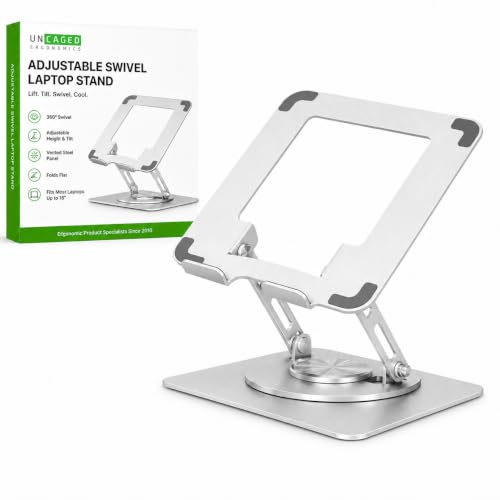
Uncaged Ergonomics Swivel Laptop Stand
What We Like
- 360° rotating base for easy sharing
- Height and tilt adjust for ergonomic typing
- Vented deck keeps laptop cool
- Folds flat for travel
Trade-offs
- Weighs 2.0 lb, heavier than the 0.4 lb Roost V3
- Smaller base than some competitors at 10.6 x 8.2 inches
A full 360-degree rotating base means you can spin your screen to share with a coworker without lifting the laptop or tugging cables, a simple shift that makes collaboration feel natural. This stand also lifts the screen to eye level and tilts the deck for a more comfortable wrist angle, so you’re not hunched over during long calls or typing sessions. The vented cooling channels let warm air escape underneath, helping the machine stay cooler through a full workday. It’s a well-rounded choice for anyone who wants ergonomic support plus the flexibility to pivot between solo focus and quick screen sharing.
The trade-off comes in portability: at 2.0 pounds, it’s heavier than a featherlight option like the Roost V3 (0.4 lb), so it’s less suited for daily bag carry. But it folds flat in one movement, making it easy to stash when you switch desks or work from a cafe. If your priority is a sturdy, adjustable stand that rotates fully and keeps your laptop cool, this one delivers real everyday comfort without locking you into one position.
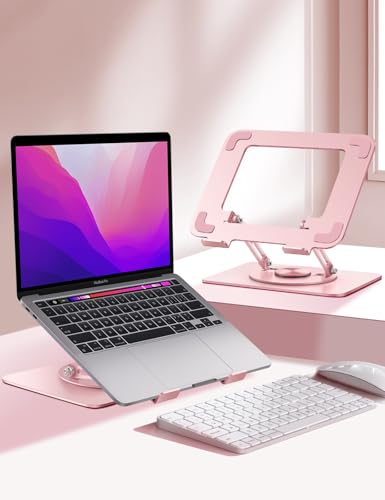
Vaydeer Adjustable Laptop Stand
What We Like
- 360° rotation base for easy sharing
- Supports up to 22 lbs
- Hollow design promotes cooling airflow
Trade-offs
- At 3.6 lb, heavier than some portable stands
- Foldable but not ultra-compact for travel
A 360° rotation base lets you turn the screen toward a colleague without moving the stand itself. Made from solid metal, it holds up to 22 pounds, enough for most 10- to 17.3-inch laptops, including larger gaming models.
The trade-off for that sturdy metal build is weight: at 3.6 pounds, it’s heavier than many portable stands. That makes the Vaydeer less ideal if you need a stand to carry daily. It does fold flat for storage, but it’s not the most portable option. For a desk that stays put, though, the extra heft buys you stability and a full range of motion.
Product photos
Lamicall Aluminum Laptop Stand

What We Like
- Adjustable height and angle
- Large aluminum base for stability
- Ventilation holes prevent overheating
Trade-offs
- No 360-degree rotation for sharing your screen
- Heavier base limits portability for frequent travel
At 0.1 pounds, this stand folds up to fit into a laptop bag, making it a lightweight portable option in this guide. Its adjustable height and angle let you find a comfortable viewing position at a coffee shop or home desk, and the large aluminum base keeps things steady while you type. The multiple ventilation holes help your laptop stay cool during long work sessions. This stand suits anyone who moves between workspaces and wants an ergonomic setup without extra bulk.
That light portability comes with a simpler design that lacks the 360-degree rotation found on some other stands. You will need to reposition the whole stand to face a different direction, which matters if you frequently share your screen or work in tight corners. But when your main goal is a stand that packs small and sets up quickly, this Lamicall delivers that without adding bulk to your daily carry.
Product photos
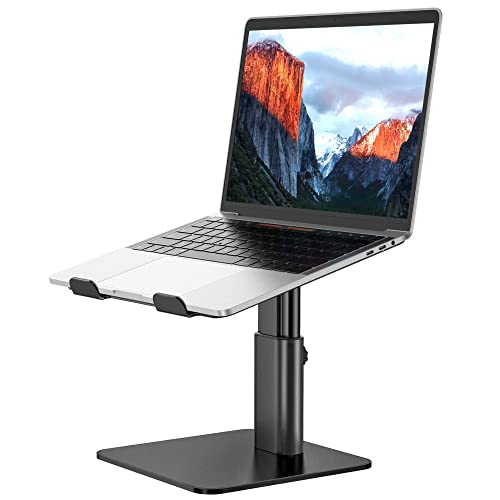
BESIGN LSX6N Laptop Stand
What We Like
- Open aluminum design boosts airflow
- Adjustable height from 5.6 to 8.6 inches
- Sturdy aluminum holds up to 8.8 lbs
- Rubber pads prevent scratches and slipping
Trade-offs
- No swivel adjustment for rotating the laptop
- Manual screw adjustment requires tools to change height
An open aluminum frame that lifts your laptop 5.6 to 8.6 inches off the desk means air can circulate freely underneath, keeping the chassis cool even during long work sessions. This stand is ideal for anyone who runs processor-heavy apps or simply wants to avoid a hot lap. The rubber grips hold the computer securely, and the 8.8-pound weight limit covers most standard notebooks up to 15.6 inches.
The stand’s open aluminum design keeps laptops cool by promoting airflow, which is its main strength over models like the Nulaxy 360° Rotating Laptop Stand that prioritize rotation. It’s a straightforward, ventilated riser for desk users who value cooling over swivel flexibility.
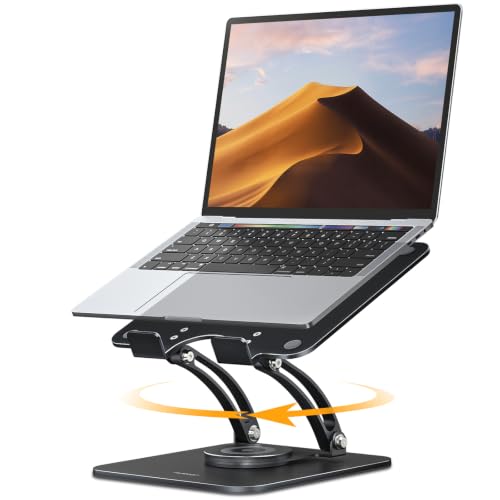
Nulaxy 360° Rotating Laptop Stand
What We Like
- 360° rotating base for easy screen sharing
- 22 lbs load capacity for heavy laptops
- Non-slip silicone pads and baffle hooks
- Foldable design for portability
Trade-offs
- Weighs 1.9 pounds, less portable than lighter stands
- Not ideal for ultralight travel setups
With a 22-pound load capacity, this stand can handle even the heaviest gaming and business laptops without wobbling. The premium damping hinges have passed over 6,000 rotation tests, so your screen stays steady during typing or tapping. Non-slip silicone pads and reinforced baffle hooks keep the laptop locked in place, making it a reliable choice for anyone who needs a sturdy, stable desk setup. The 360° rotating base is a bonus for collaborative work, you can swivel the screen to share without moving the laptop itself.
The trade-off is portability: at 1.9 pounds, it’s heavier than the Roost V3 (0.4 lbs), so it’s less suited for frequent travel. The foldable design does help it flatten for storage, but if you’re constantly packing up for coffee shops or libraries, a lighter option might be better. For a dedicated desk where stability matters most, this stand delivers the rock-solid support that heavy laptop users need.
Roost V3 Laptop Stand
What We Like
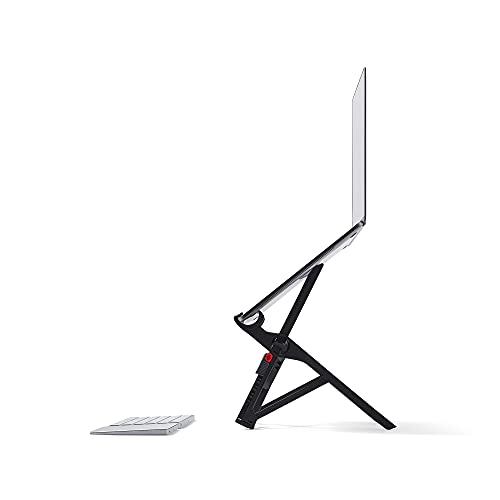
- Weighs only 6 oz
- Packs impossibly thin
- Zero-flex interlocking truss frame
- Self-adjusting PivotGrips for universal fit
Trade-offs
- External keyboard/mouse recommended for ergonomic use
- No built-in rotation or swivel base
At just 6 oz, the Roost V3 is one of the lightest stands in this guide, letting you slip it into a laptop bag without noticing it’s there. That makes it a strong choice for anyone who moves between desks, coffee shops, or co-working spaces. Its interlocking truss frame keeps the screen perfectly still even on a wobbly table, and the self-adjusting grips automatically lock onto laptops from 12 to 18 inches. For the frequent traveler who wants a consistent, ergonomic setup on the go, this stand delivers a stable platform that packs thin.
The Roost V3 is built purely for height adjustment, so there’s no swivel or tilt mechanism like you’ll find on the Uncaged Ergonomics Swivel Laptop Stand. If you frequently share your screen with a coworker or need to rotate your laptop for presentations, you’ll miss that flexibility. Also, because it lifts the screen to an eye-level range of 6.5 to 12.5 inches, an external keyboard and mouse become essential to avoid reaching up to type. That’s a minor inconvenience for the ultralight traveler, but for a fixed desk setup where you want more adjustability, a heavier stand with a rotating base might serve you better.
Nulaxy Telescopic Laptop Stand

What We Like
- 18-inch height adjustment for standing desks
- 360° rotation for easy screen sharing
- Supports up to 22 pounds
- Fits laptops 10 to 17 inches
Trade-offs
- At 4.0 pounds, less portable than lighter stands
- Requires external keyboard and mouse for stable typing
- Must remove laptop before adjusting height or angle
With an 18-inch height range, this stand lets you switch between sitting and standing without hunching or craning your neck. That kind of vertical reach makes it a natural fit for anyone who wants a true standing-desk converter without the bulk of a full desktop riser. The 360-degree rotation is another bonus: you can turn the screen toward a coworker or client without lifting the laptop, which keeps meetings flowing in an open office.
Weight is the trade-off here: at 4.0 pounds, it’s heavier than the Vaydeer Adjustable Laptop Stand (3.6 pounds), so it’s not the most travel-friendly option if you move between desks. You’ll also want a separate keyboard and mouse, because the manufacturer notes that typing on the laptop itself can feel wobbly at full height. For a dedicated workstation where stability and adjustability matter more than portability, this stand delivers exactly what it promises.
Gogoonike Metal Laptop Stand

What We Like
- Adjustable height and angle
- Foldable for easy portability
- Ventilated design for heat dissipation
- Anti-skid silicone pads protect device
Trade-offs
- No rotation or swivel feature
- Only supports up to 17.6 lbs
At just 1.7 pounds and folding flat, this metal stand slips into any backpack without adding bulk, perfect for the freelancer or student who moves between coffee shops and co-working spaces. The adjustable height and angle let you dial in a comfortable viewing position, while the open ventilated top keeps your laptop from overheating during long work sessions. Rubber mats and anti-skid pads hold your device securely, so you can type without worrying about slips or scratches.
That portability comes at the cost of a swivel feature, so you’ll need to reposition the whole stand if you want to share your screen. Still, for anyone who wants a lightweight, budget-friendly stand they can toss in a bag and set up anywhere, this one delivers exactly what it promises.
Product photos
JCZT 360° Rotating Laptop Stand
What We Like
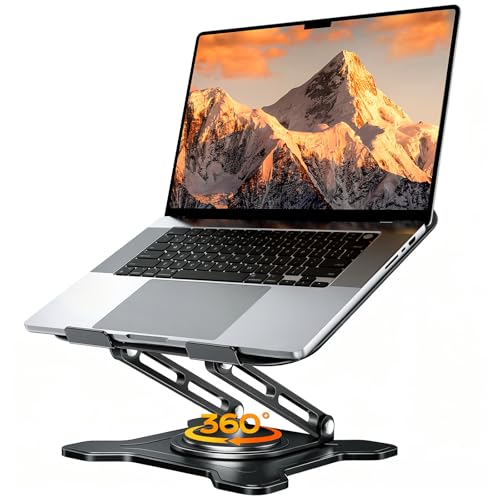
- Smooth 360° dual-axis swivel base
- One-piece fiber metal for durability
- Folds compact for travel
- Open design promotes airflow cooling
Trade-offs
- At 3.0 lb, heavier than many portable stands
- Fixed 1.8-inch height limits ergonomic range
A 360° rotating base on a metal frame lets you turn the laptop to share your screen with a coworker or client without lifting a finger. That dual-axis swivel is the standout feature here, making this stand ideal for collaborative workspaces or anyone who frequently switches between portrait and landscape views. The one-piece fiber metal build feels sturdy and stable, and the open, suspended design helps keep your laptop cool during long sessions. It folds down to a compact size for slipping into a backpack, though at 3 pounds it’s not the lightest travel companion.
That full rotation comes with a fixed height of just 1.8 inches, so it won’t lift the screen as high as adjustable stands like the Vaydeer Adjustable Laptop Stand. If you need a taller lift for standing desk use or prefer more tilt flexibility, this might feel restrictive. But for desk work where screen sharing and a stable, ventilated base matter most, the JCZT delivers a solid, space-saving solution.
Product photos
RIWUCT Aluminum Alloy Laptop Stand

What We Like
- Folds flat for easy storage
- Adjustable height up to 7.48 inches
- Non-slip pads and straps for stability
- Open design helps with heat ventilation
Trade-offs
- No built-in rotation or swivel
- At 1.3 pounds, not ultra-light for travel
- Requires external keyboard for intense typing
Raising your laptop up to 7.48 inches helps you find a comfortable viewing angle at a desk. Made from aluminum alloy, this stand feels sturdy and supports up to 8.8 pounds without shaking. It folds for easy storage, so you can tuck it into a bag or drawer when not in use. That makes it a practical choice for anyone who moves between workstations or wants to keep their desk clutter-free. The open two-hand design also leaves plenty of room for airflow, helping your laptop stay cool during long sessions.
The trade-off here is that this stand doesn’t swivel or rotate, so you’ll need to reposition your whole setup to face a different direction. The manufacturer also recommends using an external keyboard during intense typing. For someone who values portability and basic ergonomic lift over extra motion features, this is a smart, affordable pick.
Product photos
How We Evaluated Laptop Stands For Desk
Our evaluation is research-based. We examined manufacturer specifications, design materials, and load capacities. We also reviewed expert round-ups from ergonomic and productivity sources, and looked for consistent patterns in owner feedback about real-world use.
We focused on four criteria that matter most for a desk stand. Stability came first: a stand must hold your laptop securely without wobbling during typing. Adjustability followed, including height range, tilt angles, and any rotation or swivel features. Cooling was important because many laptops run hot. A ventilated deck or open design helps prevent throttling. Portability mattered for those who move between desks or work remotely.
An evaluation based on published information has limits. The conclusions are drawn from published specs, expert consensus, and what owners commonly report. This approach helps you narrow down the field, but your personal ergonomic needs and desk setup should guide the final choice.
What To Look For In Laptop Stands For Desk
Choosing a laptop stand comes down to how you work. The right stand supports your posture, keeps your laptop cool, and fits your desk space without taking over.
Look for a stand that lifts your screen to eye level, has a stable base for typing, and offers enough airflow to keep your laptop from overheating. Height adjustability and a rotating base add flexibility for sharing your screen or switching between sitting and standing.
Stability and Build Quality
A stable stand prevents wobble during typing and keeps your laptop secure. Look for aluminum or steel construction with non-slip pads or silicone grips. Check the load capacity: heavier laptops need a stand rated for at least 8 to 10 pounds, while some heavy-duty models support up to 22 pounds. A wide base also improves stability, especially if you use an external keyboard and mouse.
Adjustability and Ergonomics
The best ergonomic height puts your screen at or slightly below eye level, with the top of the monitor about two to three inches above your eyes. Look for stands that offer height adjustment, tilt angles, or both. Some models offer 360° rotation, which is helpful for sharing your screen with a coworker or switching between landscape and portrait orientation. If you use a standing desk, a telescopic stand with a wider height range lets you alternate between sitting and standing.
Cooling and Airflow
Laptops generate heat, especially during long work sessions or demanding tasks. A ventilated deck with open slots or a hollow aluminum design allows air to circulate underneath the laptop. Some stands use a mesh or perforated surface to promote passive cooling. If your laptop runs hot, prioritize a stand with an open design rather than a solid platform.
- Check the stand’s height range to see if it matches your desk and chair setup.
- Measure your laptop’s width and depth to ensure it fits the stand’s deck.
- If you travel, weigh the stand and check its folded dimensions.
- Look for rubber or silicone pads that protect your laptop from scratches.
- Consider whether you need a rotating base for screen sharing.
A simple rule: the more time you spend at your desk, the more you should invest in adjustability and stability.
Laptop Stands For Desk Compared
The table below compares the key specs of all ten laptop stands, including weight, height adjustment, rotation, and load capacity, so you can see at a glance which model fits your desk needs.
| Product | Weight | Adjustability | Compatibility |
|---|---|---|---|
| Uncaged Ergonomics Swivel Laptop Stand | 2.0 lb | Height and tilt adjustable | N/A |
| Vaydeer Adjustable Laptop Stand | 3.6 pounds | 0° to 180° tilt and height adjustments | 10" to 17.3" laptops |
| Lamicall Aluminum Laptop Stand | 0.1 pounds | Height and angle | 10" to 17.3" laptops |
| BESIGN LSX6N Laptop Stand | 2.2 pounds | Height and angle | 10-15.6" laptops |
| Nulaxy 360° Rotating Laptop Stand | 1.9 pounds | Height and angle | 10-16" laptops |
| Roost V3 Laptop Stand | 0.4 pounds | Height range 6.5-12.5" | 12-18" |
| Nulaxy Telescopic Laptop Stand | 4.0 pounds | Height and tilt angle | 10-17 inch laptops |
| Gogoonike Metal Laptop Stand | 1.7 pounds | Height and angle | 10-15.6" laptops |
| JCZT 360° Rotating Laptop Stand | 3.0 pounds | Height and angle | 10-16 inch laptops |
| RIWUCT Aluminum Alloy Laptop Stand | 1.3 pounds | Height up to 7.48 inches | 10-16 inch laptops |
Frequently Asked Questions
What height should a laptop stand be for ergonomic typing?
The ideal height puts the top of your screen at or slightly below eye level. For most people, that means raising the laptop several inches above the desk surface. You should also tilt the screen back slightly to reduce glare. An external keyboard and mouse are recommended when using a raised stand.
Do laptop stands help with overheating?
Yes, many laptop stands improve airflow by lifting the laptop off the desk and allowing air to circulate underneath. Stands with open aluminum designs, ventilation holes, or mesh surfaces are especially effective at passive cooling. This can help prevent thermal throttling during demanding tasks.
Are rotating laptop stands worth it?
Rotating stands are useful if you frequently share your screen with a coworker or switch between portrait and landscape orientation. A 360° swivel base lets you turn the laptop without moving the stand itself. If you work alone at a fixed desk, rotation is less essential.
Can I use a laptop stand with a standing desk?
Yes, many laptop stands work well with standing desks. For the best experience, look for a telescopic or height-adjustable stand that can reach the higher range needed for standing. Some models offer up to 18 inches of height adjustment, which pairs well with a standing desk converter.
What is the best laptop stand for travel?
The Roost V3 is a top choice for travel because it weighs only 6 ounces and folds into a compact, thin shape that fits easily in a bag. It uses a self-adjusting grip system to hold different laptop sizes securely. Keep in mind that it does not include a rotating base.
The Bottom Line
The Uncaged Ergonomics Swivel Laptop Stand is the best overall pick for most desk workers. It combines a 360° rotating base with height and tilt adjustments, a vented deck for cooling, and a foldable design for occasional travel. It is ideal for anyone who wants a sturdy, ergonomic stand without sacrificing the ability to share their screen.
If you travel frequently and need the lightest possible option, the Roost V3 is the best ultralight choice at just 6 ounces. For collaborative desk setups where you often turn your screen toward a colleague, the Vaydeer Adjustable Laptop Stand offers a sturdy rotating base and supports heavier laptops.
The single most important factor is adjustability: a stand that lets you set the right height and angle for your body will make the biggest difference in your comfort and posture. Choose one that fits your desk, your laptop, and how you actually work.
