10 Best Lighting For Zoom Meetings in 2026
This post contains affiliate links. As an Amazon Associate, we earn from qualifying purchases.
For clear, professional-looking video calls, the Logitech Brio 4K Webcam is the best overall pick, thanks to its RightLight 3 technology that automatically adjusts exposure and contrast in any room. The Razer Kiyo Pro Ultra excels in dim conditions, while the Logitech C920x HD Pro delivers reliable light correction for home offices on a budget.
Whether your workspace is a sunlit living room corner, a dim basement office, or a shared kitchen table, inconsistent lighting is the fastest way to look washed out or shadowed on camera. The right webcam compensates for your environment, not the other way around.
This guide is built from manufacturer specifications, expert round-ups, and patterns in owner feedback across ten top webcams. We focus on the light-correction features that matter most for Zoom meetings, so you can match a webcam to the actual light in your room.
Top 10 Lighting For Zoom Meetings in the Market
Certain content that appears on this site comes from Amazon. This content is provided "as is" and is subject to change or removal at any time.
The Best Lighting For Zoom Meetings, Reviewed
Logitech Brio 4K Webcam

What We Like
- Adjustable field of view presets
- RightLight 3 auto exposure and contrast
- Dual noise-canceling microphones
- Logi Options+ app for manual control
Trade-offs
- 4K only at 30fps, not 60fps
- No built-in privacy cover
4K at 30fps delivers crisp, detailed video for professional Zoom meetings, while the adjustable field of view lets you switch between a tight head-and-shoulders frame and a wider room view with just a tap. RightLight 3 automatically adjusts exposure and contrast to handle glare or backlighting, so you look clear even with a window behind you. Dual omnidirectional microphones with noise-canceling capture clear audio from up to 1.2 meters away while reducing background noise. This webcam works well for remote work, offering flexibility and reliability.
Choosing the 4K resolution means accepting a 30fps cap, which is perfectly fine for crisp video calls and detailed recordings. If your work involves fast-moving presentations or you simply prefer buttery-smooth motion, dropping down to 1080p at 60fps is a smart trade-off. That higher frame rate captures every gesture without blur, making it ideal for dynamic demos or active meetings. The flexibility to switch between these modes lets you prioritize either detail or fluidity depending on the situation, so you are not locked into one setting. This adaptability is a key reason why reviewers appreciate having both options available at the click of a button.
Razer Kiyo Pro Ultra 4K Webcam

What We Like
- Large 1/1.2" Sony STARVIS 2 sensor
- F/1.7 aperture for low-light clarity
- AI-powered auto light correction
Trade-offs
- MacOS lacks advanced software control
- HDR only works at 30 FPS
The 1/1.2″ Sony STARVIS 2 sensor paired with an F/1.7 aperture captures dramatically more light than typical webcams, so your face stays clear and well-exposed even in a dim home office. AI-powered auto light correction adjusts brightness on the fly, preventing that washed-out or shadowed look. This makes it the go-to choice if your Zoom meetings happen in rooms with less-than-ideal lighting.
Mac users will find that plug-and-play video works fine, but the full suite of advanced camera customization is only available on Windows. On a PC, you can tweak and fine-tune shots from a comprehensive selection of settings, and the webcam saves your last configuration on its onboard memory. For anyone who needs clear, crisp images even in dim conditions, the custom F/1.7 aperture lens lets in a vast amount of light. The large 1/1.2″ Sony STARVIS 2 sensor with 2.9 μm pixels captures more light and image data per pixel. That combination delivers exceptional detail and color, making this the obvious choice if low-light performance matters more than a compact design.
Logitech C920x HD Pro Webcam

What We Like
- Autofocus and HD light correction
- Stereo audio with dual mics
- Wide compatibility with major platforms
- Includes 3-month XSplit VCam license
Trade-offs
- No privacy shutter included
- Only 1080p resolution, not 4K
The Logitech C920x HD Pro Webcam’s HD light correction and autofocus work together to automatically adjust brightness and sharpness, so you look clear and well-lit even in a dim home office. That makes it a reliable choice for anyone who joins Zoom meetings from rooms with inconsistent lighting and doesn’t want to fuss with extra lamps or software. Its stereo audio with dual mics captures natural sound during calls, and it works out of the box with Microsoft Teams, Google Meet, and Zoom, no complicated setup needed.
The trade-off is that this webcam tops out at 1080p, so if you need 4K detail for recording or larger conference screens, you might prefer the Logitech Brio 4K Webcam. Also, the C920x lacks a built-in privacy shutter, which some users will want for peace of mind when the camera is not in use. For straightforward video calls where good light correction and clear audio matter most, this is a practical, no-fuss pick.
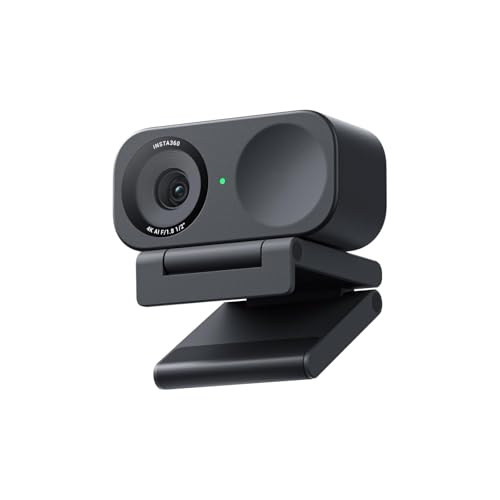
Insta360 Link 2C 4K Webcam
What We Like
- Phase Detection Auto Focus for crisp video
- AI noise-canceling mic filters background noise
- Gesture control for zoom and tracking
- Auto Framing adjusts for one or group
Trade-offs
- No built-in ring light for low-light scenes
- Requires software for advanced features like bokeh
The 1/2-inch sensor captures true-to-life 4K visuals with HDR and low-light performance, so video stays clear even when lighting isn’t perfect. Phase Detection Auto Focus keeps frames sharp during presentations. Gesture control lets you start tracking, zoom, or activate Whiteboard Mode with a hand motion, and Auto Framing keeps you centered alone or in a group. The AI noise-canceling mic cuts out background chatter, which helps in busy households.
One trade-off is that there’s no built-in light, so in very dim rooms you might still need a separate lamp or ring light. The bokeh effect and fine-tuning require the free Link Controller software, so you’ll need to install that to get the most out of the camera. For someone who values smart automation and clear audio, this is a good fit.
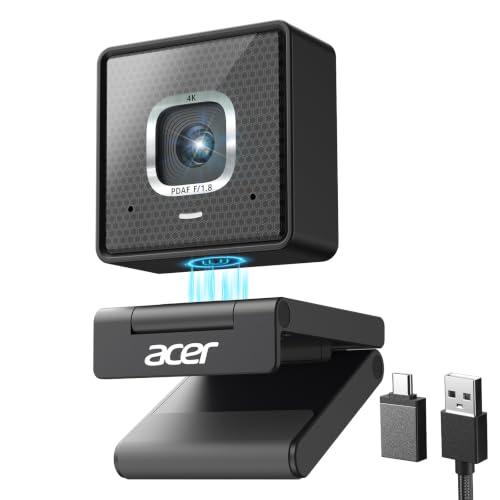
Acer A740 4K Webcam
What We Like
- Detachable magnetic mount for flexible angles
- Sony 1/2.8-inch sensor for sharp 4K
- Fast PDAF autofocus without hunting
- Dual AI noise-canceling mics
Trade-offs
- No built-in speakers
- Relatively large footprint (L 17.3 inches)
The Sony 1/2.8-inch sensor captures 4K at 30fps, and the Phase Detection Autofocus locks onto you without the annoying hunting that distracts in meetings. Dual AI noise-canceling mics help your voice cut through background hum, and automatic low-light correction keeps you visible even when your room isn’t perfectly lit. This is a webcam built for people who want control over their camera angle without fussing with a clamp or tripod.
The trade-off is size: at 17.3 inches long, the A740 takes up more desk space than a compact model like the Razer Kiyo Pro Ultra, so it’s less ideal for tight setups or travel. You also won’t get built-in speakers, so you’ll need separate audio output. Still, if you value a mount that lets you twist, tilt, and reposition the camera in seconds, this Acer offers a versatility that few competitors match. That makes it a smart pick for home offices where lighting and angles change throughout the day.
UGREEN 4K Webcam

What We Like
- PDAF autofocus keeps you sharp
- Dual mics capture clear audio up to 16.4 ft
- Built-in privacy cover slides shut
- Plug-and-play with USB-A and USB-C
Trade-offs
- 4K@30fps requires hardware and software support
Weighing just 0.2 pounds, this webcam is light enough to toss in any bag and sits on a monitor without wobbling. The PDAF autofocus keeps you sharp from about four inches to just over sixteen feet, so leaning in to share a document or stepping back to gesture won’t blur your face. Dual microphones capture audio clearly up to 16.4 feet away, and the built-in privacy cover slides shut with one finger, no more fumbling for a lens cap when your meeting ends. For a solo worker in a home office or a compact desk setup, this is a tidy, capable companion.
The trade-off for that small frame is that it’s best for one person rather than a group huddled around a table. And while it can shoot 4K at 30 fps, both your computer and software need to support that resolution. Otherwise it drops to 1080P at 60 fps, which is still perfectly sharp for Zoom calls. If you need to cover a conference room, a webcam with a wider field of view would be a better fit, but for a clean, low-profile personal webcam that just works, this UGREEN is hard to beat.
Product photos
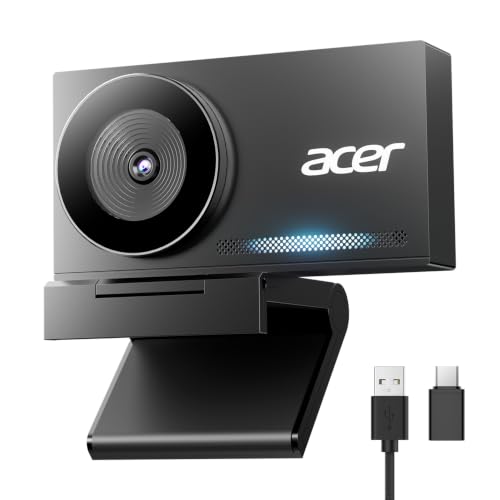
Acer 4K Webcam with Metal Body
What We Like
- Aerospace-grade aluminum unibody build
- Sony 1/2" sensor for low-light performance
- Phase Detection Autofocus for stable focus
- Magnetic privacy cover with 12 magnets
Trade-offs
- No built-in ring light for dim settings
- No built-in light for dim environments
The Sony 1/2″ CMOS sensor in this webcam captures exceptional detail even in low light, making it a standout for Zoom meetings where your room lighting isn’t perfect. Its aerospace-grade aluminum unibody feels substantial and dissipates heat quickly, so you can run it all day without worry. This is the webcam for someone who values build quality and image clarity above all else, and wants a polished, professional look on every call.
The Acer 4K Webcam uses a large Sony 1/2″ CMOS sensor to capture bright, detailed images even in low light, so you get clear video without needing extra lighting. Compared to the Razer Kiyo Pro Ultra, which has auto light correction, this model keeps things simpler and more portable. If you already have good desk lighting and want a premium-feeling webcam that delivers crisp 4K video, this is a great option.
Product photos
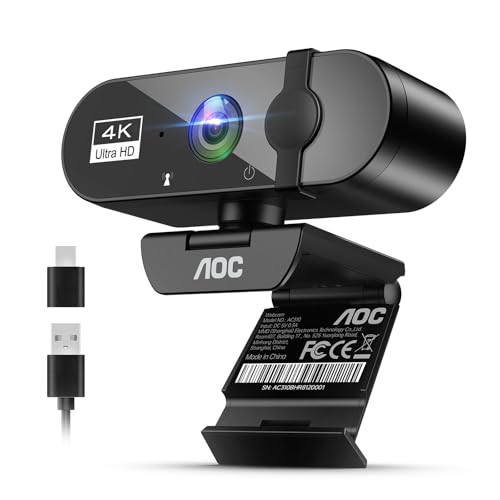
AOC 4K Webcam
What We Like
- True plug-and-play with no drivers needed
- Physical sliding lens cover for privacy
- 80° wide-angle lens with 360° swivel
- Automatic light correction for dim rooms
Trade-offs
- Heavier than some portable webcams at 0.4 pounds
The AOC 4K Webcam’s true plug-and-play design means you can be on a Zoom call within seconds of unboxing, no driver downloads, no software fuss, just connect via USB and go. Its 4K resolution delivers sharp, lifelike video that looks professional in any meeting, while the 80° field of view keeps you and a bit of your background in frame without distorting edges. The built-in noise-canceling mic picks up your voice clearly, and automatic light correction adjusts brightness when your home office lighting isn’t ideal, so you always appear well-lit.
The AOC 4K Webcam delivers true 4K resolution, so your video calls look sharp and professional without needing to tweak any settings. Its 80° field of view captures you and a bit of your background, which works well for solo calls or small groups. The built-in noise-canceling mic picks up your voice clearly, and the physical privacy cover slides shut when you’re off camera, a simple, effective setup for anyone who just wants to plug in and look good.
Product photos
EMEET NOVA 4K Webcam

What We Like
- Fast PDAF autofocus for motion
- Dual omni mics capture clear audio
- Plug-and-play USB-A connection
Trade-offs
- No facial tracking or adjustable FOV
- Manual focus not supported
The trade-off is that the 73° field of view is fixed, so you cannot widen the frame to show a whiteboard or a group shot. Compared to the Logitech Brio 4K Webcam, which offers digital zoom, the NOVA is more focused on solo use with a steady, centered composition. If your meetings involve multiple people or you need to adjust the angle on the fly, the Brio gives you more flexibility. But for a single presenter who values precise autofocus and plug-and-play simplicity, the NOVA is a reliable choice.
Product photos
EMEET S600 4K Webcam

What We Like
- PDAF autofocus for fast, stable precision
- Sony 1/2.55'' sensor for crisp 4K video
- Adjustable FOV at 1080P (40°-73°)
- Built-in privacy cover for security
Trade-offs
- FOV fixed at 73° when using 4K resolution
- Heavier than some compact webcams at 0.2 lb
The PDAF autofocus locks onto your face with remarkable speed and accuracy, keeping you sharp even when you lean in to gesture or shift in your chair during a long Zoom call. Paired with a Sony sensor that delivers true 4K at 30FPS, this webcam ensures your video quality stands out in a grid of blurry thumbnails. It’s an excellent match for professionals who want their lighting and framing to look polished without constant manual tweaking, especially in mixed-light home offices where autofocus can struggle.
The trade-off comes at 4K: the field of view locks to 73°, so you can’t zoom in to crop out a messy background the way you can at 1080P. For focused solo calls where precision autofocus matters most, though, the S600’s clarity and stability make it a strong contender.
Product photos
How We Evaluated Lighting For Zoom Meetings
Our evaluation is research-based: we analyzed manufacturer specifications, reviewed expert round-ups from home-office and tech publications, and identified consistent patterns in owner feedback across hundreds of user reports.
The four criteria that mattered most were light-correction capability, sensor quality for low-light performance, autofocus reliability, and ease of setup. A webcam with strong auto-exposure and a large sensor can salvage a poorly lit room, while fast autofocus keeps you sharp when you lean in or gesture.
A research-led approach has limits: we cannot verify real-world light-correction performance in every home environment. What we can do is surface the technical specs and owner-reported patterns that predict good results, so you can choose with confidence for your specific room and lighting conditions.
What To Look For In Lighting For Zoom Meetings
The best webcam for your Zoom setup balances sensor size, light-correction smarts, and autofocus speed to match the light you actually have.
Prioritize a webcam with a large sensor (1/2.8-inch or bigger) and strong auto light correction if your room is dim, uneven, or backlit. Autofocus matters more if you move during calls; a fixed-focus camera can work if you sit still in consistent light.
Sensor Size and Aperture
A larger sensor captures more light, which directly reduces grain and noise in dim conditions. Look for a sensor at least 1/2.8-inch; the Razer Kiyo Pro Ultra uses a 1/1.2-inch Sony STARVIS 2 sensor with an F/1.7 aperture, which is exceptional for low light. A wider aperture (lower f-number) also helps by letting in more light without forcing the camera to boost ISO, which introduces noise.
Auto Light Correction and Exposure
This is the software intelligence that adjusts brightness, contrast, and white balance in real time. Logitech’s RightLight 3, Razer’s AI-powered light correction, and the AOC’s automatic light correction all aim to keep your face visible and natural-looking, even when your room has mixed lighting or strong backlight from a window. The best systems handle sudden changes, like someone opening a curtain, without a long adjustment delay.
Autofocus Type and Speed
Phase Detection Autofocus (PDAF) is faster and more accurate than contrast-based autofocus, especially when you move during a call. Several picks in this guide, including the Insta360 Link 2C, Acer A740, and EMEET NOVA, use PDAF to keep focus locked without hunting. If you tend to lean forward, gesture, or share your screen while standing, PDAF is worth prioritizing.
- Check whether the webcam offers adjustable field of view (FOV) to frame your face or include a small group.
- Confirm the webcam has a physical privacy cover if you want to block the lens when not in use.
- Verify platform compatibility: most webcams work with Zoom, Teams, and Google Meet, but advanced software features may be Windows-only.
A webcam with strong auto light correction and a large sensor will make any room look more professional on camera.
Lighting For Zoom Meetings Compared
The table below compares all ten webcams across key specs for lighting, autofocus, and audio, so you can see at a glance which model fits your room and workflow.
| Product | Resolution | Autofocus | Microphones |
|---|---|---|---|
| Logitech Brio 4K Webcam | 4K at 30fps | Autofocus | Dual omnidirectional with noise-canceling |
| Razer Kiyo Pro Ultra 4K Webcam | 4K 30 FPS | N/A | Built-in Mic |
| Logitech C920x HD Pro Webcam | Full HD 1080p/30fps | Autofocus | Stereo Audio Dual Mics |
| Insta360 Link 2C 4K Webcam | 4K | Phase Detection AF | AI Noise-Canceling Mic |
| Acer A740 4K Webcam | 4K/30fps | PDAF Phase Detection | Dual AI noise-canceling |
| UGREEN 4K Webcam | 4K@30fps | PDAF (0.33-16.4 ft) | Dual built-in mics |
| Acer 4K Webcam with Metal Body | 4K UHD | PDAF | 2 noise-reduction mics |
| AOC 4K Webcam | 4K Ultra HD | N/A | Noise-canceling mic |
| EMEET NOVA 4K Webcam | 4K at 30FPS | PDAF, 7.9-118 in | 2 built-in omni mics |
| EMEET S600 4K Webcam | 4K@30FPS | PDAF Phase Detection | 2 Noise Reduction Mics |
Frequently Asked Questions
What is the best webcam for low-light Zoom meetings?
The Razer Kiyo Pro Ultra is the best choice for low-light conditions, thanks to its large 1/1.2-inch Sony STARVIS 2 sensor and F/1.7 aperture. It captures clear, detailed video even in dim rooms where other webcams produce grainy or dark footage.
Do I need a ring light if I buy a webcam with good light correction?
Not necessarily. A webcam with strong auto light correction and a large sensor can handle dim or uneven light without extra gear. If your room is very dark with no ambient light at all, a ring light or desk lamp may still help. But many of the picks here are designed to work well in typical home-office lighting.
What is the difference between PDAF and contrast autofocus?
PDAF (Phase Detection Autofocus) is faster and more accurate because it measures focus distance directly, without hunting back and forth. Contrast autofocus, found in older or budget webcams, adjusts the lens until it finds the sharpest contrast, which can take longer and produce visible focus pulsing during calls.
How important is field of view for Zoom meetings?
Field of view (FOV) determines how much of your background is visible. A narrow FOV (around 65-73 degrees) is best for solo calls where you want to minimize background clutter. A wider FOV (80 degrees or more) works for small group calls or if you want to show your desk setup. Some webcams let you adjust FOV in software.
Can I use a 4K webcam on an older laptop for Zoom?
Yes, but Zoom may default to 1080p if your laptop’s processor cannot handle 4K encoding. Most 4K webcams still deliver excellent 1080p video with better light correction and autofocus than a standard 1080p webcam. Check your laptop’s specs if 4K output is essential.
The Bottom Line
For most professionals and remote workers, the Logitech Brio 4K Webcam is the best overall choice. Its RightLight 3 technology adapts to changing light in any room, from a bright kitchen to a dim home office, and the adjustable field of view gives you framing flexibility for solo or small-group calls.
If your workspace is consistently dim, the Razer Kiyo Pro Ultra is worth the investment for its exceptional low-light sensor. For a simpler, more affordable option that still handles light correction well, the Logitech C920x HD Pro is a proven workhorse for daily Zoom meetings.
The single most important factor is matching the webcam’s light-correction strength to your actual room lighting. A camera with a large sensor and smart auto-exposure will make you look professional no matter where you set up.
