9 Best Office Chairs For Neck Pain in 2026
This post contains affiliate links. As an Amazon Associate, we earn from qualifying purchases.
The CASASIO Ergonomic Office Chair is our best overall pick for neck pain relief, thanks to its 3D adjustable headrest that cradles the neck and a dual-direction lumbar cushion that reduces fatigue. For those who need even more headrest customization, the ELABEST T23 offers a 2.5-inch vertical range, while the CAPOT provides micro-adjust lumbar support with eight levels.
Neck pain from sitting often stems from a chain reaction: poor lumbar support leads to slouching, which forces your head forward, straining your cervical spine. The right chair interrupts this cycle by supporting your lower back and allowing your headrest to meet your neck at a neutral angle.
This guide is based on a thorough evaluation of specifications, manufacturer data, expert round-ups, and patterns in owner feedback. We focused on the key features that directly impact neck comfort, helping you choose with confidence.
Top 9 Office Chairs For Neck Pain in the Market
Certain content that appears on this site comes from Amazon. This content is provided "as is" and is subject to change or removal at any time.
The Best Office Chairs For Neck Pain, Reviewed
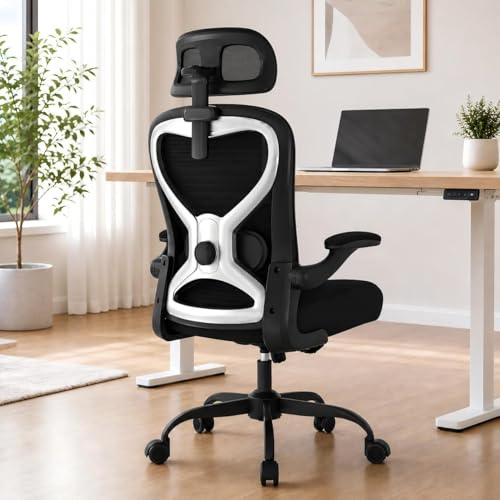
CASASIO Ergonomic Office Chair
What We Like
- 3D adjustable headrest cradles neck and head
- Dual-direction adjustable lumbar cushion reduces fatigue
- Virgin foam seat prevents soreness after 8+ hours
- Tilt and rock motion relieves tension
Trade-offs
- Flip-up armrests lack depth or width adjustment
- No tilt lock for fixed recline angle
A 3D adjustable headrest that moves in height, depth, and angle means you can dial in exactly the neck support that keeps your head aligned during long work sessions. That kind of precision is rare at this level, and it pairs beautifully with a dual-direction adjustable lumbar cushion that targets lower back fatigue. The virgin foam seat is thick enough to prevent soreness even after eight hours, and the breathable mesh back keeps you cool. This chair is built for someone who spends full days at a desk and refuses to compromise on comfort.
The trade-off is that the flip-up armrests are simple, they tuck away neatly but don’t offer the depth or width adjustments you might want for fine-tuning elbow position. Compared to the Steelcase Gesture, which offers more arm and recline adjustments, the CASASIO is lighter and easier to move, but it asks you to accept a simpler approach to arm support. For the price, the neck and lumbar support are outstanding.
ELABEST T23 Ergonomic Office Chair

What We Like
- 3D headrest with 2.5" vertical range
- 2D lumbar adjusts depth and height
- 3D armrests reduce shoulder fatigue
- BIFMA 5.1 certified durability
Trade-offs
- No flip-up armrests for tight spaces
- 3D armrests lack flip-up design for tight spaces
The 3D headrest moves 2.5 inches up and down, rotates 90 degrees, and flips 100 degrees, so you can dial in neck support while typing upright or leaning back for a break. The 2D lumbar support adds another layer of customization, letting you tweak both height and depth to match your lower back curve.
The mesh seat, while breathable, won’t feel as plush as a thick foam cushion. That’s something to consider if you prefer a softer sit. Compared to the SIHOO M18, which has 2D armrests, the T23 gives you 3D armrests for more upper-body alignment options. It’s a well-built chair for anyone who needs precise neck and shoulder relief without jumping to premium price tiers.
Product photos
CAPOT Ergonomic Mesh Office Chair

What We Like
- Micro-adjust lumbar with 8 levels
- Cooling Aerovith Mesh seat
- 400 lb weight capacity
- 5-year warranty with free parts
Trade-offs
- Headrest only adjusts in height and depth
- Armrests flip up but lack 4D adjustment
- Backrest tilt limited to 3 lock angles
The CAPOT Ergonomic Mesh Office Chair’s 2-inch, 8-level micro-adjust lumbar support targets the L1-L5 spine precisely, reducing lower back pressure by 50%, a huge relief for anyone who spends eight-plus hours at a desk. The cooling Aerovith Mesh seat boosts support by 30% while cutting pelvic pressure by 20%, so you stay comfortable and less fatigued through long workdays. It suits people from 5’5″ to 6’2″, with a flexible headrest that adjusts in both height and depth for tailored neck support, and a backrest that locks at 90, 110, or 125 degrees to match your focus needs.
One limitation is that the headrest only moves in height and depth, not tilt or rotation. That may limit fine-tuning for some neck pain sufferers. The armrests flip up to save space, and the backrest offers three lock angles. Still, for targeted lumbar support and cooling comfort at a weight capacity of 400 lbs, this chair delivers where it counts.
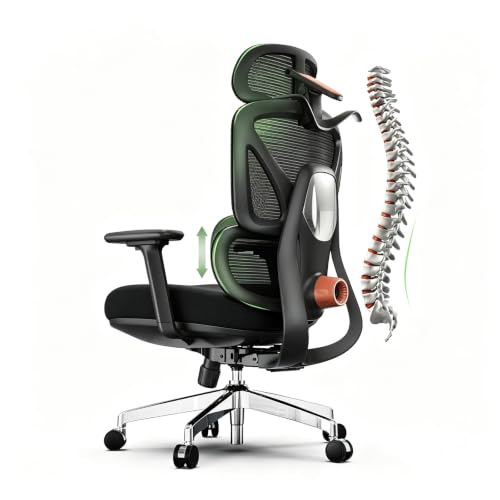
Ergoa Ergonomic Mesh Office Chair
What We Like
- 8-position lumbar support for personalized fit
- 11-position 3D headrest targets neck pain
- 4D armrests reduce shoulder strain
- Breathable mesh keeps you cool
Trade-offs
- At 48 lb, heavier than many alternatives
- Heavy 48-lb frame makes repositioning a chore
The 4D armrests adjust up, down, in, out, forward, back, and rotate 45 degrees, so you can park your elbows exactly where they feel natural and ease shoulder tension during a long day. That kind of fine-tuning pairs with a breathable mesh back that keeps air moving, which means you stay cool even when you’re planted for hours. The adjustable lumbar support and headrest add more ways to dial in comfort, making this chair a practical fit for anyone who can’t find relief in a one-size-fits-all seat.
At 48 pounds, it’s noticeably heavier than the CASASIO (30 lb), so moving it around the room takes more effort. But that solid build also supports up to 400 pounds, making it a sturdy option for bigger frames. The recline goes from 90 to 135 degrees with three lockable positions, and the lumbar support adjusts automatically as you lean back to keep your spine aligned. If you need a chair that adapts to your body rather than the other way around, this one delivers without compromise.
Product photos
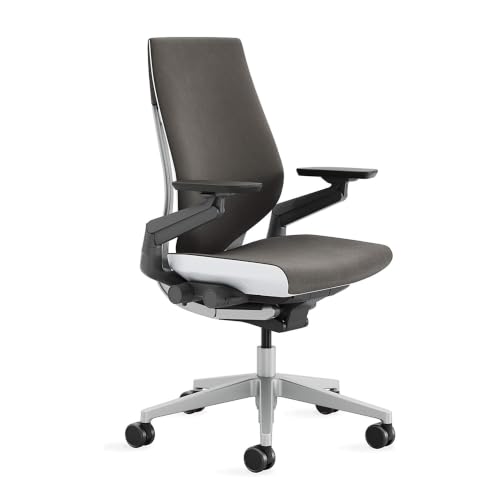
Steelcase Gesture Office Chair
What We Like
- 360-degree arms for any posture
- Contoured back follows spine's natural shape
- Intuitive adjustments within arm's reach
- Full recline range with upright lock
Trade-offs
- At 70 pounds, very heavy to move
- Wheels designed only for carpet floors
The Steelcase Gesture’s 360-degree arms are its standout feature, letting you support your elbows and shoulders in virtually any position you naturally shift into during long work sessions. That freedom of movement is paired with a contoured back that mirrors your spine’s curve, so even when you lean back into the full recline range (with three lockable settings), your lower back stays supported. It’s a chair built for people who change postures constantly and need a precise, intuitive fit, the adjustments are all on the right side, right where your hand falls.
At 70 pounds, the Gesture is a heavy chair that stays put once you place it. Rearranging your setup isn’t a quick task, and its carpet-only wheels mean you’ll need to swap them if your home office has hard floors. Compared to the lighter, mesh-backed ELABEST T23, the Gesture offers far more arm adjustability. For someone who values arm support above all and doesn’t move their chair often, this is a premium, long-term investment.
Product photos
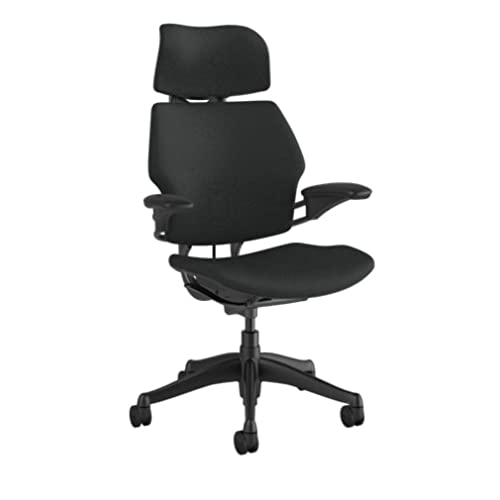
Humanscale Freedom Office Chair
What We Like
- Responsive backrest adapts to spine
- Near consistent eye level while reclining
- Contoured cushions reduce pressure points
- Includes adjustable headrest
Trade-offs
- At 38 pounds, it's heavy to move
- Armrests are height-adjustable only, not 4D
The pivoting backrest automatically adapts to your spine as you lean back, so you don’t have to fiddle with levers or knobs to find the right recline tension. This means the chair responds to your movements naturally, keeping your eye level nearly constant even as you shift positions, a real benefit if you tend to change posture throughout the day while working. The contoured cushions follow your body’s shape, spreading your weight more evenly and reducing concentrated pressure points that can lead to discomfort. With a headrest included, it offers solid support for your neck during those moments when you want to lean back and rest your head.
That said, the Freedom Chair’s backrest shape is fixed, so if you prefer a chair with a separate lumbar adjustment dial, this model won’t offer that. At 38 pounds, it’s also on the heavier side, so moving it between rooms isn’t a quick task. This chair is best for someone who values a simple, intuitive recline that moves with them, rather than a seat with lots of separate adjustments to tweak.
Product photos
SIHOO M18 Ergonomic Office Chair
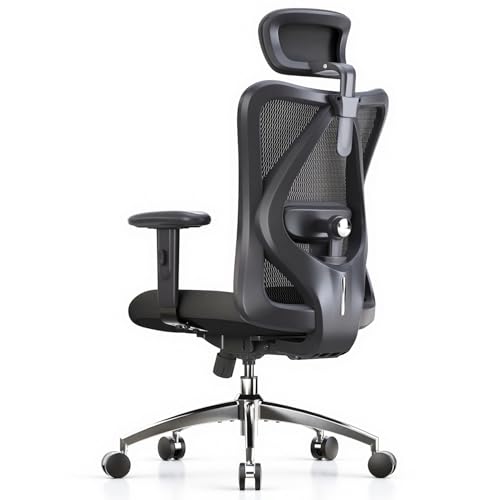
What We Like
- Four-point support (head, back, hip, hands)
- Adjustable headrest and lumbar support
- Breathable mesh backrest
- Tilt lock with adjustable resistance
Trade-offs
- 2D armrests limit positioning flexibility
- No forward tilt for upright typing posture
The four-point support system, head, back, hips, and hands, helps distribute pressure so you can sit for hours without feeling sore. You can adjust the headrest and lumbar support to match your spine, and the mesh back lets air circulate, which keeps you from getting sticky during a long workday. It fits people from 5’6″ to 6’2″ and supports up to 330 pounds, so it works for a broad range of body types. The backrest reclines through three angles, and you can set the tilt resistance to keep it from flopping back too fast or feeling too stiff.
The trade-off here is the 2D armrests, which only adjust up-down and rotate, not side-to-side or forward-back like some competitors. That limits how precisely you can position your elbows and forearms, especially if you switch between typing and reading. Compared to the ELABEST T23 with its 3D armrests and 3D headrest, the SIHOO offers fewer adjustments for the upper body. But for someone who wants a straightforward, supportive chair with a strong warranty and a weight capacity that covers most users, the M18 delivers reliable four-point support without overcomplicating things.
Marsail Ergonomic Office Chair

What We Like
- Lumbar adjusts 1.18" in/out and 2.16" up/down
- 3.14" thick high-density foam seat
- 3D adjustable armrests with flip-up option
- Breathable mesh backrest
Trade-offs
- 2D headrest limits neck angle customization
- 2D headrest adjusts in only two directions
The Marsail Ergonomic Office Chair’s lumbar support moves 1.18 inches forward and backward and 2.16 inches up and down, letting you dial in exactly where your lower back needs pressure. That kind of precision is rare at this level, and it directly addresses the postural strain that often triggers neck pain. The 3.14-inch thick high-density foam seat cushions long sits without bottoming out, while the breathable mesh back keeps you cool. For someone who spends hours at a desk and wants to stop slouching, this chair gives you the tools to sit better without fussing with a dozen levers.
The 2D headrest adjusts in two directions. If you’re tall or prefer your neck supported in a specific spot, it may not hit the mark. Still, the Marsail’s adjustable lumbar and generous 330-pound weight capacity make it a strong fit for most body types. The flip-up 3D armrests also let you slide the chair under a desk when you’re done, saving floor space in a home office.
GABRYLLY Ergonomic Office Chair
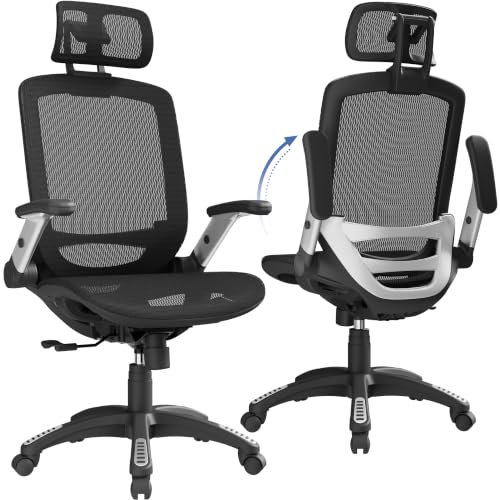
What We Like
- Flip-up arms save desk space
- Breathable mesh seat and back
- High back with head and lumbar support
- Generous seat for larger builds
Trade-offs
- Armrests only flip up, not adjustable in other ways
- No lumbar depth or height adjustment mentioned
With a recline that locks between 90 and 120 degrees, you can lean back for a break or sit upright for focused work. This design suits users from about 5’2″ to 6’1″, especially those who need extra room and solid back support.
The armrests flip up 45 degrees to slide the chair under a desk, but they don’t adjust in width or angle, so you can’t fine-tune arm position for neck and shoulder alignment. Compared to the ELABEST T23, which offers 3D armrests and adjustable lumbar support, the GABRYLLY keeps things simpler. For users who want a breathable chair with straightforward ergonomics and easy storage, this is a practical option.
Product photos
How We Evaluated Office Chairs For Neck Pain
This guide draws from manufacturer specifications, expert round-ups from ergonomic specialists, and patterns found in thousands of owner reviews. We analyzed the features and reported experiences that matter most for neck pain relief.
We prioritized three main criteria. First, headrest adjustability was paramount, as a headrest that moves in height, depth, and angle is critical for targeting individual neck pain points. Second, lumbar support integration matters because a stable lower back keeps the spine aligned, preventing the forward head posture that causes strain. Third, overall build quality and adjustability, including armrests and seat depth, ensure the chair fits your body for hours without creating new discomfort.
An honest limit of this research-led approach is that personal fit can only be fully determined by sitting in a chair. We have identified the chairs with the most adjustability and positive owner feedback to give you the best starting point, but your unique body shape and pain points are the final judge.
What To Look For In Office Chairs For Neck Pain
Choosing a chair for neck pain means looking beyond a simple headrest. You need a system of support that works together to keep your spine in a neutral, aligned position.
Look for a chair with a headrest that adjusts in at least three directions: height, depth, and angle. The lumbar support should move independently. Armrests that can be positioned help keep your shoulders relaxed.
Headrest Adjustability
A headrest that only moves up and down is a good start, but for neck pain, you need more. A 3D headrest that also tilts and moves forward or backward allows you to cradle the back of your skull, not just the middle of your neck. This is the most direct way to relieve pressure on your cervical spine. The ELABEST T23, for example, offers a 2.5-inch vertical range, which is a specific, useful measurement for tall or short users.
Lumbar Support Integration
Neck pain often originates in the lower back. When your lumbar spine is unsupported, you slouch, your pelvis tilts back, and your head juts forward to keep your eyes level. This forward head posture strains your neck muscles. Look for lumbar support that adjusts in both height and depth. The CAPOT’s micro-adjust lumbar with eight levels is a prime example of the precision needed to lock in a healthy curve.
Overall Build and Adjustability
A chair that fits your body from the seat up prevents compensatory postures. Check that the seat depth allows you to sit with your back against the lumbar support and two to three fingers of space behind your knees. Armrests that adjust in height and width help keep your shoulders down and relaxed, reducing tension that can travel up to your neck. A stable base and smooth-rolling casters also matter, as they prevent you from twisting your spine to reach for things.
- Does the headrest adjust in height, depth, and angle?
- Can the lumbar support move independently in height and depth?
- Do the armrests adjust to keep your elbows at a 90-degree angle?
- Is the seat depth appropriate for your leg length?
- Does the chair have a weight capacity that suits your body?
A good rule of thumb: if you can set the headrest to support the base of your skull while your lower back is firmly against the lumbar support, you have found a strong candidate.
Office Chairs For Neck Pain Compared
The table below compares the key ergonomic features of our top picks, focusing on the adjustments that most directly affect neck pain relief.
| Product | Weight Capacity | Headrest Adjustment | Armrests |
|---|---|---|---|
| CASASIO Ergonomic Office Chair | 330 lbs | 3D (height, depth, angle) | Flip-up |
| ELABEST T23 Ergonomic Office Chair | 300 lbs | 3D: 2.5" up/down, 90° rotate, 100° flip | 3D: 3.2" up/down, 1.6" slide, 15° pivot |
| CAPOT Ergonomic Mesh Office Chair | 400 lbs | Height and depth | 4D Flip-up |
| Ergoa Ergonomic Mesh Office Chair | 400 lbs | 11-position 3D adjustable | 4D soft-padded |
| Steelcase Gesture Office Chair | N/A | N/A | 360-degree arms |
| Humanscale Freedom Office Chair | N/A | Included | Standard Height Adjustable Duron Arms |
| SIHOO M18 Ergonomic Office Chair | 330 lbs | N/A | 2D |
| Marsail Ergonomic Office Chair | 330 lbs | 2D | 3D adjustable, flip-up |
| GABRYLLY Ergonomic Office Chair | 300 lbs | N/A | Flip-up, 45° |
Frequently Asked Questions
What is the best office chair for neck pain?
The CASASIO Ergonomic Office Chair is our best overall pick because its 3D adjustable headrest cradles the neck and head, and its dual-direction lumbar cushion helps maintain proper spinal alignment. This combination directly targets the root causes of neck strain from sitting.
How should a headrest be adjusted for neck pain?
The headrest should support the base of your skull, not the middle of your neck. Adjust it so that when you sit upright with your back against the lumbar support, your head is in a neutral position with your ears aligned over your shoulders. A 3D headrest that moves in height, depth, and angle is ideal for achieving this.
Is a mesh or cushioned seat better for neck pain?
The choice between mesh and cushioned seats is about personal comfort and support, not a direct factor for neck pain. A breathable mesh seat can be better for staying cool during long hours. A high-density foam seat, like the virgin foam in the CASASIO, can prevent soreness that might cause you to shift and lose good posture.
Can a chair with poor lumbar support cause neck pain?
Yes, poor lumbar support is a common cause of neck pain. When your lower back is unsupported, you tend to slouch, which tilts your pelvis and pushes your head forward. This forward head posture increases the load on your cervical spine, leading to strain and pain.
What is the difference between 2D, 3D, and 4D armrests?
2D armrests adjust in height only. 3D armrests add width adjustment, allowing you to bring them closer or farther from your body. 4D armrests also pivot or rotate, which can help you find the perfect angle to keep your shoulders relaxed. For neck pain, armrests that keep your shoulders from hunching are beneficial.
The Bottom Line
The CASASIO Ergonomic Office Chair is our best overall choice for anyone who needs all-day neck and lower back relief from an adjustable, breathable chair. Its 3D headrest and dual-direction lumbar cushion work together to keep your spine aligned, making it a strong foundation for a pain-free workday.
If you need even more headrest customization, the ELABEST T23 offers the most vertical range for targeting your specific neck pain point. For those who require precise lumbar support, the CAPOT provides micro-adjustments with eight levels. Budget-conscious shoppers should look to the SIHOO M18 for a solid four-point support system at a more accessible price point.
The single most important factor when buying a chair for neck pain is ensuring the headrest and lumbar support can be adjusted to fit your unique body. A chair that cannot be tailored to your spine will only prolong the problem.
