10 Best Pc Chairs in 2026
This post contains affiliate links. As an Amazon Associate, we earn from qualifying purchases.
For long hours at a desk, the right chair makes all the difference. We think the Razer Iskur V2 X Ergonomic Gaming Chair is the best overall pick because its built-in lumbar arch targets the lower back directly, and the wide, plush seat distributes pressure evenly. For those who want adjustable lumbar support, the CAPOT Ergonomic Mesh Office Chair is a top choice, while the Herman Miller Classic Aeron Task Chair offers an unmatched warranty.
The real challenge with PC chairs is finding one that supports your body through hours of work or gaming without causing discomfort. Seat depth, back support, armrest adjustability, and breathability all play a role in how a chair performs over time.
This guide is based on a thorough review of manufacturer specifications, expert round-ups, and patterns in owner feedback. We focused on the features that matter most for long-term comfort and durability, helping you find the right fit for your needs and budget.
Top 10 PC Chairs in the Market
Certain content that appears on this site comes from Amazon. This content is provided "as is" and is subject to change or removal at any time.
The Best PC Chairs, Reviewed
Razer Iskur V2 X Ergonomic Gaming Chair

What We Like
- Built-in lumbar arch for lower back
- Wide seat with reduced edges
- Plush fabric is breathable and cool
- 152-degree recline for relaxing
Trade-offs
- 2D armrests lack depth adjustment
- Heavy at 50.3 pounds to move
The built-in lumbar arch gently supports your lower back and encourages a neutral sitting position, which makes long gaming sessions far more comfortable. Combined with a widened seat base that guides your body toward the center for even pressure distribution, this chair is designed to keep you stable and supported for hours. The high-density foam cushions mold to your shape, adding stability without feeling overly firm. For gamers who prioritize back health and all-day comfort, this model delivers exactly what you need without unnecessary complexity.
The 2D armrests adjust in height and rotation, which covers the basics for most gaming setups, but you won’t get the forward/backward or side-to-side movement found on some premium chairs. At 50.3 pounds, it’s not a chair you’ll want to move around frequently, but the solid build and plush fabric finish make it a worthy investment for anyone seeking a dedicated, ergonomic gaming seat.
CAPOT Ergonomic Mesh Office Chair

What We Like
- Cooling Aerovith mesh seat
- Flip-up armrests save desk space
- 400 lbs weight capacity
Trade-offs
- No seat depth adjustment for different leg lengths
- Armrests lack width and pivot adjustments
Breathable Aerovith mesh covers the larger cushion, keeping you cool during extended work sessions. The seat reduces pelvic pressure by 20% and enhances support by 30%, so you stay comfortable even after hours at the desk. Wide, non-peeling soft armrests flip up 90° to let you roll the chair completely under the desk, freeing up valuable workspace. A leak-proof SGS gas lift prevents accidental sinking, and the stainless steel base reliably supports up to 400 lbs. Silent PU wheels glide smoothly without marking floors, making this a practical choice for long desk work.
The trade-off comes in adjustability breadth. And while the backrest locks at three angles, there’s no seat depth slider to accommodate different thigh lengths. For someone who needs fine-tuned lumbar alignment above all else, this chair delivers where it counts.
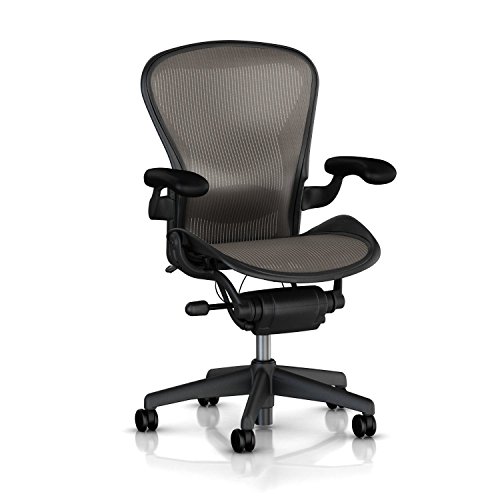
Herman Miller Classic Aeron Task Chair
What We Like
- 12-year warranty with born-on-date sticker
- Breathable Pellicle suspension dissipates heat
- Kinemat tilt keeps joints in natural motion
- Waterfall seat edge reduces thigh pressure
Trade-offs
- At 48.0 lb, it is heavy to move
- No headrest included for neck support
A 12-year warranty with an official born-on-date sticker is the kind of promise that tells you this chair is built to last. Herman Miller’s patented Kinemat tilt mechanism lets your neck, shoulders, hips, knees, and ankles pivot naturally, so you’re not fighting your own body as you shift positions throughout the day. The breathable Pellicle suspension mesh keeps air moving and dissipates heat, while the waterfall front edge of the seat takes pressure off your thighs to keep blood circulating. This is a chair for someone who wants long-term support and is willing to invest in a piece that will stay comfortable for years.
The trade-off is that at 48 pounds, this is a heavy chair to slide around on carpet casters. The fully adjustable vinyl arms also lack the cushioned feel of padded armrests you might find on something like the Steelcase Gesture. But if you value a cool, breathable seat and a tilt system that moves with you naturally, the Classic Aeron delivers on those details in a way few others do. It is a premium design that prioritizes ergonomic fundamentals over extra padding or flashy features.
Product photos
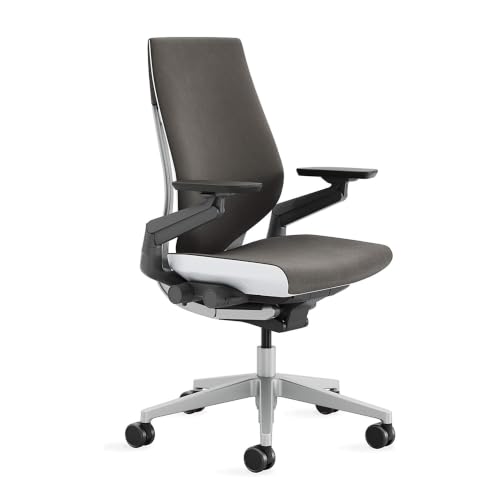
Steelcase Gesture Office Chair
What We Like
- 360-degree arms adapt to any posture
- Full recline range with three settings
- Contoured back supports spine's natural shape
- Intuitive adjustments within arm's reach
Trade-offs
- At 70 pounds, it's very heavy to move
- Designed for carpet floors only
The 360-degree arms adjust to any position you take, so you can move from typing to leaning back without losing arm support. That kind of flexibility matters if you shift postures often during the day. The contoured back follows your spine’s natural shape, and the full recline range with three settings lets you lock upright or tilt back when you need a break. All controls are on the right side within easy reach, so you never have to fumble for a lever.
At 70 pounds, this chair is not something you’ll want to roll across the room or lift onto a platform. It’s built for a dedicated spot on carpet, where its included wheels glide smoothly. If you need a chair that moves easily between rooms or sits on a hard floor, the lighter CAPOT Ergonomic Mesh Office Chair (38.0 pounds) is an alternative. For someone who values precise, intuitive adjustability and a seat that moves with you, the Gesture offers a full recline range with three settings and an upright back lock.
Product photos
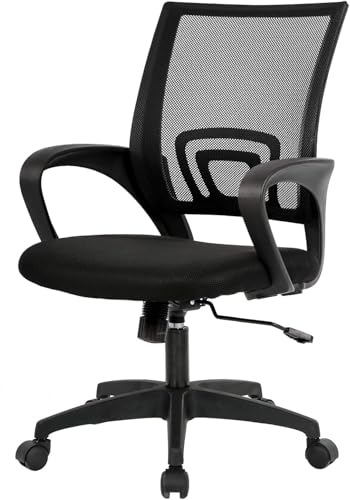
BestOffice Ergonomic Office Chair
What We Like
- Breathable mesh back keeps you cool
- Lumbar support reduces fatigue
- Adjustable height fits most desks
- Quick 10-15 minute assembly
Trade-offs
- Mid-back only, no headrest support
- 250 lb weight limit limits larger users
A 19-pound chair that assembles in 10-15 minutes means you can have a comfortable seat set up before your next coffee break. The breathable mesh back keeps air moving, so long work sessions don’t leave you sticky, and the built-in lumbar support helps reduce fatigue. It’s a smart choice for anyone who needs an affordable, no-fuss chair for a home office or desk setup without sacrificing basic ergonomic comfort.
For a budget-friendly chair that keeps you cool and supported during long work sessions, the ventilated mesh back promotes airflow so you won’t get sticky on hot days. The curved mid-back design includes lumbar support to reduce fatigue, though there’s no headrest for leaning back. Assembly takes just 10-15 minutes with included hardware, making it a practical choice for a home office.
Product photos
TRALT Ergonomic Desk Chair

What We Like
- High-resilience molded foam won't flatten
- Adjustable lumbar support for spine curve
- Breathable mesh back prevents heat buildup
- BIFMA-certified anti-sink lifting mechanism
Trade-offs
- Flip-up armrests lack 4D adjustability
- Mesh back lacks the premium feel of padded chairs
A high-density molded foam seat that bounces back day after day means you won’t feel the dreaded bottoming out after a year of use. That’s the standout reason to consider the TRALT Ergonomic Desk Chair if you spend long hours seated and want cushioning that lasts. The adjustable lumbar support actually lets you dial in depth to match your spine’s natural curve, relieving lower back pressure during extended sessions. The mesh back is ventilated to keep air moving so you stay cool, and the BIFMA-certified lift holds your height reliably without sudden drops. For someone who prioritizes seat durability and comfort at a reasonable investment, this chair delivers where many budget options fall short.
The high-density molded foam seat won’t flatten after a year, so it avoids the bottoming-out discomfort common in budget chairs. The flip-up armrests are simple and lack the 4D movement of the CAPOT Ergonomic Mesh Office Chair, so if you need to tweak arm position in every direction, you may feel limited. At 28 pounds, the chair is light enough to slide across the room easily, though it may not feel as planted on thick carpet as heavier models.
Product photos
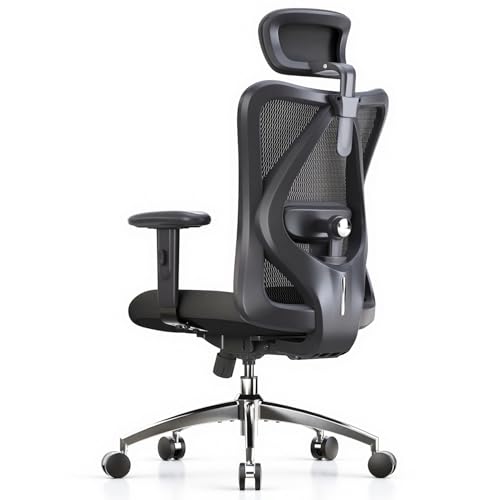
SIHOO M18 Ergonomic Office Chair
What We Like
- Breathable mesh backrest keeps you cool
- Four-point ergonomic support (head, back, hips, hands)
- Adjustable lumbar and headrest for custom fit
- Tilt lock and resistance adjustment for varied tasks
Trade-offs
- 2D armrests limit positioning compared to 4D options
- At 38 pounds, it's heavier than some mesh chairs
A breathable mesh backrest that keeps you cool during long work sessions is the standout feature here. The SIHOO M18 supports up to 330 pounds and offers four points of ergonomic adjustment: headrest, lumbar support, backrest angle, and armrests. So you can dial in a comfortable position for focused typing or leaning back on a break. With three recline angles and an under-seat tilt resistance knob, it moves easily from computer work to a relaxed video call without feeling flimsy. This chair suits anyone who spends hours at a desk and wants airflow and adjustability without a premium price tag.
The armrests adjust in two dimensions (height and width), but not forward/backward or rotationally like the 4D arms on the CAPOT Ergonomic Mesh Office Chair. That means you might not find the perfect elbow angle for every task. At 38 pounds, it’s also a bit heavier than some mesh competitors, though the weight contributes to a sturdy feel. If you prioritize breathability and solid lumbar support over maximum armrest flexibility, the M18 delivers where it counts.
GTPLAYER Big and Tall Gaming Chair
What We Like
- 400 lbs weight capacity for larger frames
- Built-in spring lumbar support
- Upgraded cloud-like triple-pad seat cushion
- Stable metal frame and base
Trade-offs
- 48.0 pounds makes it heavy to move
- No adjustable armrests mentioned
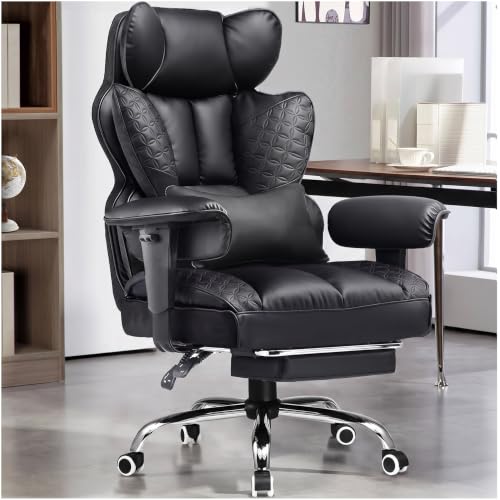
With a 400-pound weight capacity and a thick, enlarged headrest that increases contact area for head and neck support, this chair is built for larger frames. The prominent sides of the backrest wrap around your back to reduce pressure points, while the built-in spring lumbar support and triple-pad cushion deliver targeted comfort for hips and thighs. It’s a stable, heavy-duty option for anyone who needs more room and support than standard gaming chairs provide.
At 48 pounds, this chair is less convenient to shift around your space. Compared to the CAPOT Ergonomic Mesh Office Chair at 38 pounds, it’s heavier. The PU leather is breathable, durable, and easy to clean, which suits home office use. For big and tall users who prioritize sturdy construction and generous dimensions, this chair delivers where it counts.
Product photos
Marsail Ergonomic Office Chair

What We Like
- 3D adjustable armrests
- Adaptable lumbar support
- Breathable mesh backrest
- 330 lb weight capacity
Trade-offs
- 2D headrest adjustment limited to two directions
- 3D armrests lack forward/backward slide adjustment
A fully adjustable lumbar support that moves 1.18 inches forward and backward and 2.16 inches up and down means you can dial in exactly the lower-back curve your body needs. That kind of precision is rare at this price point, and it makes the Marsail a smart pick for anyone who spends long hours at a desk and wants to avoid that nagging ache between the shoulder blades. The 3D armrests move forward or back and swivel left or right, and the headrest adjusts in two directions, so you can fine-tune your posture from head to elbows. The ventilated mesh back promotes airflow, and the 3.14-inch thick foam seat cushions your sit bones without sagging.
The trade-off? At 30.4 pounds, this chair is noticeably lighter than the Steelcase Gesture (70 pounds), which means it won’t feel as planted on carpet or during aggressive reclining. It’s a thoughtful, practical choice for the home office.
Product photos
N-GEN GAMING Big & Tall Gaming Chair
What We Like
- Supports up to 400 lbs
- Pocket spring cushion for sofa-like comfort
- Adjustable recline with footrest
- Reinforced steel frame and base
Trade-offs
- Linked armrests move with backrest, limiting adjustability
- Heavy 40.7 pounds makes it hard to move
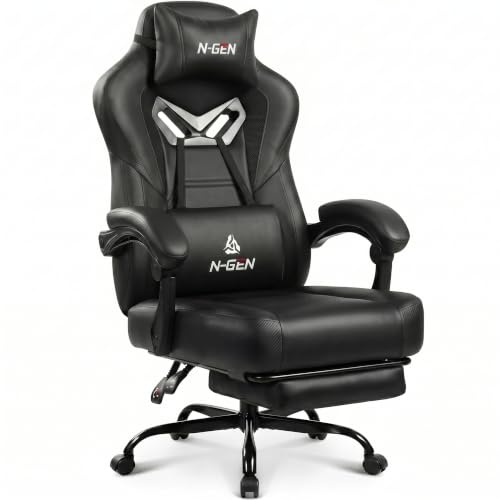
With a reinforced steel frame and SGS certified gas lift rated for 400 lbs, this chair is built to support larger frames without wobble or sag. The wide pocket spring seat delivers sofa-like comfort that distributes pressure evenly during long gaming or work sessions. It’s a smart choice for anyone who needs heavy-duty support but doesn’t want to sacrifice plush seating or the ability to recline and stretch out with the included footrest.
The armrests are linked to the backrest, so they move when you recline, which can feel less precise than the fully independent 4D arms on the CAPOT Ergonomic Mesh Office Chair. Still, for the combination of generous weight capacity, pocket spring cushioning, and a footrest, this chair delivers real value for bigger gamers and home office users.
Product photos
How We Evaluated PC Chairs
Our research began with a close look at each chair’s specifications and manufacturer claims. We then compared these details against insights from expert round-ups and common themes found in owner feedback across multiple sources. This approach helped us understand how each chair performs in real-world use, not just on paper.
We evaluated chairs on four key criteria: ergonomic support (lumbar, headrest, and armrest adjustability), build quality and materials (frame, base, and upholstery), weight capacity and size range, and warranty coverage. These factors directly affect how comfortable and durable a chair will be over years of daily use.
It is important to note that this is a research-led evaluation, not a hands-on test. While we cannot speak to the feel of a chair from personal experience, the patterns we found in owner feedback and expert analysis give a reliable picture of what to expect from each model.
What To Look For In PC Chairs
Choosing a PC chair means balancing comfort, adjustability, and durability. The right chair supports your body through long sessions without causing strain, and it should last for years.
Focus on lumbar support that matches your spine, a seat depth that leaves a few inches between the back of your knees and the seat edge, and armrests that allow your shoulders to relax. Breathable materials help you stay cool, and a high weight capacity ensures the chair is built for your frame.
Lumbar and Back Support
The most critical feature is lumbar support that fits the natural curve of your lower back. Some chairs have built-in arches, while others offer adjustable pads or air bladders. A chair with a contoured backrest that follows your spine’s shape can reduce fatigue over long sessions.
Seat Comfort and Dimensions
The seat cushion should be firm enough to support your hips without flattening over time. Look for high-resilience foam or mesh suspension that breathes. Seat depth is equally important: your knees should be at a 90-degree angle with a few inches of space behind them. A waterfall front edge reduces pressure on your thighs.
Adjustability Options
The more adjustments a chair offers, the better it can fit your body. Key adjustments include seat height, armrest height and width, lumbar depth, and recline tension. Four-dimensional (4D) armrests allow movement in all directions, while simpler 2D or 3D options may still work well for many users.
- Check that the armrests can be positioned so your shoulders stay relaxed.
- Ensure the recline lock holds your preferred angle during work.
- Verify that the seat height range matches your desk height.
- Look for a tilt tension control that lets you rock back with ease.
A good rule of thumb: the chair should adjust to fit you, not the other way around.
PC Chairs Compared
The table below compares key specs and features across our top picks, making it easy to see which chair matches your needs.
| Product | Weight | Weight Capacity | Armrests |
|---|---|---|---|
| Razer Iskur V2 X Ergonomic Gaming Chair | 50.3 pounds | N/A | 2D (height & rotation) |
| CAPOT Ergonomic Mesh Office Chair | 38.0 pounds | 400 lbs | 4D Flip-up Arms |
| Herman Miller Classic Aeron Task Chair | 48.0 pounds | N/A | Fully adjustable vinyl arms |
| Steelcase Gesture Office Chair | 70.0 pounds | N/A | 360-degree arms |
| BestOffice Ergonomic Office Chair | 19.0 pounds | 250 lbs | ergonomic armrests |
| TRALT Ergonomic Desk Chair | 28.0 pounds | 330 lbs | Flip-up Armrests |
| SIHOO M18 Ergonomic Office Chair | 38.0 pounds | 330 lbs | 2D Adjustable |
| GTPLAYER Big and Tall Gaming Chair | 48.0 pounds | 400 lbs | N/A |
| Marsail Ergonomic Office Chair | 30.4 pounds | 330 lbs | 3D adjustable |
| N-GEN GAMING Big & Tall Gaming Chair | 40.7 lbs | 400 lbs | N/A |
Frequently Asked Questions
What is the best PC chair for long hours of sitting?
The Razer Iskur V2 X Ergonomic Gaming Chair is our best overall pick because its built-in lumbar arch provides targeted lower back support, and the wide, breathable fabric seat helps distribute pressure during extended sessions.
How much should I spend on a PC chair?
Budget-friendly options like the BestOffice Ergonomic Office Chair offer solid support at an accessible price point. For more adjustability and longer warranties, mid-range and premium chairs from brands like Herman Miller and Steelcase represent a greater investment that can pay off in comfort and durability.
Are mesh or foam PC chairs better?
Mesh chairs, such as the CAPOT Ergonomic Mesh Office Chair, offer superior breathability and can keep you cooler during long sessions. Foam chairs like the TRALT Ergonomic Desk Chair provide a plusher feel but may retain more heat. Your preference depends on your climate and comfort priorities.
What is the difference between a gaming chair and an office chair?
Gaming chairs often have a more aggressive, racer-style design with high backrests and built-in lumbar support, like the Razer Iskur V2 X. Office chairs typically focus on adjustability and ergonomic features, such as the Herman Miller Aeron. Both can be suitable for long hours if they fit your body well.
How do I know if a PC chair will fit my height and weight?
Check the chair’s weight capacity and recommended user height. For heavier users, chairs like the GTPLAYER Big and Tall Gaming Chair and the N-GEN GAMING Big & Tall Gaming Chair offer 400-pound capacities. For taller users, look for chairs with adjustable headrests and seat height ranges that accommodate your frame.
The Bottom Line
For most people, the Razer Iskur V2 X Ergonomic Gaming Chair is the best overall choice. Its built-in lumbar support and wide, breathable seat make it a strong option for anyone who spends long hours at a desk, whether for work or gaming.
If your budget is tighter, the BestOffice Ergonomic Office Chair delivers reliable lumbar support and breathable mesh at a very accessible price. For those who need a higher weight capacity, the GTPLAYER Big and Tall Gaming Chair and N-GEN GAMING Big & Tall Gaming Chair both support up to 400 pounds with reinforced frames.
The single most important factor when buying a PC chair is getting one that fits your body. No amount of features can make up for a chair that is too small, too large, or lacking the lumbar support your spine needs.
