10 Best Under Desk Keyboard Trays in 2026
This post contains affiliate links. As an Amazon Associate, we earn from qualifying purchases.
The VIVO Clamp-on Keyboard and Mouse Tray is our Best Overall pick for its rock-solid C-clamp mount that holds up to 11 pounds and slides out smoothly for comfortable typing angles. For corner desk setups, the HUANUO Under Desk Keyboard Tray offers 180-degree swivel and tilt, while the BONTEC Under Desk Keyboard Tray is our Budget Pick for affordable ergonomics without drilling.
The challenge with under desk keyboard trays is finding one that fits your specific desk, thickness, edge shape, and underside clearance all matter. A tray that wobbles or doesn’t slide smoothly defeats its purpose of improving your posture.
We evaluated these trays based on specifications, manufacturer documentation, and patterns in owner feedback to help you find the right fit for your desk and work style.
Top 10 Under Desk Keyboard Trays in the Market
Certain content that appears on this site comes from Amazon. This content is provided "as is" and is subject to change or removal at any time.
The Best Under Desk Keyboard Trays, Reviewed
VIVO Clamp-on Keyboard and Mouse Tray

What We Like
- Sturdy C-clamp mount, no desk damage
- Holds up to 11 lbs
- Easy slide-out for ergonomic angles
Trade-offs
- Requires 32.5" of clear desk space
- Not for desks thicker than 1.25"
- Incompatible with beveled desk edges
The trade-off is that the 32.5-inch total clamp-to-clamp length demands a wide open area underneath your desk, so it won’t work on narrow workstations or desks with beveled edges.
HUANUO Under Desk Keyboard Tray
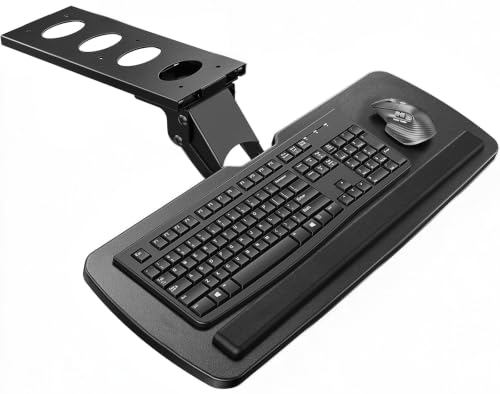
What We Like
- Swivels 180° for corner desks
- 6.3-inch height adjustment for sit-stand
- Tilts 6° up to 22° down
- Includes wrist rest
Trade-offs
- Requires no cross beam under desk
- Needs 14.17 inch clearance from desk edge
A 180-degree swivel range means you can turn your keyboard tray to face any monitor without scooting your chair around, a huge plus for corner desks or multi-screen setups. The 6.3 inches of height adjustment also lets you move from sitting to standing without losing ergonomic alignment, and the tilt range (6° up, 22° down) helps keep your wrists in a neutral position. This is the tray to pick if your desk layout changes throughout the day and you want one platform that adapts to every angle.
This tray demands a clean under-desk setup: no cross beam can be in the way, and you need at least 14.17 inches of clearance from the desk edge to any beam or obstacle. That makes it less universal than the VIVO Clamp-on Keyboard and Mouse Tray, which uses a clamp mount and doesn’t require beam-free space. But if your desk is clear underneath, the HUANUO’s swivel and tilt flexibility is hard to beat for ergonomic versatility.
Product photos
HUANUO Keyboard Tray for Cross Beam Desks
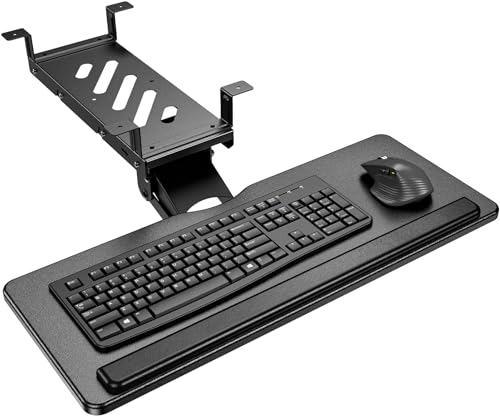
What We Like
- Two installation options for flat and cross beam desks
- Smooth metal roller track tested for 20,000 cycles
- 6.3-inch height adjustment for sit-stand use
- 180° swivel and tilt for ergonomic comfort
Trade-offs
- Requires desktop depth over 17 inches
- Only fits wood, plywood, or particle board desks
- Needs 2.56 inches of desk edge space for full retraction
This under-desk tray comes with two specially-designed brackets for cross beam desks. So it fits electric standing desks and other frames that have a beam underneath, a rare compatibility that saves you from buying a separate mounting kit. The 6.3 inches of height adjustment lets you switch between sitting and standing without hunching, while the 180-degree swivel and 22-degree downward tilt help you find a natural wrist angle for long typing sessions. It’s a practical choice if you have a cross beam desk and want a tray that installs without extra hardware.
This tray only mounts to wood, plywood, or particle board, so if your desk is glass or metal, you’ll need to look elsewhere. It also requires a desktop depth greater than 17 inches and leaves 2.56 inches of edge space exposed when fully retracted, which can feel limiting on smaller surfaces. Compared to the VIVO Clamp-on Keyboard and Mouse Tray, which clamps onto the desk without drilling, the HUANUO offers a more permanent, beam-friendly solution but asks for more careful measurement and a compatible desk surface.
Product photos
Kensington SmartFit Ergonomic Keyboard Tray
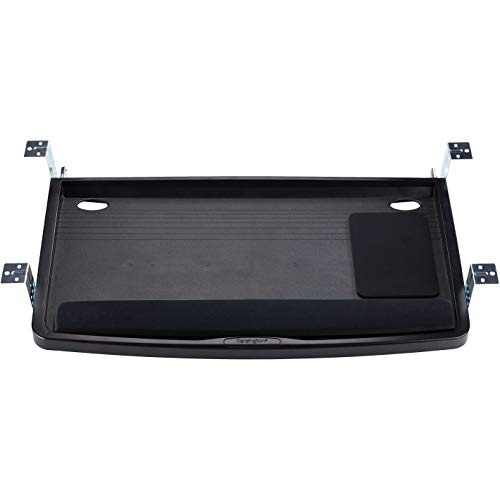
What We Like
- Extra-wide 24.5-inch tray
- Fits oversize and ergonomic keyboards
- Holds wrist rest, mouse, and pad
- Adjustable to SmartFit comfort color
Trade-offs
- Requires 31-33 inches of desk clearance
- Not suitable for desks under 31 inches wide
An extra-wide 24.5-inch tray means you can keep your full-size keyboard, wrist rest, and mouse all on one surface without bumping elbows. That generous width makes this Kensington ideal for anyone with a spacious desk who wants a clutter-free typing zone. The SmartFit color-matching adjustment system also takes the guesswork out of finding your ideal height, so you can dial in comfort quickly.
The installation footprint is the main consideration: with mounting arms, the total width spans 31 to 33 inches, so you need a desk that can accommodate that reach. If your desk has the clearance, this Kensington delivers the roomiest workspace in the guide.
BONTEC Under Desk Keyboard Tray
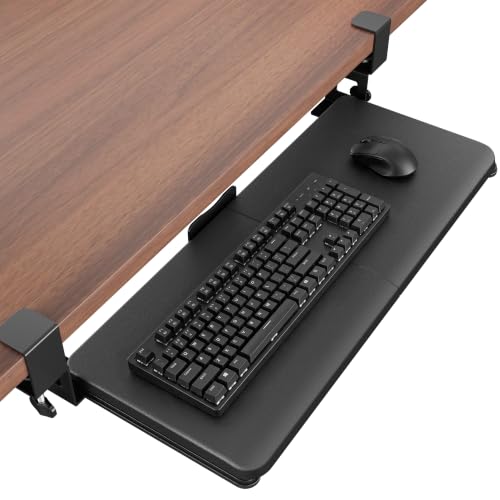
What We Like
- No-drill C-clamp installation
- Spacious 25.6 x 11.8 inch platform
- Protective pads prevent scratches
- Slides under desk when not in use
Trade-offs
- Requires 31.3 in clear width underneath
- Not compatible with desks that have curved, beveled, or rounded edges
A 25.6 by 11.8 inch platform gives you room for both a standard keyboard and a mouse, so you can clear off your desktop without squeezing your hands into a cramped space. The no-drill C-clamp mount secures to desks up to 1.97 inches thick, and the protective pads keep the underside scratch-free. This tray is a smart, budget-friendly way to free up valuable surface area for monitors, documents, or just a cleaner workspace.
The catch is that the clamps need a flat, unobstructed underside, desks with curved or beveled edges or crossbars underneath won’t work. You’ll also need at least 31.3 inches of width to install it. Best for anyone with a standard flat desk who wants an affordable, space-saving ergonomic upgrade.
Product photos
VIVO Under Desk Keyboard and Mouse Tray

What We Like
- Full side-to-side rotation
- 5-inch height adjustment
- Slides forward and back
- Supportive rubber padding
Trade-offs
- Needs spacer bracket for height-adjustable desks
- Requires 14.25" clearance between desktop edge and crossbar
- Minimum desktop thickness 5/8"
Full side-to-side rotation and 5 inches of height adjustment let you tilt and pivot the tray to find a comfortable typing angle. The rubber padding adds support under your wrists during long sessions. This tray slides forward and back on a 14.25-inch track, so you can tuck it away when not in use.
The full rotation requires 14.25 inches of clearance between the desktop edge and any crossbar underneath. If you have a height-adjustable desk, you will need to buy a separate spacer bracket (MOUNT-SPACER01). The HUANUO Under Desk Keyboard Tray swivels 180 degrees instead of rotating fully, but it uses a screw-mount system that may fit more desk types without extra parts. For a standard fixed desk where unrestricted rotation is a priority, this VIVO model delivers that flexibility.
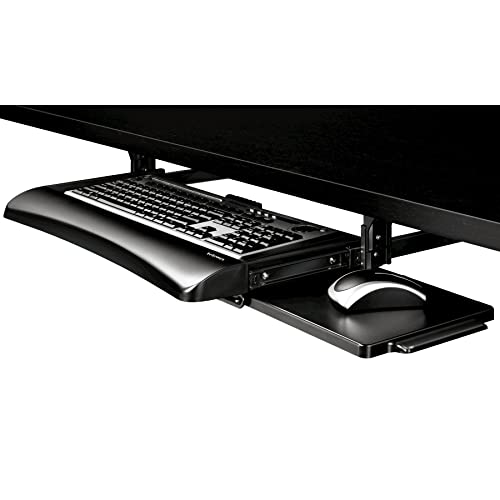
Fellowes Office Suites Underdesk Keyboard Drawer
What We Like
- Three height adjustments for custom fit
- Spacious platform fits keyboards up to 20" wide
- Pre-installed mouse tray on right side
- Sturdy impact-resistant tray
Trade-offs
- Needs 23.5" width and 14.5" depth underneath desk
- Mouse tray fixed on right side only
The Fellowes Office Suites Underdesk Keyboard Drawer offers three distinct height adjustments, so you can fine-tune the tray to exactly where your hands rest most naturally. That kind of flexibility makes it a smart pick if you share a desk or just like to switch between sitting and standing positions throughout the day. The spacious platform holds keyboards up to 20 inches wide, and the pre-installed mouse tray on the right means everything stays within easy reach. At just 3.9 pounds, it’s light enough to install without a second pair of hands, yet the impact-resistant tray feels sturdy enough for daily use.
This tray screws directly into the underside of your desk, so you’ll need to drill holes, no clamp-on convenience like the VIVO Clamp-on model. It also requires a clear 23.5 inches of width and 14.5 inches of depth underneath, which means crossbars or supports could get in the way.
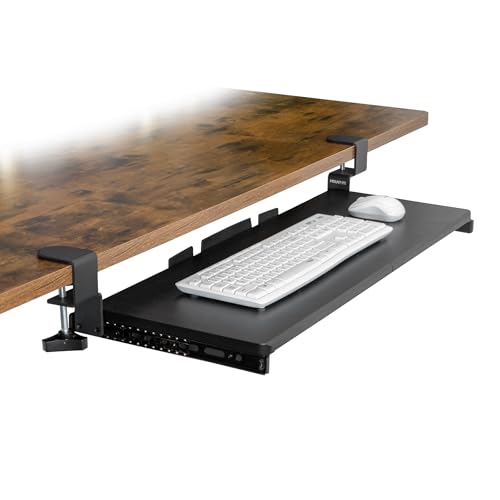
Mount-It! Extra-Wide Keyboard Tray
What We Like
- 30-inch tray fits full keyboard and mouse
- C-clamp fits desks up to 1.77 inches thick
- Smooth wobble-free steel gliding rails
- Lifetime warranty with US-based support
Trade-offs
- Not compatible with beveled edges or corner desks
- Requires at least 12 inches of clearance underneath
A 30-inch wide tray means you can finally set a full-size mechanical keyboard and mouse side by side without squeezing. That extra width, paired with a sturdy C-clamp that grips desks up to 1.77 inches thick, makes this a rare find for anyone with a thicker work surface or a standing desk. The steel gliding rails stay locked in place during fast typing, so no drifting or wobbling. It’s a practical ergonomic upgrade that installs in about 10-15 minutes without drilling, ideal for renters or anyone wanting a reversible setup.
The C-clamp system won’t work on desks with beveled edges, corner shapes, or crossbars, and you need at least 12 inches of clearance underneath. Compared to the VIVO Clamp-on tray, which offers a 27-inch platform at a similar weight capacity, the Mount-It! gives you more surface area but requires a bit more space below the desk. If your desk has a flat edge and enough room, this extra-wide tray delivers a stable, spacious typing station that feels built to last.
Product photos
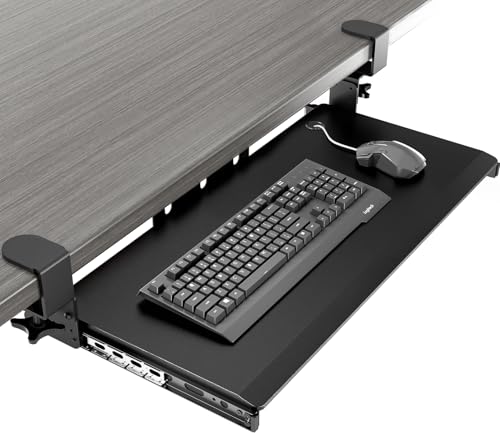
AX WABER Adjustable C-Clamp Tray
What We Like
- Extra sturdy C-clamp mount
- Holds up to 11 lbs
- Easy no-damage installation
- 27.3-inch wide platform
Trade-offs
- Not for desks thicker than 1.9 inches
- Not compatible with beveled desk edges
- Only extends 5.7 inches from desk
A 27.3-inch wide tray paired with heavy-duty C-clamps that hold up to 11 pounds means this is built for stability. The clamps attach without damaging your desk surface, and the slide-out platform keeps your keyboard and mouse within easy reach while freeing up workspace. It’s a straightforward, no-fuss solution for anyone who wants a solid, stationary tray that won’t wobble during long typing sessions.
The tray extends just 5.7 inches from the desk edge, so you won’t be able to pull your keyboard far forward while typing, something to keep in mind if you like a lot of reach. It also requires a desk thickness of no more than 1.9 inches and won’t work with beveled edges, so check your desk’s profile before buying. For a straightforward, sturdy mount that doesn’t budge, this is a reliable choice.
Product photos
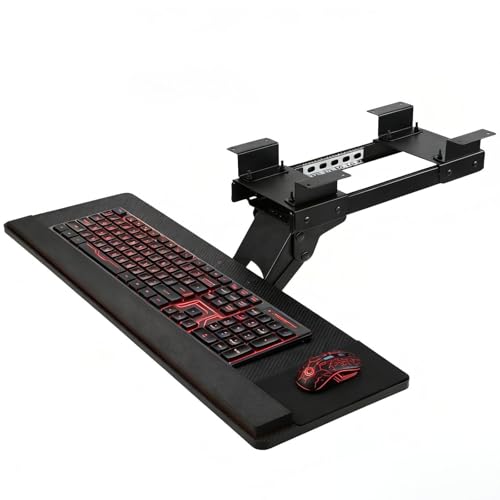
FAHKNS 360° Adjustable Keyboard Tray
What We Like
- 360° rotation for flexible positioning
- Spacious 29.5-inch tray holds keyboard and mouse
- Smooth ball bearing slide rail
- Up to 42 lbs capacity
Trade-offs
- Requires desk thickness over 0.6 inches
- At 12.6 lbs, heavier than some alternatives
The 360-degree rotation lets you angle the tray exactly where your hands feel most natural, whether typing or switching between tasks. The 42-pound capacity easily supports a full-size keyboard, mouse, and accessories, while the 5.5-inch height and ±30° tilt adjustments let you dial in ergonomic comfort. This is a great fit for anyone who values flexibility and needs a large, sturdy platform under their desk.
At 12.6 pounds, this tray is notably heavier than some alternatives, so it’s built to stay put during use. The desktop must be thicker than 0.6 inches for installation, which means very thin tabletops won’t work. If you don’t need full 360° rotation and prefer a lighter setup, the HUANUO Under Desk Tray offers 180-degree swivel.
Product photos
How We Evaluated Under Desk Keyboard Trays
Our research began with a close look at each tray’s mounting system, platform dimensions, and weight capacity from manufacturer specifications. We then studied expert round-ups and thousands of owner reviews to understand what makes a tray work well in real homes and offices.
The three criteria that mattered most were mounting compatibility, adjustability, and platform size. Mounting compatibility means checking if it fits your desk’s thickness and edge shape. Adjustability covers whether you can set the right height, tilt, and reach. Platform size determines if it can hold both your keyboard and mouse comfortably. A tray that fails on any of these will likely end up unused.
A research-led evaluation has limits, we haven’t installed each tray on every desk type. But by cross-referencing specs with what owners report, we’ve identified the trays most likely to deliver a stable, comfortable experience.
What To Look For In Under Desk Keyboard Trays
Before you buy, measure your desk’s thickness, edge profile, and the clear space underneath. These three numbers will narrow your options immediately.
Measure your desk thickness and edge shape, check for cross beams or obstructions underneath, and know your keyboard width. The right tray mounts securely, slides smoothly, and puts your hands at elbow height.
Mounting System and Desk Compatibility
The mounting system determines whether a tray will work with your desk at all. C-clamp trays install without drilling and work best on flat, bevel-free desk edges up to about 1.25 to 1.9 inches thick. Cross beam desks, common with electric standing desks, require special brackets like those on the HUANUO Keyboard Tray for Cross Beam Desks. Some trays, like the Fellowes Office Suites, require permanent drilling.
Platform Size and Layout
A tray that is too narrow forces your mouse onto the desktop, defeating the ergonomic benefit. Standard trays run about 24 to 27 inches wide, while extra-wide options like the Kensington SmartFit (24.5 inches) and Mount-It! Extra-Wide (30 inches) accommodate full-size keyboards alongside a mouse. Measure your keyboard’s width and add at least 6 inches for mouse space.
Adjustability and Range of Motion
Look for height adjustment (most offer 5 to 6.3 inches), tilt (6 to 22 degrees is typical), and side-to-side swivel if you use a corner desk. The VIVO Under Desk Keyboard and Mouse Tray offers full rotation for flexible positioning, while the FAHKNS 360° Adjustable Tray rotates a full 360 degrees for maximum freedom.
- Measure your desk thickness with a ruler, not a tape measure
- Check for cross beams, cable trays, or drawer slides underneath
- Confirm your desk edge is flat, not beveled or rounded
- Test that the tray’s slide mechanism is smooth before final tightening
A tray should let your elbows rest at 90 degrees with wrists straight. If it forces you to reach or hunch, it is not the right one.
Under Desk Keyboard Trays Compared
The table below compares key specs across all ten trays to help you match one to your desk and typing style.
| Product | Tray Size | Weight Capacity | Mount Type |
|---|---|---|---|
| VIVO Clamp-on Keyboard and Mouse Tray | 26.8" x 11" | 11 lbs | C-clamp |
| HUANUO Under Desk Keyboard Tray | 25 x 9.8 in | N/A | screw-mount |
| HUANUO Keyboard Tray for Cross Beam Desks | 25 x 9.84 inches | 11 lbs | N/A |
| Kensington SmartFit Ergonomic Keyboard Tray | 24.5 inches | 5.0 pounds | Under-desk (arms) |
| BONTEC Under Desk Keyboard Tray | 25.6 x 11.8 in | 11 lb | C-Clamp |
| VIVO Under Desk Keyboard and Mouse Tray | 25" x 10" | 10 lbs | N/A |
| Fellowes Office Suites Underdesk Keyboard Drawer | 22.4 inches | 3.9 pounds | Screw-mount under desk |
| Mount-It! Extra-Wide Keyboard Tray | 30 inches | 11 lbs | C-clamp |
| AX WABER Adjustable C-Clamp Tray | 27.3 x 8.3 inches | 11 lbs | C-clamp |
| FAHKNS 360° Adjustable Keyboard Tray | 29.5 x 9.4 inches | 42 pounds | N/A |
Frequently Asked Questions
What is the best under desk keyboard tray for a standing desk?
The HUANUO Keyboard Tray for Cross Beam Desks is specifically designed for electric standing desks with cross beams. It includes two installation options, one for flat desks and one for cross beam frames, and offers 6.3 inches of height adjustment to accommodate sit-stand use.
How do I measure my desk for a keyboard tray?
Measure the thickness of your desktop with a ruler. Check whether the front edge is flat, beveled, or rounded. Then measure the clear space underneath, from the front edge back to any cross beams or obstructions, and the width between any legs or supports.
Can I install a keyboard tray without drilling?
Yes, many trays use a C-clamp mounting system that grips the desk edge without screws or holes. The VIVO Clamp-on Keyboard and Mouse Tray and the BONTEC Under Desk Keyboard Tray both install with clamps and include protective pads to prevent damage to your desk.
What size keyboard tray do I need?
Measure your keyboard’s width and add at least 6 inches for mouse space. Standard trays are 24 to 27 inches wide, while extra-wide options like the Mount-It! Extra-Wide Tray at 30 inches can fit a full keyboard and mouse side by side.
How much weight can an under desk keyboard tray hold?
Most trays hold between 10 and 15 pounds, which covers a standard keyboard and mouse. The FAHKNS 360° Adjustable Tray supports up to 42 pounds, making it one of the strongest options for heavier setups.
The Bottom Line
The VIVO Clamp-on Keyboard and Mouse Tray earns our Best Overall spot because it combines a rock-solid, no-drill mount with a spacious platform that slides out smoothly for ergonomic typing angles. It’s the right choice for anyone with a wide, flat-bottomed desk who wants a stable tray that won’t damage their furniture.
If your desk has a cross beam or you use a standing desk, the HUANUO Keyboard Tray for Cross Beam Desks is your best bet. Budget-conscious shoppers should look at the BONTEC Under Desk Keyboard Tray, which offers a no-drill clamp installation and a roomy platform at an affordable price.
The single most important factor is desk compatibility. Measure your desk’s thickness, edge shape, and underside clearance before you choose, a perfect tray on the wrong desk is no help at all.
